Join us at FabCon Atlanta from March 16 - 20, 2026, for the ultimate Fabric, Power BI, AI and SQL community-led event. Save $200 with code FABCOMM.
Register now!The Power BI Data Visualization World Championships is back! Get ahead of the game and start preparing now! Learn more
I keep encountering an error with expanding a collumn and then applying the query change:
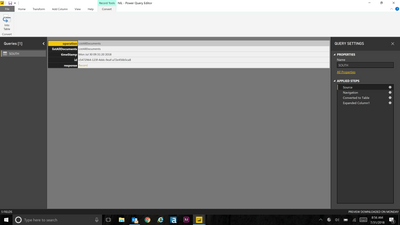
1. Opening record
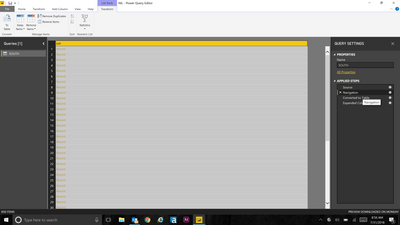
2.Putting it into a table
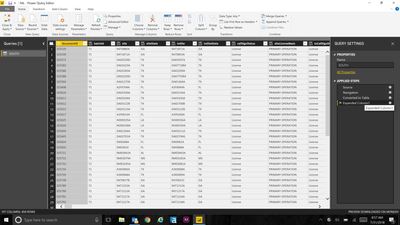
3. Expanding It into the full table
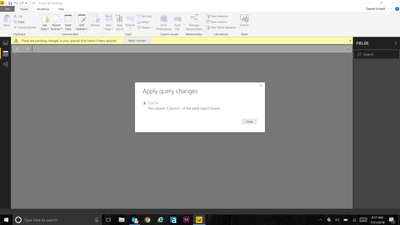
4. Applying query change. Error finding correct column
Does anyone have any ideas what might be going on?
Solved! Go to Solution.
Glad to hear that. Next time, you may try the try expression.
Hi @dscheid,
Which column are you trying top retrieve?
I don't get it correctly. Please give more details and will try to help.
Ninter.
Hi there,
I am trying to access all the rows and columns to make a visualization. I am starting with JSON data from a web source. To get it into a usable format I need to excute a query to get it into a spreadsheet format by exanding columns. I get to the format I want, but when I hit "Close and Apply" it throws the error listed above.
Could you please the internet link if it is not private ( sensitive data)?
Ninter
I reinstalled the application, and it seems to be working now. Must have been a small bug. Thank you
Glad to hear that. Next time, you may try the try expression.
The Power BI Data Visualization World Championships is back! Get ahead of the game and start preparing now!
| User | Count |
|---|---|
| 39 | |
| 37 | |
| 33 | |
| 32 | |
| 29 |
| User | Count |
|---|---|
| 133 | |
| 88 | |
| 85 | |
| 68 | |
| 64 |