This time we’re going bigger than ever. Fabric, Power BI, SQL, AI and more. We're covering it all. You won't want to miss it.
Learn moreLevel up your Power BI skills this month - build one visual each week and tell better stories with data! Get started
Hi community,
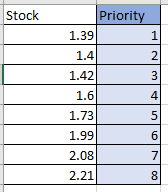
I have a column that displays the stock i have in the warehouse. I would like to create a "priority" column that automatically assigns ascendent numbers based that column. In blue below what i want to achieve: any suggestions?
Solved! Go to Solution.
@alevandenes , if you need within production week
Rankx(filter(Table, [production Week] =earlier([production Week]) , [Stock],,asc, dense)
Column Rank: https://www.youtube.com/watch?v=wDS_Vi4r9I4&list=PLPaNVDMhUXGaaqV92SBD5X2hk3TMNlHhb&index=39
Measure Rank: https://www.youtube.com/watch?v=DZb_6j6WuZ0&list=PLPaNVDMhUXGaaqV92SBD5X2hk3TMNlHhb&index=40
Hi @amitchandak , thank you very much: the formula works! do you know how can i integrate the orange column into it? i want the priority numbering dependent on the production week. Thanks a lot in advance
@alevandenes , if you need within production week
Rankx(filter(Table, [production Week] =earlier([production Week]) , [Stock],,asc, dense)
Column Rank: https://www.youtube.com/watch?v=wDS_Vi4r9I4&list=PLPaNVDMhUXGaaqV92SBD5X2hk3TMNlHhb&index=39
Measure Rank: https://www.youtube.com/watch?v=DZb_6j6WuZ0&list=PLPaNVDMhUXGaaqV92SBD5X2hk3TMNlHhb&index=40
Check out the April 2026 Power BI update to learn about new features.
Sign up to receive a private message when registration opens and key events begin.
If you have recently started exploring Fabric, we'd love to hear how it's going. Your feedback can help with product improvements.
| User | Count |
|---|---|
| 36 | |
| 28 | |
| 27 | |
| 20 | |
| 18 |
| User | Count |
|---|---|
| 66 | |
| 36 | |
| 33 | |
| 26 | |
| 24 |