cancel
Showing results for 
Search instead for 
Did you mean: 

The Power BI Data Visualization World Championships is back! Get ahead of the game and start preparing now! Learn more

Reply
Cypher294
Frequent Visitor

Priority Based SLA Calculation

HI,


I've got a question about a combined statement


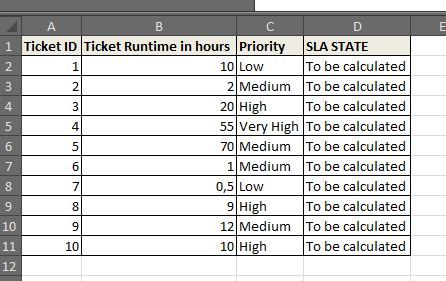
In my source data we have the ticket information "priority" and runtime in hours.

Now I've want to create a statement about a SLA breach status.


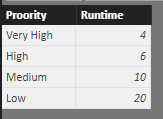
In my example the SLA values would be


Priority Very High - 4 Hours

Priorty High - 6 Hours

Priority Medium - 10 hours

Priority Low - 20 hours


Depending on the value of " Ticket runtime in hours" and the "priority" of the ticket the Column " SLA State" needs to be set to " SLA OK" or "SLA Violated" if the " Ticket Runtime in hours" is equal or higher then the values explained before the state needs to be set to " SLA Violated" otherwise it needs to be set to " SLA OK.


1.JPG


Thanks for help


1 ACCEPTED SOLUTION
v-yulgu-msft
Microsoft Employee
Microsoft Employee

Hi @Cypher294,


Suppose you have such a table to list SLA values.

1.PNG


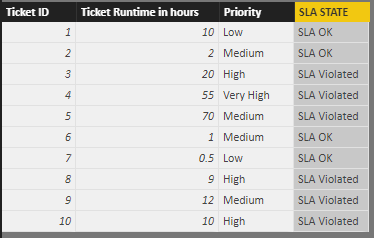
Then, in data table, create a calculated column.

SLA STATE =
IF (
    Table_1[Ticket Runtime in hours]
        >= LOOKUPVALUE ( Table_2[Runtime], Table_2[Proority], Table_1[Priority] ),
    "SLA Violated",
    "SLA OK"
)

2.PNG


Best regards,

Yuliana Gu

Community Support Team _ Yuliana Gu
If this post helps, then please consider Accept it as the solution to help the other members find it more quickly.

View solution in original post

2 REPLIES 2
v-yulgu-msft
Microsoft Employee
Microsoft Employee

Hi @Cypher294,


Suppose you have such a table to list SLA values.

1.PNG


Then, in data table, create a calculated column.

SLA STATE =
IF (
    Table_1[Ticket Runtime in hours]
        >= LOOKUPVALUE ( Table_2[Runtime], Table_2[Proority], Table_1[Priority] ),
    "SLA Violated",
    "SLA OK"
)

2.PNG


Best regards,

Yuliana Gu

Community Support Team _ Yuliana Gu
If this post helps, then please consider Accept it as the solution to help the other members find it more quickly.

Thank You 🙂

Helpful resources

Announcements
Power BI DataViz World Championships

Power BI Dataviz World Championships

The Power BI Data Visualization World Championships is back! Get ahead of the game and start preparing now!

December 2025 Power BI Update Carousel

Power BI Monthly Update - December 2025

Check out the December 2025 Power BI Holiday Recap!

FabCon Atlanta 2026 carousel

FabCon Atlanta 2026

Join us at FabCon Atlanta, March 16-20, for the ultimate Fabric, Power BI, AI and SQL community-led event. Save $200 with code FABCOMM.