cancel
Showing results for 
Search instead for 
Did you mean: 

The Power BI Data Visualization World Championships is back! Get ahead of the game and start preparing now! Learn more

Reply
DouweMeer
Impactful Individual

Previousyear excluding a filter

To start, I received a deadline for Friday and have been breaking my head over this for the past few weeks. 

My problem is dat previousyear works as you expect. Within its own context it makes a calculation of this. So if you have sold pieces in region 1, 2 and 3 from this year and past year and you stuff the measure in a matrix where on row level is the year and regions, it calculates it without any problem. 

Now the problem starts. There is an additional filter to show whether current year sales is actually 'maintained'. Maintained is calculated whether the product was sold previous year based on a monthy YTD calculation. This verification is put in the raw data table where the measures are running on. The problem is that now 'new' sales with a calculation of previousyear do have sales. This since it makes the calculations of previous year on the context of the filter in the raw data table. If 2019 had an X amount of sales on 'new' products, the last year sales measure for 2020 on 'new' products, will sum to the amount of X in 2019. However, these X sales is rather for 2020 considered as 'maintained' sales or lost sales, but never 'new'. 

I was hoping someone could tell me. I've trying to redesign my tables, work with different relationships but all to no avail.


Original measure:

Sales (LY) =
VAR a1 = max ( 'Price Realization (2)'[Year] )
VAR a2 =
calculate (
sum ( 'Price Realization (2)'[FXN sale EUR] )
, filter (  all ( 'Date table PR (2)'[Date] ) , year ( 'Date table PR (2)'[Date] ) = a1 - 1 )
)
RETURN
a2
 
Changed:
Sales (LY) =
VAR a1 = max ( 'Price Realization (2)'[Year] )
VAR a2 =
calculate (
sum ( 'Price Realization (2)'[FXN sale EUR] )
, all ( 'Date table PR (2)'[Date] ) , all ( 'Price Realization (2)'[Maintain TY YTD] ) , year ( 'Date table PR (2)'[Date] ) = a1 - 1
)
RETURN
a2
4 REPLIES 4
amitchandak
Super User
Super User

Can you share sample data and sample output.

Share with Power BI Enthusiasts: Full Power BI Video (20 Hours) YouTube
Microsoft Fabric Series 60+ Videos YouTube
Microsoft Fabric Hindi End to End YouTube

@amitchandak 

Sort of, can't share you a pbix due to restriction. 

Test table:

YearProductSalesBusiness
2018A5New
2018A3New
2018B8New
2018A17New
2018A21New
2019A12Maintain
2019A15Maintain
2019B2Maintain
2019C8New
2020A5Maintain
2020B3Maintain
2020C18Maintain
2020D20New


Untitled.png

Untitled2.png

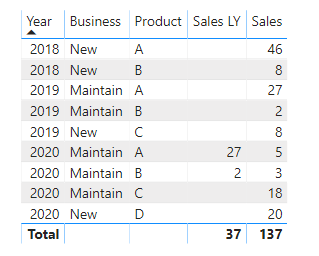
Ass you can see, for 2019 there is maintained sales, however, for 2018 there wasn't any 'maintained' sales, only 'new' sales. Both products A and B had been sold in 2018 and thus should populate the number of Sales LY for maintained business in 2019. 

@DouweMeer ,Please check: https://www.dropbox.com/s/vighl8efolwisj4/previousYear_yearand%20date.pbix?dl=0


I converted to date and used time intelligence

Share with Power BI Enthusiasts: Full Power BI Video (20 Hours) YouTube
Microsoft Fabric Series 60+ Videos YouTube
Microsoft Fabric Hindi End to End YouTube

@amitchandak 

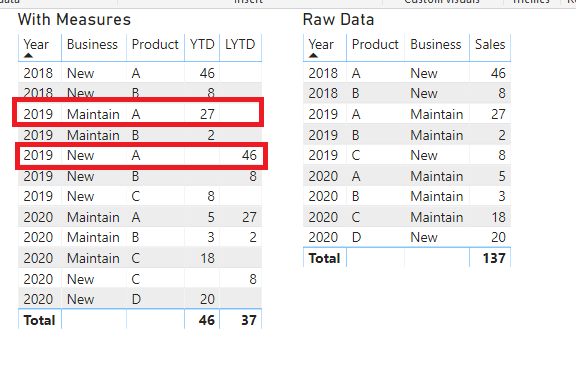
Was one of my attempts as well. What you get is due to the 1 to many relationship one way that products duplicate in a year. Once as a maintain and once as 'new'. The problem lies in the previousyear once again. 

Untitled.png

A is an example, B has this for 2019 as well. C has it in 2020 as it is the first year it is 'maintained'. 

Helpful resources

Announcements
Power BI DataViz World Championships

Power BI Dataviz World Championships

The Power BI Data Visualization World Championships is back! Get ahead of the game and start preparing now!

December 2025 Power BI Update Carousel

Power BI Monthly Update - December 2025

Check out the December 2025 Power BI Holiday Recap!

FabCon Atlanta 2026 carousel

FabCon Atlanta 2026

Join us at FabCon Atlanta, March 16-20, for the ultimate Fabric, Power BI, AI and SQL community-led event. Save $200 with code FABCOMM.