cancel
Showing results for 
Search instead for 
Did you mean: 

A new Data Days event is coming soon! This time we’re going bigger than ever. Fabric, Power BI, SQL, AI and more. Don't miss out.

Reply
Nicholas-Dunne
Frequent Visitor

Previous week column

Hello, 

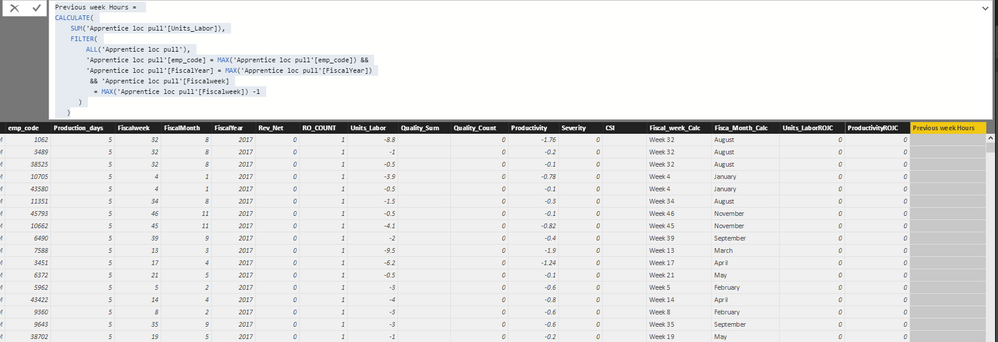
I would like to return the employee's previous week "Units_Labor". I feel like I'm close but I'm not receiving an error or anything in return. 


This is the calc that I'm using.


Previous week Hours =
       CALCULATE(
                  SUM('Apprentice loc pull'[Units_Labor]),
                  FILTER(
                       ALL('Apprentice loc pull'),
                             'Apprentice loc pull'[emp_code] = MAX('Apprentice loc pull'[emp_code]) &&
                             'Apprentice loc pull'[FiscalYear] = MAX('Apprentice loc pull'[FiscalYear])
                             && 'Apprentice loc pull'[Fiscalweek]
                             = MAX('Apprentice loc pull'[Fiscalweek]) -1
)
)


Any help would be appreciated. 

Thank youpower bi.PNG

1 ACCEPTED SOLUTION
v-yulgu-msft
Microsoft Employee
Microsoft Employee

Hi @Nicholas-Dunne,


Please try this DAX formula:

Previous week Hours =
LOOKUPVALUE (
    'Apprentice loc pull'[Units_Labor],
    'Apprentice loc pull'[emp_code], 'Apprentice loc pull'[emp_code],
    'Apprentice loc pull'[FiscalYear], 'Apprentice loc pull'[FiscalYear],
    'Apprentice loc pull'[Fiscalweek], 'Apprentice loc pull'[Fiscalweek] - 1
)

Best regards,

Yuliana Gu

Community Support Team _ Yuliana Gu
If this post helps, then please consider Accept it as the solution to help the other members find it more quickly.

View solution in original post

2 REPLIES 2
v-yulgu-msft
Microsoft Employee
Microsoft Employee

Hi @Nicholas-Dunne,


Please try this DAX formula:

Previous week Hours =
LOOKUPVALUE (
    'Apprentice loc pull'[Units_Labor],
    'Apprentice loc pull'[emp_code], 'Apprentice loc pull'[emp_code],
    'Apprentice loc pull'[FiscalYear], 'Apprentice loc pull'[FiscalYear],
    'Apprentice loc pull'[Fiscalweek], 'Apprentice loc pull'[Fiscalweek] - 1
)

Best regards,

Yuliana Gu

Community Support Team _ Yuliana Gu
If this post helps, then please consider Accept it as the solution to help the other members find it more quickly.

This formula works if you do not have previous year's data in your table. At week 1, this formula doesn't know to look at the previous week's rows (52) of the previous year. I've tried to create an IF formula, and here's what I have. The bolded area is my problem. I'm not sure how to nest the argument. The error says The number of arguments is invalid. Function LOOKUPVALUE must have a value for each specified column reference. Any help would be appreciated!


LastWkDriverCountNew =
IF (Table_hqtr_db_HRWeek_vHRStats[WeekofYear] = 1,
lookupvalue (
'Table_hqtr_db_HRWeek_vHRStats'[Drivers],
'Table_hqtr_db_HRWeek_vHRStats'[Terminal], 'Table_hqtr_db_HRWeek_vHRStats'[Terminal],
'Table_hqtr_db_HRWeek_vHRStats'[Year], 'Table_hqtr_db_HRWeek_vHRStats'[Year],
'Table_hqtr_db_HRWeek_vHRStats'[WeekofYear], 'Table_hqtr_db_HRWeek_vHRStats'[WeekofYear] = 52 &&
'Table_hqtr_db_HRWeek_vHRStats'[Year], 'Table_hqtr_db_HRWeek_vHRStats'[Year] - 1),
IF (Table_hqtr_db_HRWeek_vHRStats[WeekofYear] <> 1,
lookupvalue (
'Table_hqtr_db_HRWeek_vHRStats'[Drivers],
'Table_hqtr_db_HRWeek_vHRStats'[Terminal], 'Table_hqtr_db_HRWeek_vHRStats'[Terminal],
'Table_hqtr_db_HRWeek_vHRStats'[Year], 'Table_hqtr_db_HRWeek_vHRStats'[Year],
'Table_hqtr_db_HRWeek_vHRStats'[WeekofYear], 'Table_hqtr_db_HRWeek_vHRStats'[WeekofYear] - 1)
))

Helpful resources

Announcements
May Power BI Update Carousel

Power BI Monthly Update - May 2026

Check out the May 2026 Power BI update to learn about new features.

Fabric SQL PBI Data Days

Data Days 2026 coming soon!

Sign up to receive a private message when registration opens and key events begin.

New to Fabric survey Carousel

New to Fabric Survey

If you have recently started exploring Fabric, we'd love to hear how it's going. Your feedback can help with product improvements.

Power BI DataViz World Championships carousel

Power BI DataViz World Championships - June 2026

A new Power BI DataViz World Championship is coming this June! Don't miss out on submitting your entry.