cancel
Showing results for 
Search instead for 
Did you mean: 

The Power BI Data Visualization World Championships is back! Get ahead of the game and start preparing now! Learn more

Reply
sajjadkhan25
Helper I
Helper I

Previous month value is not showing when my current month is blank or zero

Hi Team, @amitchandak ,

sajjadkhan25_0-1646623035964.png

value for dec  2021 is not showing for previous month, please help me 
my dax is simple

sajjadkhan25_0-1646623133329.png

thanks in advance

 
1 ACCEPTED SOLUTION
Anonymous
Not applicable

Hi @sajjadkhan25 ,


Blank is returned because there are other unreplaced time filters in the filter context. Date columns in fact tables do not automatically override filters for other columns in the current table.


Please try this measure.


test1_pm_card = CALCULATE([test1],PREVIOUSMONTH(VALUES('vmConsolidated2C'[Fiscal Date])))


If it doesn't work. Please try to create a new calculated table and then create a relationship with the date column of the original table.


Table2 = VALUES(vmConsolidated2C[Fiscal Date])
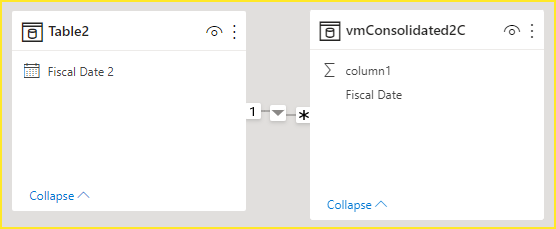
 

vcgaomsft_1-1646794893929.png

Then drag the Fiscal Date 2 column of table2, [test1] and [test2_pm_card] into the visual. The final test result is this.
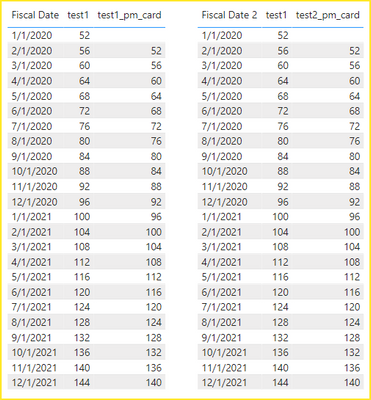
vcgaomsft_2-1646795174219.png

Attach the PBIX file for reference. Hope it helps.


If this doesn't work for you, please consider sharing more details about it. And it would be great if there was a sample file without any sensitive information here.


It makes it easier to give you a solution.

  1. Sample (dummy dataset) data as text, use the table tool in the editing bar.
  2. Expected output from sample data.
  3. Explanation in words of how to get from 1. to 2.


Best Regards,
Community Support Team_Gao


If there is any post helps, then please consider Accept it as the solution to help the other members find it more quickly. If I misunderstand your needs or you still have problems on it, please feel free to let us know. Thanks a lot!

How to get your questions answered quickly -- How to provide sample data

View solution in original post

2 REPLIES 2
Anonymous
Not applicable

Hi @sajjadkhan25 ,


Blank is returned because there are other unreplaced time filters in the filter context. Date columns in fact tables do not automatically override filters for other columns in the current table.


Please try this measure.


test1_pm_card = CALCULATE([test1],PREVIOUSMONTH(VALUES('vmConsolidated2C'[Fiscal Date])))


If it doesn't work. Please try to create a new calculated table and then create a relationship with the date column of the original table.


Table2 = VALUES(vmConsolidated2C[Fiscal Date])


vcgaomsft_1-1646794893929.png

Then drag the Fiscal Date 2 column of table2, [test1] and [test2_pm_card] into the visual. The final test result is this.

vcgaomsft_2-1646795174219.png

Attach the PBIX file for reference. Hope it helps.


If this doesn't work for you, please consider sharing more details about it. And it would be great if there was a sample file without any sensitive information here.


It makes it easier to give you a solution.

  1. Sample (dummy dataset) data as text, use the table tool in the editing bar.
  2. Expected output from sample data.
  3. Explanation in words of how to get from 1. to 2.


Best Regards,
Community Support Team_Gao


If there is any post helps, then please consider Accept it as the solution to help the other members find it more quickly. If I misunderstand your needs or you still have problems on it, please feel free to let us know. Thanks a lot!

How to get your questions answered quickly -- How to provide sample data

amitchandak
Super User
Super User

@sajjadkhan25  , Please use a date calendar table, Marked as date table


are try like examples


MTD Sales = CALCULATE(SUM(Sales[Sales Amount]),DATESMTD('Date'[Date]))
last MTD Sales = CALCULATE(SUM(Sales[Sales Amount]),DATESMTD(dateadd('Date'[Date],-1,MONTH)))
last month Sales = CALCULATE(SUM(Sales[Sales Amount]),previousmonth('Date'[Date]))


Month behind Sales = CALCULATE(SUM(Sales[Sales Amount]),dateadd('Date'[Date],-1,Month))


Why Time Intelligence Fails - Powerbi 5 Savior Steps for TI :https://youtu.be/OBf0rjpp5Hw
https://amitchandak.medium.com/power-bi-5-key-points-to-make-time-intelligence-successful-bd52912a5b...
To get the best of the time intelligence function. Make sure you have a date calendar and it has been marked as the date in model view. Also, join it with the date column of your fact/s. Refer :radacad sqlbi My Video Series Appreciate your Kudos.

Share with Power BI Enthusiasts: Full Power BI Video (20 Hours) YouTube
Microsoft Fabric Series 60+ Videos YouTube
Microsoft Fabric Hindi End to End YouTube

Helpful resources

Announcements
November Power BI Update Carousel

Power BI Monthly Update - November 2025

Check out the November 2025 Power BI update to learn about new features.

Fabric Data Days Carousel

Fabric Data Days

Advance your Data & AI career with 50 days of live learning, contests, hands-on challenges, study groups & certifications and more!

FabCon Atlanta 2026 carousel

FabCon Atlanta 2026

Join us at FabCon Atlanta, March 16-20, for the ultimate Fabric, Power BI, AI and SQL community-led event. Save $200 with code FABCOMM.

Top Solution Authors
Top Kudoed Authors