
cancel
Showing results for 
Search instead for 
Did you mean: 

The Power BI Data Visualization World Championships is back! Get ahead of the game and start preparing now! Learn more

Reply
MeiJiang
Regular Visitor

Previous month doesn't work with two slicers

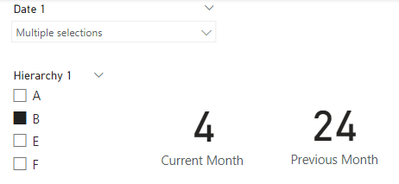
Hi, yy dashboard has two slicers - Date and Hierarchy 1. the previuos month card only changes with Date slicer but not respond to Hierarchy 1 slicer. For example, if I select Hierarchy 1 “B”, the previous month should be 13, but it still shows the whole month. Can you help on this?


Please see the attched samples:

Previous Month.pbix

Sample Raw Data - Previous Month.xlsx


Previous Month =
var _a = MAX('Sheet1'[Date 1])
var _b = EDATE(_a,-1)
return CALCULATE (
    count ( Sheet1[Name] ),
    FILTER (
        ALL('Sheet1'),
            YEAR('Sheet1'[Date 1]) = YEAR(_b)&&
            MONTH('Sheet1'[Date 1])= MONTH ( _b )
    )
)
 

MeiJiang_2-1696637110280.png


Many Thanks,

Mei

1 ACCEPTED SOLUTION
lucadelicio
Super User
Super User

Hi,


here the link to dowload the pbix file with the solution
https://we.tl/t-eCvpd8GzDQ

I create a date table that helps you to understand why you were wrong.
A table near the result explain the solution of the counting.
The relation beetween the two tables must be BOTH (in every direction -> and <-).
I hope i help you.

PLEASE MARK AS A SOLUTION IF I RESOLVE YOUR PROBLEM

Regards

Luca D'Elicio


Luca D'Elicio

LinkedIn Profile

View solution in original post

5 REPLIES 5
lucadelicio
Super User
Super User

Hi,


here the link to dowload the pbix file with the solution
https://we.tl/t-eCvpd8GzDQ

I create a date table that helps you to understand why you were wrong.
A table near the result explain the solution of the counting.
The relation beetween the two tables must be BOTH (in every direction -> and <-).
I hope i help you.

PLEASE MARK AS A SOLUTION IF I RESOLVE YOUR PROBLEM

Regards

Luca D'Elicio


Luca D'Elicio

LinkedIn Profile

Hi Luca,


Thanks so much to looking into my question! the link you provided is not the pbix link. Can you please share it again?


Thanks,

Mei


Look better please!

here the link to dowload the pbix file with the solution
https://we.tl/t-eCvpd8GzDQ

lucadelicio_0-1696943221103.png


Luca D'Elicio

LinkedIn Profile

Great! you are amazing, Luca! I accepted it as a solution. 

One more thing - how can I copy the Datatable you created within pbix to my new pbix?


Thanks,
Mei

Hi,


thank you, if you go in the datatable mode view you can select the table and copy the dax code that i used to create it.
When you paste it in your project select "Create new table" in the menu and replace every reference to the old table with the new table.
Try to understand what the code does it's not difficult.
It will be more easy replace the value!

Regards,


Luca D'Elicio

LinkedIn Profile

Helpful resources

Announcements
Power BI DataViz World Championships

Power BI Dataviz World Championships

The Power BI Data Visualization World Championships is back! Get ahead of the game and start preparing now!

November Power BI Update Carousel

Power BI Monthly Update - November 2025

Check out the November 2025 Power BI update to learn about new features.

FabCon Atlanta 2026 carousel

FabCon Atlanta 2026

Join us at FabCon Atlanta, March 16-20, for the ultimate Fabric, Power BI, AI and SQL community-led event. Save $200 with code FABCOMM.