cancel
Showing results for 
Search instead for 
Did you mean: 

Get Fabric Certified for FREE during Fabric Data Days. Don't miss your chance! Request now

Reply
VipinReddy
Microsoft Employee
Microsoft Employee

Previous, current and next month hours calculation

I am facing an issue calculating the hours for the previous, current and next month. The sample data I have is as below. 

VipinReddy_1-1625119677657.png 

Based on the date I would like to calculate the Available, Allocated and Consumed Hours. I would like the result to be in the way below. 

VipinReddy_2-1625119786655.png

Currently my matrix shows the total hours for each. I want to show the previous, current and next month hours for all three i.e. Available, Allocated and Consumed. 

Hope you can help me with this. Thank you in advance. 

1 ACCEPTED SOLUTION
v-xulin-mstf
Community Support
Community Support

Hi @VipinReddy


You need create a dimension table as:

Date slicer = 
VALUES('Table'[Date]) 

Try measure as:

Allocate_curr_month = 
CALCULATE(
    MAX('Table'[Allocate]),
    FILTER(
        'Table',
        'Table'[Date]=MAX('Date slicer'[Date])))
Allocate_next_month = 
CALCULATE(
    MAX('Table'[Allocate]),
    FILTER(
        'Table',
        MONTH('Table'[Date])=MONTH(MAX('Date slicer'[Date]))-1)
)
Allocate_pre_month = 
CALCULATE(
    MAX('Table'[Allocate]),
    FILTER(
        'Table',
        MONTH('Table'[Date])=MONTH(MAX('Date slicer'[Date]))+1)
)

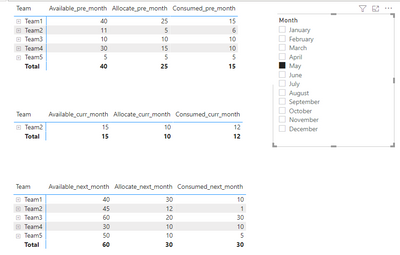
Here is the output:

vxulinmstf_0-1625559538445.png

The pbix is attached.


If you still have some question, please don't hesitate to let me known.‌‌

Best Regards,

Link


Is that the answer you're looking for? If this post helps, then please consider Accept it as the solution. Really appreciate!

View solution in original post

2 REPLIES 2
v-xulin-mstf
Community Support
Community Support

Hi @VipinReddy


You need create a dimension table as:

Date slicer = 
VALUES('Table'[Date]) 

Try measure as:

Allocate_curr_month = 
CALCULATE(
    MAX('Table'[Allocate]),
    FILTER(
        'Table',
        'Table'[Date]=MAX('Date slicer'[Date])))
Allocate_next_month = 
CALCULATE(
    MAX('Table'[Allocate]),
    FILTER(
        'Table',
        MONTH('Table'[Date])=MONTH(MAX('Date slicer'[Date]))-1)
)
Allocate_pre_month = 
CALCULATE(
    MAX('Table'[Allocate]),
    FILTER(
        'Table',
        MONTH('Table'[Date])=MONTH(MAX('Date slicer'[Date]))+1)
)

Here is the output:

vxulinmstf_0-1625559538445.png

The pbix is attached.


If you still have some question, please don't hesitate to let me known.‌‌

Best Regards,

Link


Is that the answer you're looking for? If this post helps, then please consider Accept it as the solution. Really appreciate!

amitchandak
Super User
Super User

@VipinReddy , with help from a date table and time intelligence


MTD Sales = CALCULATE(SUM(Table[hour]),DATESMTD('Date'[Date]))
last MTD Sales = CALCULATE(SUM(Table[hour]),DATESMTD(dateadd('Date'[Date],-1,MONTH)))

next MTD Sales = CALCULATE(SUM(Table[hour]),DATESMTD(dateadd('Date'[Date],1,MONTH)))
last month Sales = CALCULATE(SUM(Table[hour]),previousmonth('Date'[Date]))
next month Sales = CALCULATE(SUM(Table[hour]),nextmonth('Date'[Date]))

this month = CALCULATE(Table[hour]),DATESMTD(ENDOFMONTH('Date'[Date])))


To get the best of the time intelligence function. Make sure you have a date calendar and it has been marked as the date in model view. Also, join it with the date column of your fact/s. Refer :radacad sqlbi My Video Series Appreciate your Kudos.

Share with Power BI Enthusiasts: Full Power BI Video (20 Hours) YouTube
Microsoft Fabric Series 60+ Videos YouTube
Microsoft Fabric Hindi End to End YouTube

Helpful resources

Announcements
November Power BI Update Carousel

Power BI Monthly Update - November 2025

Check out the November 2025 Power BI update to learn about new features.

Fabric Data Days Carousel

Fabric Data Days

Advance your Data & AI career with 50 days of live learning, contests, hands-on challenges, study groups & certifications and more!

FabCon Atlanta 2026 carousel

FabCon Atlanta 2026

Join us at FabCon Atlanta, March 16-20, for the ultimate Fabric, Power BI, AI and SQL community-led event. Save $200 with code FABCOMM.

Top Solution Authors
Top Kudoed Authors