Join us at FabCon Atlanta from March 16 - 20, 2026, for the ultimate Fabric, Power BI, AI and SQL community-led event. Save $200 with code FABCOMM.
Register now!The Power BI Data Visualization World Championships is back! Get ahead of the game and start preparing now! Learn more
Hi all
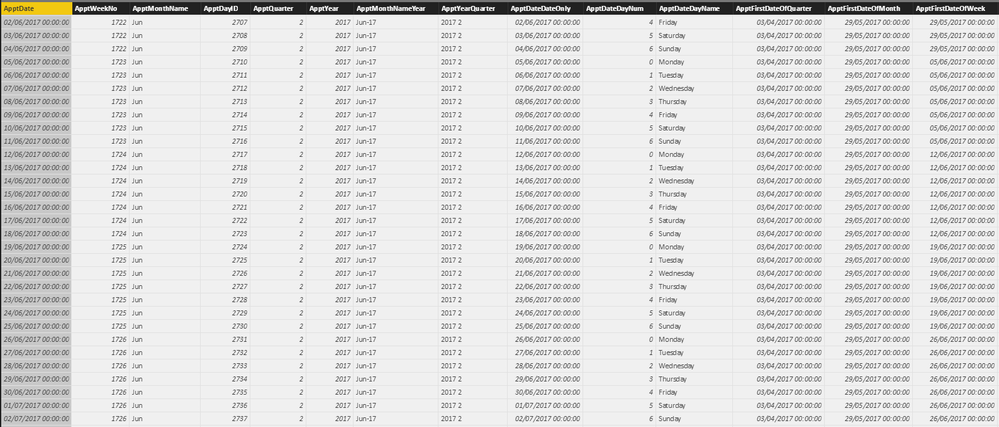
I am trying to get the previous weeks figures based on the week in a calendar table.
Specifically I want to be able to create a table that uses the dates from the calendar table to get appointment figures for the current week and the previous week.
Please see tables below.
Any help greatly appreciated.
Solved! Go to Solution.
Hi @BryanWhellams,
You can create measures below:
CurrentWeekTotal = CALCULATE(SUM(Table1[Appointments]),FILTER(ALL(Table1),'Table1'[WeekNumber]=MAX('Calendar'[Weeknum])))
PreviousWeekTotal = CALCULATE(SUM(Table1[Appointments]),FILTER(ALL(Table1),'Table1'[WeekNumber]=MAX('Calendar'[Weeknum])-1))
For details, you can download attached pbix file.
Best Regards,
Qiuyun Yu
Hi @BryanWhellams,
Is there a possibility to not have data for a certain week(s). So, you may have data for 1701, 1702 and 1704. There is no data for 1703. Is this possible?
Hi @BryanWhellams,
You can create measures below:
CurrentWeekTotal = CALCULATE(SUM(Table1[Appointments]),FILTER(ALL(Table1),'Table1'[WeekNumber]=MAX('Calendar'[Weeknum])))
PreviousWeekTotal = CALCULATE(SUM(Table1[Appointments]),FILTER(ALL(Table1),'Table1'[WeekNumber]=MAX('Calendar'[Weeknum])-1))
For details, you can download attached pbix file.
Best Regards,
Qiuyun Yu
The Power BI Data Visualization World Championships is back! Get ahead of the game and start preparing now!
| User | Count |
|---|---|
| 40 | |
| 37 | |
| 35 | |
| 34 | |
| 28 |
| User | Count |
|---|---|
| 136 | |
| 99 | |
| 73 | |
| 66 | |
| 65 |