Don't miss your chance to take exam DP-600 or DP-700 on us!
Request nowLearn from the best! Meet the four finalists headed to the FINALS of the Power BI Dataviz World Championships! Register now
Hi all
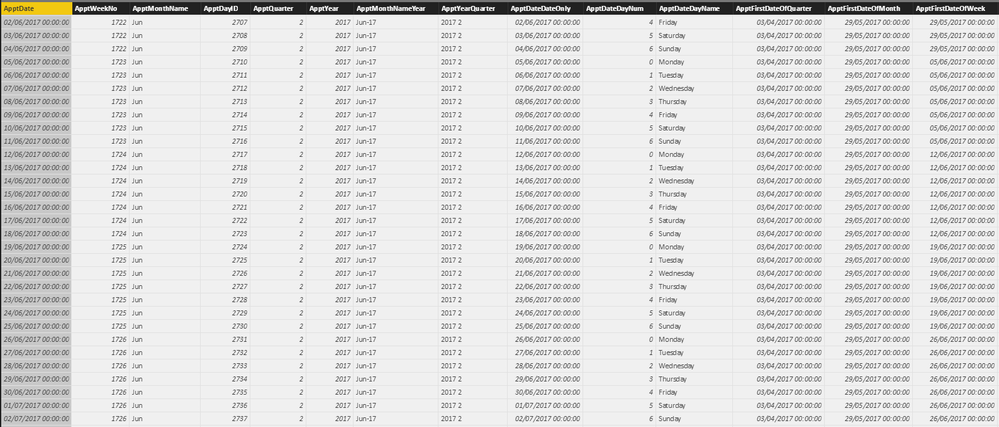
I am trying to get the previous weeks figures based on the week in a calendar table.
Specifically I want to be able to create a table that uses the dates from the calendar table to get appointment figures for the current week and the previous week.
Please see tables below.
Any help greatly appreciated.
Solved! Go to Solution.
Hi @BryanWhellams,
You can create measures below:
CurrentWeekTotal = CALCULATE(SUM(Table1[Appointments]),FILTER(ALL(Table1),'Table1'[WeekNumber]=MAX('Calendar'[Weeknum])))
PreviousWeekTotal = CALCULATE(SUM(Table1[Appointments]),FILTER(ALL(Table1),'Table1'[WeekNumber]=MAX('Calendar'[Weeknum])-1))
For details, you can download attached pbix file.
Best Regards,
Qiuyun Yu
Hi @BryanWhellams,
Is there a possibility to not have data for a certain week(s). So, you may have data for 1701, 1702 and 1704. There is no data for 1703. Is this possible?
Hi @BryanWhellams,
You can create measures below:
CurrentWeekTotal = CALCULATE(SUM(Table1[Appointments]),FILTER(ALL(Table1),'Table1'[WeekNumber]=MAX('Calendar'[Weeknum])))
PreviousWeekTotal = CALCULATE(SUM(Table1[Appointments]),FILTER(ALL(Table1),'Table1'[WeekNumber]=MAX('Calendar'[Weeknum])-1))
For details, you can download attached pbix file.
Best Regards,
Qiuyun Yu
Share feedback directly with Fabric product managers, participate in targeted research studies and influence the Fabric roadmap.
Check out the February 2026 Power BI update to learn about new features.
| User | Count |
|---|---|
| 55 | |
| 45 | |
| 38 | |
| 16 | |
| 14 |
| User | Count |
|---|---|
| 87 | |
| 69 | |
| 38 | |
| 29 | |
| 26 |