cancel
Showing results for 
Search instead for 
Did you mean: 

Try your skills in the Power BI Dataviz World Championship! Round one ends June 26. Join now

Reply
Anonymous
Not applicable

Previous Period Calculation Help

Hello,


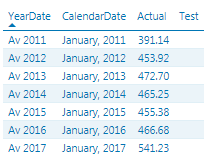
I'm trying to write a DAX formula to get the previous year data in my table.  Currently I have the following table:


Capture.PNG


My formula for my "Test" column is:


Test = CALCULATE(sum([Actual]), DATEADD([CalendarDate], -1, YEAR))


However, my "Test" column appears blank when I'd expect the row for 2012 to show the actual value for 2011, the 2013 row to show the value for 2012, etc.  This seems simple as I've done it so many times before, but for some reason I can't get this one working.  Any idea what may be wrong with my formula here?

1 ACCEPTED SOLUTION
Ashish_Mathur
Super User
Super User

Hi,


That formula should be written as a measure (not as a calculated column).  You may also try this measure


=CALCULATE(SUM([Actual]),SAMEPERIODLASTYEAR(Calendar[CalendarDate]))


In your visual, drag any/all time dimensions only from the Calendar Table.  Also, ensure that there is a relationship from the Date column of the Data Table to the CalendarDate column of the Calendar Table.


Hope this helps.


Regards,
Ashish Mathur
http://www.ashishmathur.com
https://www.linkedin.com/in/excelenthusiasts/

View solution in original post

3 REPLIES 3
Ashish_Mathur
Super User
Super User

Hi,


That formula should be written as a measure (not as a calculated column).  You may also try this measure


=CALCULATE(SUM([Actual]),SAMEPERIODLASTYEAR(Calendar[CalendarDate]))


In your visual, drag any/all time dimensions only from the Calendar Table.  Also, ensure that there is a relationship from the Date column of the Data Table to the CalendarDate column of the Calendar Table.


Hope this helps.


Regards,
Ashish Mathur
http://www.ashishmathur.com
https://www.linkedin.com/in/excelenthusiasts/
Anonymous
Not applicable

Hi Ashish,


Thanks for your formula.  Actually, your formula and my formula both did the trick.  I was just referencing the date column from my date table and then placing the date column from my fact table into the visual.  Once I fixed that, I was able to get the results properly.


Thanks for your help!

You are welcome.  If my reply helped, please mark it as Answer.


Regards,
Ashish Mathur
http://www.ashishmathur.com
https://www.linkedin.com/in/excelenthusiasts/

Helpful resources

Announcements
Fabric Data Days is here Carousel

Fabric Data Days 2026

Don't miss out on Data Days, June 15 through August 7. Learn Fabric, Power BI, SQL, AI and more.

Power BI DataViz World Championships carousel

Power BI DataViz World Championships - June 2026

A new Power BI DataViz World Championship is coming this June! Don't miss out on submitting your entry.