cancel
Showing results for 
Search instead for 
Did you mean: 

We've captured the moments from FabCon & SQLCon that everyone is talking about, and we are bringing them to the community, live and on-demand. Starts on April 14th. Register now

Reply
SpaceCat42
Regular Visitor

Previous Month Error using a Measure

This works and returns the correct 'current month' values:

  • Current Month Value = CALCULATE(SUM(Table1[Value]),MONTH(Table1[Originated])=MONTH(TODAY()))


Previous Month formula calculates every row with the correct amount. However i only want the row to populate if it mets the criteria of a "prevous month." Is there a simple fix here?


previous month = var current_month = MONTH(TODAY()) return CALCULATE(SUM('Table1'[Value]),FILTER('Table1',MONTH('Table1'[Originated])=current_month-1))

5 REPLIES 5
v-lili6-msft
Community Support
Community Support

hi, @SpaceCat42

After my test, this formula works well,

if you want this new measure as below:

new previous month = CALCULATE(SUM(Table1[Value]),PREVIOUSMONTH(Table1[Originated].[Date]),MONTH(Table1[Originated])=MONTH(TODAY())-1)

For example:

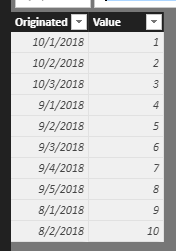
basic data

4.PNG

Result:

5.PNG

here is pbix, please try it.

https://www.dropbox.com/s/mmccx2bj8bp470s/Previous%20Month%20Error%20using%20a%20Measure.pbix?dl=0


If it is not your case, please share some data sample and expected output . You can upload it to OneDrive or Dropbox and post the link here. Do mask sensitive data before uploading.


Best Regards,

Lin


Community Support Team _ Lin
If this post helps, then please consider Accept it as the solution to help the other members find it more quickly.
Anonymous
Not applicable


@SpaceCat42 wrote:

This works and returns the correct 'current month' values:

  • Current Month Value = CALCULATE(SUM(Table1[Value]),MONTH(Table1[Originated])=MONTH(TODAY()))


Previous Month formula calculates every row with the correct amount. However i only want the row to populate if it mets the criteria of a "prevous month." Is there a simple fix here?


previous month = var current_month = MONTH(TODAY()) return CALCULATE(SUM('Table1'[Value]),FILTER('Table1',MONTH('Table1'[Originated])=current_month-1))


Bit confusing here. As per the blue highlight, your previous month measure works fine. What is your requirement ?


Thanks
Raj

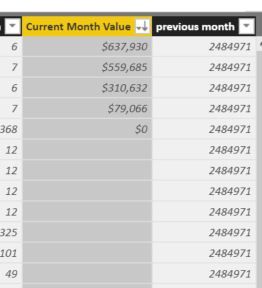
Hi Raj, see my screen capture below. I need to use a measure otherwise i get a 'circular reference' error.

hi, @SpaceCat42

These two formulas work well for create the measure

and do not use them to create the column.


Reference:https://www.sqlbi.com/articles/understanding-circular-dependencies/


Best Regards,

Lin

Community Support Team _ Lin
If this post helps, then please consider Accept it as the solution to help the other members find it more quickly.

Demo.JPG

Here's  a screen grab. Current Month colum is correct. The previous month column has the proper value, but its replicated itself across all the data rows.

Helpful resources

Announcements
New to Fabric survey Carousel

New to Fabric Survey

If you have recently started exploring Fabric, we'd love to hear how it's going. Your feedback can help with product improvements.

Power BI DataViz World Championships carousel

Power BI DataViz World Championships - June 2026

A new Power BI DataViz World Championship is coming this June! Don't miss out on submitting your entry.

Join our Fabric User Panel

Join our Fabric User Panel

Share feedback directly with Fabric product managers, participate in targeted research studies and influence the Fabric roadmap.

March Power BI Update Carousel

Power BI Community Update - March 2026

Check out the March 2026 Power BI update to learn about new features.