cancel
Showing results for 
Search instead for 
Did you mean: 

Try your skills in the Power BI Dataviz World Championship! Round one ends June 26. Join now

Reply
giuliapiazza94
Helper IV
Helper IV

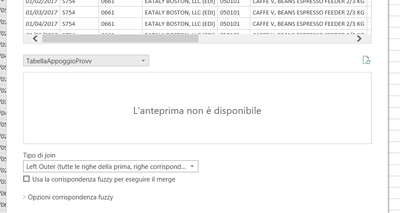
Preview failed

Hi guys,

I don't know why It doesn't work

All the other tables work, this not


giuliapiazza94_0-1632239992031.png


Have you ideas?

thank you


1 ACCEPTED SOLUTION
Anonymous
Not applicable

Hi  @giuliapiazza94 ,

Does your two tables have some kind of dependency, one referencing the other?

For example, if you want to merge table A and table B, but table B itself is merged from table A with other tables. At this time, table A and table B are merged. Will show an error like this.

https://community.powerbi.com/t5/Power-Query/Not-being-able-to-merge-two-tables-in-Power-Query/td-p/...


You can also update power bi desktop to the latest version.


Best Regards,

Liu Yang

If this post helps, then please consider Accept it as the solution to help the other members find it more quickly.

View solution in original post

5 REPLIES 5
Anonymous
Not applicable

Hi  @giuliapiazza94 ,

Does your two tables have some kind of dependency, one referencing the other?

For example, if you want to merge table A and table B, but table B itself is merged from table A with other tables. At this time, table A and table B are merged. Will show an error like this.

https://community.powerbi.com/t5/Power-Query/Not-being-able-to-merge-two-tables-in-Power-Query/td-p/...


You can also update power bi desktop to the latest version.


Best Regards,

Liu Yang

If this post helps, then please consider Accept it as the solution to help the other members find it more quickly.

aaah okok, it's the same error.

Thank you 😁

Anonymous
Not applicable

It may have timed out. Depends on your data source origin. Try refreshing the preview. If it does not work, save your progress, close Power Query & Power BI, open again and retry. 

I've tried and it doesn't work. The second table is a file excel (like the others that work).

If I do the merge in a new query it works. I don't understand 😅

Anonymous
Not applicable

I'm happy that you could solve it! Yes, sometimes weird stuff happens on Power Query haha 🙂 

Helpful resources

Announcements
Fabric Data Days is here Carousel

Fabric Data Days 2026

Don't miss out on Data Days, June 15 through August 7. Learn Fabric, Power BI, SQL, AI and more.

Power BI DataViz World Championships carousel

Power BI DataViz World Championships - June 2026

A new Power BI DataViz World Championship is coming this June! Don't miss out on submitting your entry.