Join us at FabCon Atlanta from March 16 - 20, 2026, for the ultimate Fabric, Power BI, AI and SQL community-led event. Save $200 with code FABCOMM.
Register now!The Power BI Data Visualization World Championships is back! Get ahead of the game and start preparing now! Learn more
Hello, Everyone!
I believe the title of this Message is quite intuitive.
I've been using the new Preview Feature since a few days ago, and while building a new report today I couldnt find the "Drill-through" field, i.e., how can I add a DT field to a report page? For now, I have changed it back to the standard object interaction to be able to use this feature.
Solved! Go to Solution.
Hello @Contezini ,
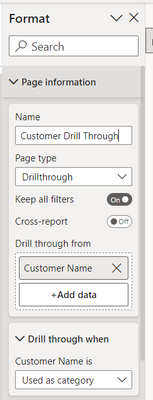
You will find it in the format pane of the page under page information as in the screenshot.
If I answered your question, please mark my post as solution, Appreciate your Kudos 👍
Proud to be a Super User! | |
Hello @Contezini ,
You will find it in the format pane of the page under page information as in the screenshot.
If I answered your question, please mark my post as solution, Appreciate your Kudos 👍
Proud to be a Super User! | |
The Power BI Data Visualization World Championships is back! Get ahead of the game and start preparing now!
| User | Count |
|---|---|
| 38 | |
| 38 | |
| 36 | |
| 28 | |
| 28 |
| User | Count |
|---|---|
| 124 | |
| 88 | |
| 74 | |
| 66 | |
| 65 |