cancel
Showing results for 
Search instead for 
Did you mean: 

View all the Fabric Data Days sessions on demand. View schedule

Reply
Anonymous
Not applicable

Preview.Error: The type of the current preview value is too complex to display.

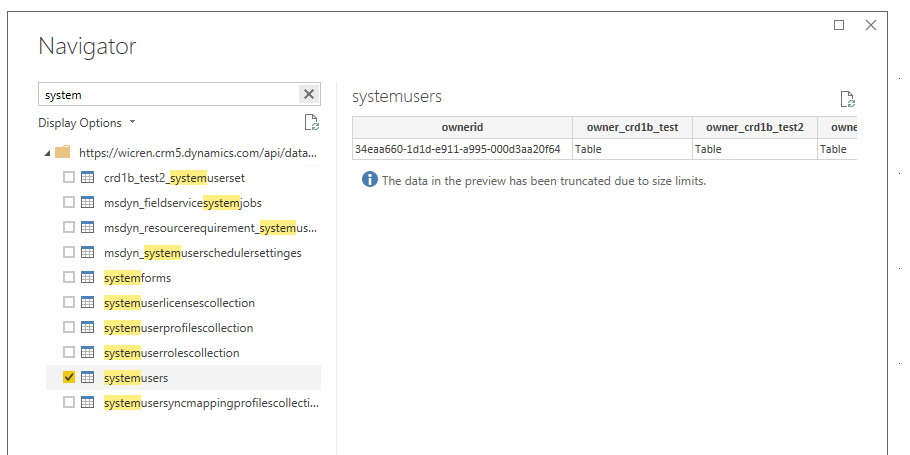
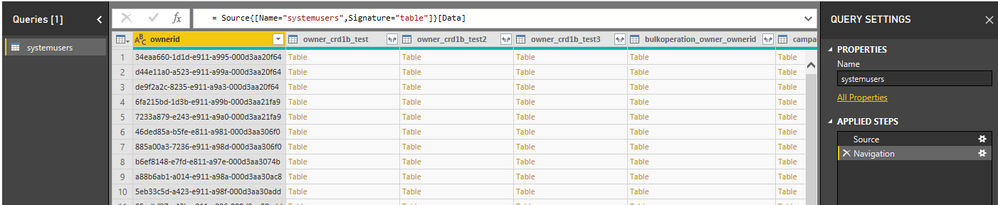
I created a CRM dashboard a while back, and since a few days I cant refresh the data anymore. After some research in the queries i noticed the following when selecting the 'navigation' step in the Systemusers table. 


Preview.Error: The type of the current preview value is too complex to display.


When selecting Source or any other steps in the existing query, they work just fine. But I'm not able to Upload or Refresh my dataset.

As almost al my CRM dashboards use this table, they all broke down at the same time. There were no updates nor changes in my Dynamics environments. 

I noticed there was a simulair issue submitted on this forum (https://community.powerbi.com/t5/Issues/Preview-Error-The-type-of-the-current-preview-value-is-too/i...

This work around works with fixing the loading/refreshing. But the issue is still at hand. Any ideas?

Your help is greatly appreciated!

André

1 ACCEPTED SOLUTION
Anonymous
Not applicable

Hi, 

I updated to the latest version of Power BI, but now It's not loading at all. Refreshin just get stuck with the system users table. The steps Source and Navigation seem to be the problem, as the table does load the steps after those. But with refreshing it just gets stuck at 28 kb, while other tables load normally. 

EDIT:
Problem has been solved. I reverted back to an older version of the file (using tfs) and the issue wasn't there. The only difference is a few steps in the query that change the data type of columns. Very weird, but it works now haha 🙂 

View solution in original post

5 REPLIES 5
Fatima-Zahra
New Member

Hello, 


I have exactly the same issue when trying to add the systemuser table from the CRM to the data flow. 

Do you have any solution to this problem please? 


Many thanks for your help. 

Best regards 

Anonymous
Not applicable

yes, thank you ^^ 

v-qiuyu-msft
Community Support
Community Support

Hi @Anonymous, 


Glad to hear the issue is resolved. May I close this thread? Smiley Happy


Best Regards,
Qiuyun Yu 

Community Support Team _ Qiuyun Yu
If this post helps, then please consider Accept it as the solution to help the other members find it more quickly.
Anonymous
Not applicable

Hi, 

I updated to the latest version of Power BI, but now It's not loading at all. Refreshin just get stuck with the system users table. The steps Source and Navigation seem to be the problem, as the table does load the steps after those. But with refreshing it just gets stuck at 28 kb, while other tables load normally. 

EDIT:
Problem has been solved. I reverted back to an older version of the file (using tfs) and the issue wasn't there. The only difference is a few steps in the query that change the data type of columns. Very weird, but it works now haha 🙂 

v-qiuyu-msft
Community Support
Community Support

Hi @Anonymous,


I have tested in Power BI desktop March version but not able to reproduce the issue. Would you please update your Power BI desktop to the latest version 2.67.5404.581 then test it again? 


e1.PNG

e2.PNG


Best Regards,
Qiuyun Yu 

Community Support Team _ Qiuyun Yu
If this post helps, then please consider Accept it as the solution to help the other members find it more quickly.

Helpful resources

Announcements
November Power BI Update Carousel

Power BI Monthly Update - November 2025

Check out the November 2025 Power BI update to learn about new features.

Fabric Data Days Carousel

Fabric Data Days

Advance your Data & AI career with 50 days of live learning, contests, hands-on challenges, study groups & certifications and more!

FabCon Atlanta 2026 carousel

FabCon Atlanta 2026

Join us at FabCon Atlanta, March 16-20, for the ultimate Fabric, Power BI, AI and SQL community-led event. Save $200 with code FABCOMM.

Top Solution Authors
Top Kudoed Authors