cancel
Showing results for 
Search instead for 
Did you mean: 

The Power BI Data Visualization World Championships is back! It's time to submit your entry. Live now!

Reply
B_kaydo
Advocate I
Advocate I

Prevent power bi from copy paste dax formulas when clicking on column columns

Hello everyone,

I have noticed that in the "Tables" panel, when I click on a created column PowerBi seems to copy it and if I click on another created column, it pastes it on another column. The issue happens whenever I click on a  column created by a formula, be it a table or a column.

It only happens when I click on the column, not when I select it in right panel, is it a normal feature ? Is there a way to turn it off ?

If it feels unclear let me know.


Thanks for the help

5 REPLIES 5
matthewstainsby
Frequent Visitor

Did this ever get resolved? I'm facing the same issue and its so annoying!!

Anonymous
Not applicable

I have the same issue. It's incredibly annoying as I have to close (without saving) the file en reopen it because I cannot undo the 'paste' and whatever DAX was supposed to be in the column is gone. 
I hope this is fixed soon as it has been going on for a while. 

The sole solution I have at the moment is to press "Esc" everytime I select a column to prevent the copying but if I ever forget it I risk losing the formulas

Anonymous
Not applicable

Hi @B_kaydo ,

I hope this message finds you well. I understand that you’re encountering an issue where the formula from a previously created calculated column seems to be copied when you create a new one. 

To assist you effectively, could you please provide a detailed step-by-step description of the process you’re following, ideally accompanied by a .gif illustrating the issue? This will help me understand the problem more clearly and guide you to a solution. Additionally, knowing the version of your Power BI Desktop could be crucial in diagnosing the issue accurately.

Thank you for reaching out, and I look forward to your response.

Best Regards

Hello @Anonymous  sorry for the late answer
I will post printscreen of what I do/what I see, hope it will make it clearer :

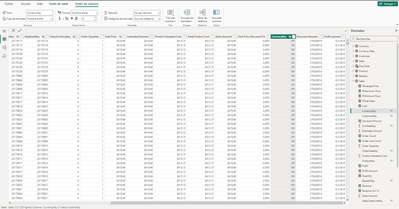
I am in the table panel, selecting a column :

B_kaydo_0-1712062941626.png

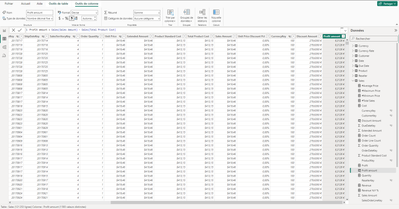
I then select another column that I created, here it is "profit amount"

B_kaydo_1-1712062990740.png


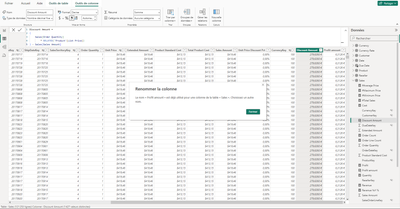
Now, if I just select the column to the left of the one I selected, here is what I see :

B_kaydo_2-1712063055036.png

To translate, the box says that I can rename my column, as there is already a column with this name.


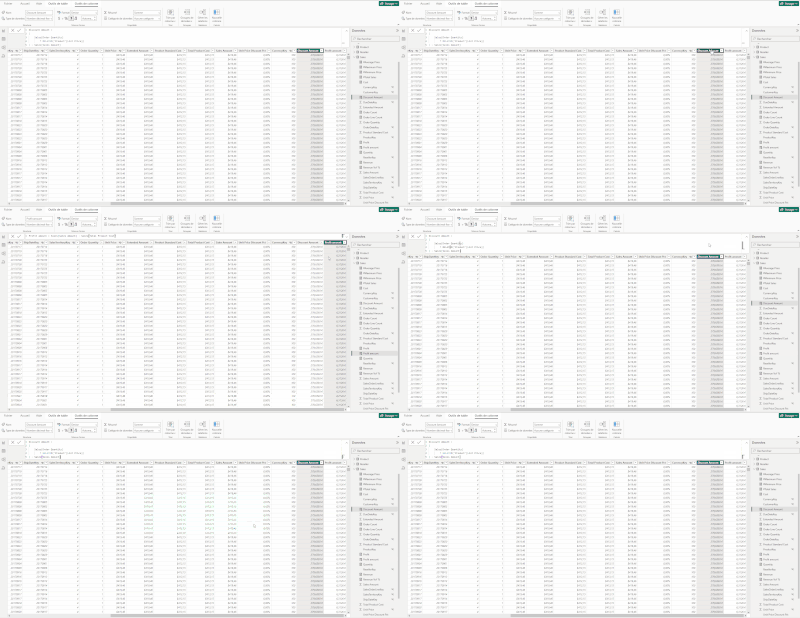
Just clicking the header has selected the whole formula and copy it, and if I click on another column it pastes it automatically, in the case of columns it doesn't overwite the formula, but for created tables it does if I am not careful

PowerBiCapture.gif

I also share a gif, hope it makes it clearer

Helpful resources

Announcements
Power BI DataViz World Championships

Power BI Dataviz World Championships

The Power BI Data Visualization World Championships is back! It's time to submit your entry.

January Power BI Update Carousel

Power BI Monthly Update - January 2026

Check out the January 2026 Power BI update to learn about new features.

FabCon Atlanta 2026 carousel

FabCon Atlanta 2026

Join us at FabCon Atlanta, March 16-20, for the ultimate Fabric, Power BI, AI and SQL community-led event. Save $200 with code FABCOMM.