cancel
Showing results for 
Search instead for 
Did you mean: 

Learn from the best! Meet the four finalists headed to the FINALS of the Power BI Dataviz World Championships! Register now

Reply
batranikhil
Frequent Visitor

Prevent Table Columns from Auto Sorting in Data View

Hi, 


I'm building a report based on some survey data, and went through the process of ordering all columns in "Transform Data". But when I came to the main view to build the report, everything was sorted Alphabetically in Data View on the right hand side. 


I couldn't find any option to prevent it from happening. 


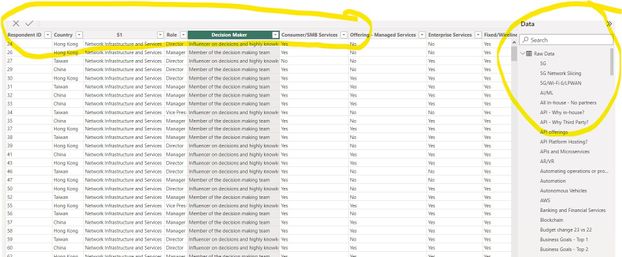
e.g. as seen in the Screenshot, the first few collumns in the table are Respondent ID, Country, S1, Decision Maker and so on. Whereas, if you look at the right in Data View, its arranged everything alphabetically -  starting with 5G, 5G Network Slicing, and so on. Ideally, I want the Columns in Data view to mantain the same order as in the original table.  


Screenshot 2023-07-06 180636.jpg


Fairly new to all PowerBI, so appreciate all the help. 


Thanks.  

2 REPLIES 2
mahenkj2
Solution Sage
Solution Sage

hi @batranikhil 


When you are building report, why concerned about Data view? You can sort as needed in the report visual. I see not much need to go through to that.


Hope it helps.

daanhumble
Microsoft Employee
Microsoft Employee

Hi @batranikhil,


Tables and columns in Power BI Desktop are by default sorted alphabetically. The custom order that you made in Power Query (or the order that came from the source system for that matter) will not propagate to the datamodel. If you want to enforce a certain order you'll have to rename the columns (for example by adding a prefix) to follow that logic.

Helpful resources

Announcements
New to Fabric survey Carousel

New to Fabric Survey

If you have recently started exploring Fabric, we'd love to hear how it's going. Your feedback can help with product improvements.

Power BI DataViz World Championships carousel

Power BI DataViz World Championships - June 2026

A new Power BI DataViz World Championship is coming this June! Don't miss out on submitting your entry.

Join our Fabric User Panel

Join our Fabric User Panel

Share feedback directly with Fabric product managers, participate in targeted research studies and influence the Fabric roadmap.

March Power BI Update Carousel

Power BI Community Update - March 2026

Check out the March 2026 Power BI update to learn about new features.