cancel
Showing results for 
Search instead for 
Did you mean: 

The Power BI Data Visualization World Championships is back! Get ahead of the game and start preparing now! Learn more

Reply
jalaomar
Helper IV
Helper IV

Presenting data in Matrix table

Hi all,


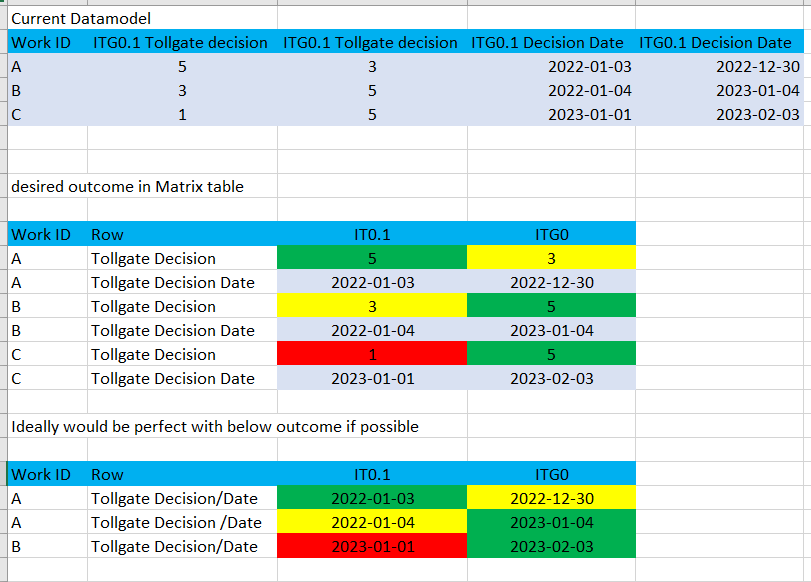
Anyone who would know how to arrive to the best desired outcome on presenting data in Matrix table?

Please see Picture. would appriciate it a lot!


jalaomar_0-1675439149283.png


1 ACCEPTED SOLUTION

Your source data is not in a usable format.  First step is to modify the structure to make it usable.

let
    Source = Table.FromRows(Json.Document(Binary.Decompress(Binary.FromText("i45WclTSUTIFYmMgNjIwMtI1MNQ1gHMMjXSNDZRidaKVnKBqTJHVmUA4xlAOSJ0zUMgQoQ4iZQjnGIEMj40FAA==", BinaryEncoding.Base64), Compression.Deflate)), let _t = ((type nullable text) meta [Serialized.Text = true]) in type table [#"Work ID" = _t, #"ITG0.1 Tollgate decision" = _t, #"ITG0 Tollgate decision" = _t, #"ITG0.1 Decision Date" = _t, #"ITG0 Decision Date" = _t]),
    #"Unpivoted Other Columns" = Table.UnpivotOtherColumns(Source, {"Work ID"}, "Attribute", "Value"),
    #"Split Column by Delimiter" = Table.SplitColumn(#"Unpivoted Other Columns", "Attribute", Splitter.SplitTextByEachDelimiter({" "}, QuoteStyle.Csv, false), {"Level", "Attribute"}),
    #"Pivoted Column" = Table.Pivot(#"Split Column by Delimiter", List.Distinct(#"Split Column by Delimiter"[Attribute]), "Attribute", "Value", List.Max)
in
    #"Pivoted Column"

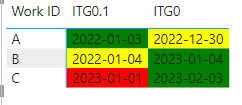
Then you can use conditional formatting to achieve your desired result.
lbendlin_0-1675610189347.png


see attached

View solution in original post

4 REPLIES 4
lbendlin
Super User
Super User

Your sample data is inconsistent. What is the correlation between ITG0.1, IT0.1 and ITG0 ?

Please provide sample data that covers your issue or question completely.
https://community.powerbi.com/t5/Community-Blog/How-to-provide-sample-data-in-the-Power-BI-Forum/ba-...
Please show the expected outcome based on the sample data you provided.

https://community.powerbi.com/t5/Desktop/How-to-Get-Your-Question-Answered-Quickly/m-p/1447523

@lbendlin 


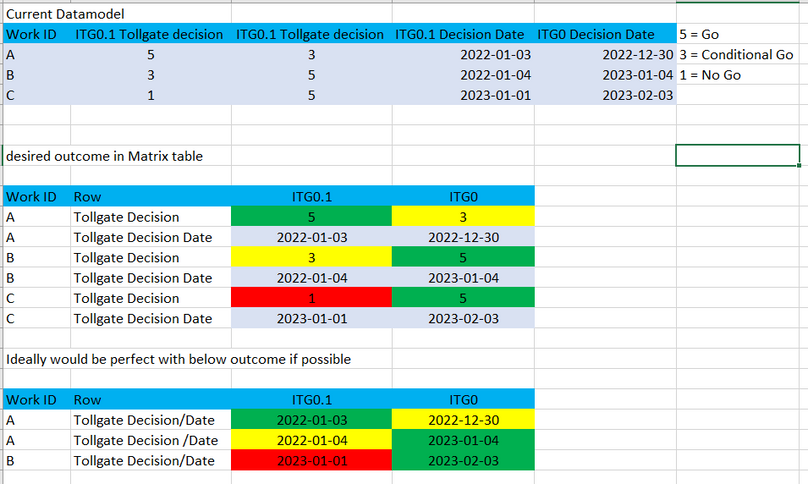
Some typo issue. But below should be consistent.


jalaomar_1-1675602740255.png


Your source data is not in a usable format.  First step is to modify the structure to make it usable.

let
    Source = Table.FromRows(Json.Document(Binary.Decompress(Binary.FromText("i45WclTSUTIFYmMgNjIwMtI1MNQ1gHMMjXSNDZRidaKVnKBqTJHVmUA4xlAOSJ0zUMgQoQ4iZQjnGIEMj40FAA==", BinaryEncoding.Base64), Compression.Deflate)), let _t = ((type nullable text) meta [Serialized.Text = true]) in type table [#"Work ID" = _t, #"ITG0.1 Tollgate decision" = _t, #"ITG0 Tollgate decision" = _t, #"ITG0.1 Decision Date" = _t, #"ITG0 Decision Date" = _t]),
    #"Unpivoted Other Columns" = Table.UnpivotOtherColumns(Source, {"Work ID"}, "Attribute", "Value"),
    #"Split Column by Delimiter" = Table.SplitColumn(#"Unpivoted Other Columns", "Attribute", Splitter.SplitTextByEachDelimiter({" "}, QuoteStyle.Csv, false), {"Level", "Attribute"}),
    #"Pivoted Column" = Table.Pivot(#"Split Column by Delimiter", List.Distinct(#"Split Column by Delimiter"[Attribute]), "Attribute", "Value", List.Max)
in
    #"Pivoted Column"

Then you can use conditional formatting to achieve your desired result.

lbendlin_0-1675610189347.png


see attached

@lbendlin Super this worked perfectly! 

Thanks

Helpful resources

Announcements
Power BI DataViz World Championships

Power BI Dataviz World Championships

The Power BI Data Visualization World Championships is back! Get ahead of the game and start preparing now!

December 2025 Power BI Update Carousel

Power BI Monthly Update - December 2025

Check out the December 2025 Power BI Holiday Recap!

FabCon Atlanta 2026 carousel

FabCon Atlanta 2026

Join us at FabCon Atlanta, March 16-20, for the ultimate Fabric, Power BI, AI and SQL community-led event. Save $200 with code FABCOMM.