Get Fabric or SQL Certified for Free.
Get certified for free when you join Fabric Data Days 2026 and dive into Fabric, Power BI, SQL, AI, and other essential data skills.
Join now- Power BI forums
- Get Help with Power BI
- Desktop
- Service
- Report Server
- Power Query
- Mobile Apps
- Developer
- DAX Commands and Tips
- Custom Visuals Development Discussion
- Health and Life Sciences
- Power BI Spanish forums
- Translated Spanish Desktop
- Training and Consulting
- Instructor Led Training
- Dashboard in a Day for Women, by Women
- Galleries
- Data Stories Gallery
- Themes Gallery
- Contests Gallery
- QuickViz Gallery
- Quick Measures Gallery
- Visual Calculations Gallery
- Fabric Apps Gallery
- Notebook Gallery
- Translytical Task Flow Gallery
- TMDL Gallery
- R Script Showcase
- Webinars and Video Gallery
- Ideas
- Custom Visuals Ideas (read-only)
- Issues
- Issues
- Events
- Upcoming Events
July 28 - August 9 | Final Round of the Power BI Dataviz World Championships. This is your chance. Learn more
- Power BI forums
- Forums
- Get Help with Power BI
- Desktop
- Re: PowerQuery Generate Rows Filling in Sequential...
- Subscribe to RSS Feed
- Mark Topic as New
- Mark Topic as Read
- Float this Topic for Current User
- Bookmark
- Subscribe
- Printer Friendly Page


- Mark as New
- Bookmark
- Subscribe
- Mute
- Subscribe to RSS Feed
- Permalink
- Report Inappropriate Content
PowerQuery Generate Rows Filling in Sequential Gaps
Hi Everyone!
I have a fact table that has incomplete data for a set amount of sequential data. I would like to use PowerQuery to "fill" in those gaps and set the value field to 0. In the field "Acc", there are values starting from TOTBIL and it continues all the way to TOTBIL_M_24. For each entity and custom1, the "Acc" field to generate would be:
| TOTBIL |
| TOTBIL_M_01 |
| TOTBIL_M_02 |
| TOTBIL_M_03 |
| TOTBIL_M_04 |
| TOTBIL_M_05 |
| TOTBIL_M_06 |
| TOTBIL_M_07 |
| TOTBIL_M_08 |
| TOTBIL_M_09 |
| TOTBIL_M_10 |
| TOTBIL_M_11 |
| TOTBIL_M_12 |
| TOTBIL_M_13 |
| TOTBIL_M_14 |
| TOTBIL_M_15 |
| TOTBIL_M_16 |
| TOTBIL_M_17 |
| TOTBIL_M_18 |
| TOTBIL_M_19 |
| TOTBIL_M_20 |
| TOTBIL_M_21 |
| TOTBIL_M_22 |
| TOTBIL_M_23 |
| TOTBIL_M_24 |
Here is a small sample of the data:
| Acc | Year | Period | Entity | Custom 1 | Value |
| TOTBIL | 2019 | 12 | ABC | ZXY | 100 |
| TOTBIL_M_01 | 2019 | 12 | ABC | ZXY | 100 |
| TOTBIL_M_03 | 2019 | 12 | ABC | ZXY | 54 |
| TOTBIL_M_04 | 2019 | 12 | ABC | ZXY | 63 |
| TOTBIL_M_05 | 2019 | 12 | ABC | ZXY | 58 |
| TOTBIL_M_06 | 2019 | 12 | ABC | ZXY | 59 |
| TOTBIL_M_07 | 2019 | 12 | ABC | ZXY | 31 |
| TOTBIL_M_09 | 2019 | 12 | ABC | ZXY | 50 |
| TOTBIL_M_10 | 2019 | 12 | ABC | ZXY | 31 |
| TOTBIL_M_11 | 2019 | 12 | ABC | ZXY | 50 |
| TOTBIL_M_12 | 2019 | 12 | ABC | ZXY | 30 |
| TOTBIL_M_13 | 2019 | 12 | ABC | ZXY | 39 |
| TOTBIL_M_14 | 2019 | 12 | ABC | ZXY | 44 |
| TOTBIL_M_15 | 2019 | 12 | ABC | ZXY | 52 |
| TOTBIL_M_16 | 2019 | 12 | ABC | ZXY | 68 |
| TOTBIL_M_17 | 2019 | 12 | ABC | ZXY | 42 |
| TOTBIL_M_18 | 2019 | 12 | ABC | ZXY | 49 |
| TOTBIL_M_19 | 2019 | 12 | ABC | ZXY | 45 |
| TOTBIL_M_20 | 2019 | 12 | ABC | ZXY | 46 |
| TOTBIL_M_21 | 2019 | 12 | ABC | ZXY | 50 |
| TOTBIL | 2019 | 12 | DEF | MNO | 300 |
| TOTBIL_M_01 | 2019 | 12 | DEF | MNO | 300 |
| TOTBIL_M_02 | 2019 | 12 | DEF | MNO | 153 |
| TOTBIL_M_03 | 2019 | 12 | DEF | MNO | 138 |
| TOTBIL_M_04 | 2019 | 12 | DEF | MNO | 44 |
| TOTBIL_M_06 | 2019 | 12 | DEF | MNO | 223 |
| TOTBIL_M_07 | 2019 | 12 | DEF | MNO | 50 |
| TOTBIL_M_08 | 2019 | 12 | DEF | MNO | 201 |
| TOTBIL_M_09 | 2019 | 12 | DEF | MNO | 136 |
| TOTBIL_M_10 | 2019 | 12 | DEF | MNO | 269 |
| TOTBIL_M_11 | 2019 | 12 | DEF | MNO | 21 |
| TOTBIL_M_12 | 2019 | 12 | DEF | MNO | 0 |
| TOTBIL_M_13 | 2019 | 12 | DEF | MNO | 0 |
| TOTBIL_M_14 | 2019 | 12 | DEF | MNO | 0 |
If we take the entity ABC and custom 1, this would be the expectd results:
| Acc | Year | Period | Entity | Custom 1 | Value |
| TOTBIL | 2019 | 12 | ABC | ZXY | 100 |
| TOTBIL_M_01 | 2019 | 12 | ABC | ZXY | 100 |
| TOTBIL_M_02 | 2019 | 12 | ABC | ZXY | 0 |
| TOTBIL_M_03 | 2019 | 12 | ABC | ZXY | 54 |
| TOTBIL_M_04 | 2019 | 12 | ABC | ZXY | 63 |
| TOTBIL_M_05 | 2019 | 12 | ABC | ZXY | 58 |
| TOTBIL_M_06 | 2019 | 12 | ABC | ZXY | 59 |
| TOTBIL_M_07 | 2019 | 12 | ABC | ZXY | 31 |
| TOTBIL_M_08 | 2019 | 12 | ABC | ZXY | 0 |
| TOTBIL_M_09 | 2019 | 12 | ABC | ZXY | 50 |
| TOTBIL_M_10 | 2019 | 12 | ABC | ZXY | 31 |
| --- | --- | --- | --- | --- | --- |
| TOTBIL_M_20 | 2019 | 12 | ABC | ZXY | 46 |
| TOTBIL_M_21 | 2019 | 12 | ABC | ZXY | 50 |
| TOTBIL_M_22 | 2019 | 12 | ABC | ZXY | 0 |
| TOTBIL_M_23 | 2019 | 12 | ABC | ZXY | 0 |
| TOTBIL_M_24 | 2019 | 12 | ABC | ZXY | 0 |
(the 3-line dashes just represents continuation of records)
Thanks for the help in advanced!
Solved! Go to Solution.
- Mark as New
- Bookmark
- Subscribe
- Mute
- Subscribe to RSS Feed
- Permalink
- Report Inappropriate Content
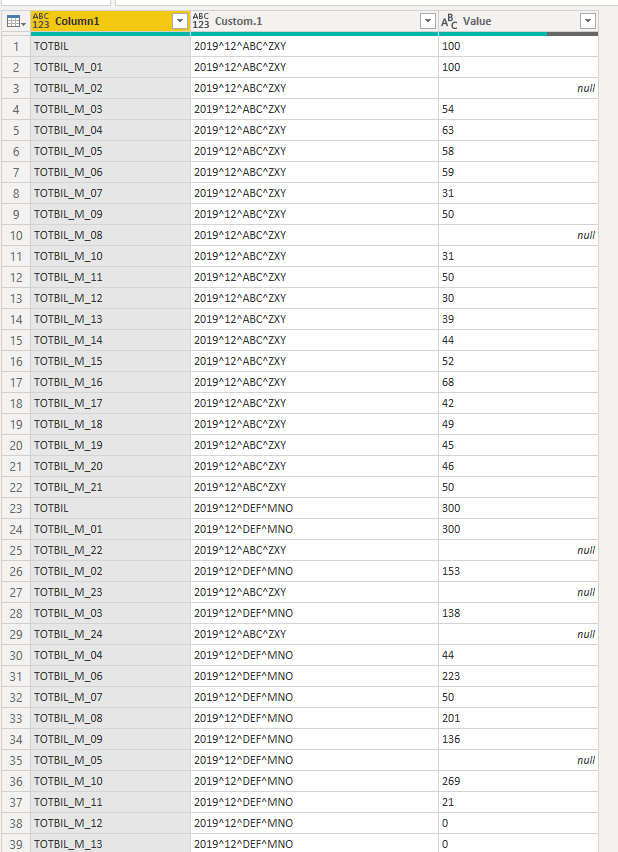
I think I got the basic logic so far. hehee.
1. Create a list of all my possible values
2. Create a key for all my attributes within my fact table
3. Create a custom column that ingests the list from step 1
4. Expand list
5. Remove all columns except my key and my custom list column
6. Merge with itself


- Mark as New
- Bookmark
- Subscribe
- Mute
- Subscribe to RSS Feed
- Permalink
- Report Inappropriate Content
Wow, ugly. @ImkeF @edhans any magic?
Follow on LinkedIn
@ me in replies or I'll lose your thread!!!
Instead of a Kudo, please vote for this idea
Become an expert!: Enterprise DNA
External Tools: MSHGQM
YouTube Channel!: Microsoft Hates Greg
Latest book!: DAX For Humans
DAX is easy, CALCULATE makes DAX hard...
- Mark as New
- Bookmark
- Subscribe
- Mute
- Subscribe to RSS Feed
- Permalink
- Report Inappropriate Content
I think I got the basic logic so far. hehee.
1. Create a list of all my possible values
2. Create a key for all my attributes within my fact table
3. Create a custom column that ingests the list from step 1
4. Expand list
5. Remove all columns except my key and my custom list column
6. Merge with itself


- Mark as New
- Bookmark
- Subscribe
- Mute
- Subscribe to RSS Feed
- Permalink
- Report Inappropriate Content
Sounds like you figured it out. I would have suggested the following, but didn't try to confirm it would work.
1. Make a list from 1..24, convert to table, pad values to 2 digits with "0", add "TOTBIL_M_" prefixe
2. Merge your original table into that and expand
3. Fill Up/Down as needed for the other columns
If this works for you, please mark it as the solution. Kudos are appreciated too. Please let me know if not.
Regards,
Pat
Did I answer your question? Mark my post as a solution! Kudos are also appreciated!
To learn more about Power BI, follow me on Twitter or subscribe on YouTube.
@mahoneypa HoosierBI on YouTube

- Mark as New
- Bookmark
- Subscribe
- Mute
- Subscribe to RSS Feed
- Permalink
- Report Inappropriate Content
Hi @hnguyen76
Another option, albeit more complicated than what you suggest, it would seem:
let
    Source = Table.FromRows(Json.Document(Binary.Decompress(Binary.FromText("lZPLCsIwEEX/JesuMpOH7dL6AMHaTRdqKf7/XxgFIbmFG7tJoBwuzZy582ymceovV9MYtdKlSzQd+/6Qzuf98flgrVmaH/gaXlY20Y7QwQPsCRwdwIEltwBHBncA7wjsBOCOJcM0xG5IFjboVbKyZISZFAfTECbFg0GhUhRgJiWCQWFSPCa3DMYHMoM+lLAygz4C/LdB4I6nczqH2/iVVysgp3ExcloClgo3o6AdtgpXI6dxNVYVzGFV/BHUndO4/BZ1F9G21tjyjbFS2SI74i4xN4oFZ2pqlWUs05LY5Q0=", BinaryEncoding.Base64), Compression.Deflate)), let _t = ((type text) meta [Serialized.Text = true]) in type table [Acc = _t, Year = _t, Period = _t, Entity = _t, #"Custom 1" = _t, Value = _t]),
    #"Changed Type" = Table.TransformColumnTypes(Source,{{"Acc", type text}, {"Year", Int64.Type}, {"Period", Int64.Type}, {"Entity", type text}, {"Custom 1", type text}, {"Value", Int64.Type}}),
    #"Added Custom" = Table.AddColumn(#"Changed Type", "Nums_in_list", each if Text.End([Acc],2) = "IL" then null else Int64.From( Text.End([Acc],2))),
    #"Added Custom1" = Table.AddColumn(#"Added Custom", "Custom", each Table.SelectRows(#"Added Custom",(Inner)=> Inner[Entity] = _[Entity] and Inner[Custom 1] = _[Custom 1])[Nums_in_list]),
    distinct_t = Table.Distinct(Table.SelectColumns(#"Added Custom1",{"Entity", "Custom 1"})),
    #"Added Custom2" = Table.AddColumn(distinct_t, "Present", each Table.SelectRows(#"Added Custom",(Inner)=> Inner[Entity] = _[Entity] and Inner[Custom 1] = _[Custom 1])[Nums_in_list]),
    #"Added Custom3" = Table.AddColumn(#"Added Custom2", "All nums", each List.Generate(()=> 1,each _<=Max_to_Fill_in,each _+1)),
    #"Added Custom4" = Table.AddColumn(#"Added Custom3", "Gaps1", each Table.FromList(List.RemoveItems([All nums],[Present]), Splitter.SplitByNothing(), null, null, ExtraValues.Error)),
    #"Added Custom6" = Table.AddColumn(#"Added Custom4", "Gaps_text", each Table.TransformColumns(Table.FromList(List.RemoveItems([All nums],[Present]), Splitter.SplitByNothing(), null, null, ExtraValues.Error), {"Column1", each if _=0 then Initial_Str_0 else Initial_Str & Text.PadStart(Text.From(_),2,"0")})[Column1]),
    #"Added Custom7" = Table.AddColumn(#"Added Custom6", "Base_row", each Table.SelectRows(Source,(inner)=>inner[Acc]=Initial_Str_0 and inner[Custom 1] = [Custom 1] and inner[Entity] = [Entity]){0}),
    #"Added Custom8" = Table.AddColumn(#"Added Custom7", "Base_row_zeros", each Record.TransformFields([Base_row],{"Value", each 0})),
    #"Added Custom9" = Table.AddColumn(#"Added Custom8", "Rows_to_add", (outer)=> List.Transform(List.Numbers(0, List.Count(outer[Gaps_text])),(middle)=> Record.TransformFields(outer[Base_row_zeros],{"Acc", (inner)=> outer[Gaps_text]{middle}}))),
    #"List Rows to add" = #"Added Custom9"[Rows_to_add],
    #"List Rows to add2" = List.Combine(#"List Rows to add"),
    Final_ = Table.InsertRows(#"Changed Type",0, #"List Rows to add2")
in
    Final_
It uses 3 parameters:
Max_to_Fill_in, with value 24
Initial_Str_0, with value "TOTBIL"
Initial_Str, with value "TOTBIL_M_"
Please mark the question solved when done and consider giving kudos if posts are helpful.
Cheers

- Mark as New
- Bookmark
- Subscribe
- Mute
- Subscribe to RSS Feed
- Permalink
- Report Inappropriate Content
@AlB ,
Holy crap that's kinda cool. Let's say I need to do this check / transformation for.... 30 million rows. Would you have any idea on wether the merge method or your method would be better in terms of performance? Granted, I won't be doing this transformation within the desktop client but it would be nice to know when i add this into a dataflow.
- Mark as New
- Bookmark
- Subscribe
- Mute
- Subscribe to RSS Feed
- Permalink
- Report Inappropriate Content
Hi @hnguyen76
I am not sure but I would guess that your solution is faster as it is much simpler (and elegant). Simplicity is usually an accurate proxy for speed of execution. If you do test both options I would be interested in knowing what the final result is though.
Please mark the question solved when done and consider giving kudos if posts are helpful.
Cheers

- Mark as New
- Bookmark
- Subscribe
- Mute
- Subscribe to RSS Feed
- Permalink
- Report Inappropriate Content
@AlB ,
I just tested on 2 million rows and I have to say the merge method is far more efficient.
Original load no transformation: 5 minutes for 2 million rows
Load with transformation using distinct merge: 7 minutes and 58 seconds for 2 million rows
Load using search method: 34 minutes 12 seconds for 2 million rows
I also noticed that the memory consumption for your method is much higher =(
- Mark as New
- Bookmark
- Subscribe
- Mute
- Subscribe to RSS Feed
- Permalink
- Report Inappropriate Content
The real test will be to try it with your big dataset. If it is slow, you can remove duplicates from the Date column before you expand the merged table, as per this article by Chris Webb. Not sure it will help but worth a try.
If this works for you, please mark it as the solution. Kudos are appreciated too. Please let me know if not.
Regards,
Pat
Did I answer your question? Mark my post as a solution! Kudos are also appreciated!
To learn more about Power BI, follow me on Twitter or subscribe on YouTube.
@mahoneypa HoosierBI on YouTube

Helpful resources

FabCon & SQLCon – Barcelona 2026
Join us in Barcelona for FabCon and SQLCon, the Fabric, Power BI, SQL, and AI community event. Save €200 with code FABCMTY200.

Fabric Community Sticker Challenge - Barcelona 2026
If you love stickers, then you will definitely want to check out our community sticker challenge, Barcelona edition!

Power BI Monthly Update - July 2026
Check out the July 2026 Power BI update to learn about new features.

Power BI DataViz World Championships - June 2026
A new Power BI DataViz World Championship is coming this June! Don't miss out on submitting your entry.

| User | Count |
|---|---|
| 25 | |
| 23 | |
| 22 | |
| 17 | |
| 14 |


| User | Count |
|---|---|
| 25 | |
| 24 | |
| 20 | |
| 19 | |
| 19 |


