cancel
Showing results for 
Search instead for 
Did you mean: 

The Power BI Data Visualization World Championships is back! Get ahead of the game and start preparing now! Learn more

Reply
Fcoatis
Post Patron
Post Patron

PowerQuery Filter by List

Hello,


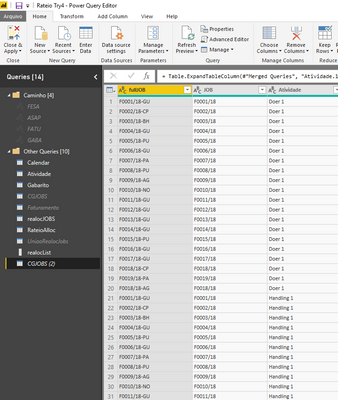
I need, in PowerQuery, create a step to filter a by field ( JOB) Table (CGJOBS (2) using a list already created (realocList). 


Fig1.PNGFig2.PNG


Thanks

1 ACCEPTED SOLUTION
Anonymous
Not applicable

@Fcoatis,

You first need to convert your list to table, then use Merge Queries transformation, and select Inner Join as the join type on the two columns

View solution in original post

4 REPLIES 4
Anonymous
Not applicable

@Fcoatis,

You first need to convert your list to table, then use Merge Queries transformation, and select Inner Join as the join type on the two columns

Anonymous
Not applicable

yes and no... that's not a filter by at query time but a merge. If we want to only keep 10 items out of millions of rows this method would require to first download the 10M rows to then only merge 10.

Filter by list would imply using Table.SelectRows and be able to refer a list of values.

Why didn´t I think that? Sometimes we are so determined to a specific type of solution we became blind.


Thanks

Anonymous
Not applicable

@Fcoatis,

Sometimes simple solution is efffective 😉

Helpful resources

Announcements
Power BI DataViz World Championships

Power BI Dataviz World Championships

The Power BI Data Visualization World Championships is back! Get ahead of the game and start preparing now!

December 2025 Power BI Update Carousel

Power BI Monthly Update - December 2025

Check out the December 2025 Power BI Holiday Recap!

FabCon Atlanta 2026 carousel

FabCon Atlanta 2026

Join us at FabCon Atlanta, March 16-20, for the ultimate Fabric, Power BI, AI and SQL community-led event. Save $200 with code FABCOMM.