
cancel
Showing results for 
Search instead for 
Did you mean: 

July 28 - August 9 | Final Round of the Power BI Dataviz World Championships. This is your chance. Learn more

Reply
ovetteabejuela
Impactful Individual

PowerQuery: Filter Top N

In Power Query, is there an equivalent function to filter top N items.


What I'm trying to do is filter on the latest 7 days and they don;t have to be consecutive days - just the latest 7 days available in the records.


How can this be done?

1 ACCEPTED SOLUTION
Anonymous
Not applicable

HI @ovetteabejuela,


You can refer to below steps to filter the dynamic last 7 days:


1. Add custom steps to find out the last date from current table.

Custom1 = List.Max(#"Changed Type"[Date])

 7.PNG


2. Enable date filter on date column and use above variable as the parameter.

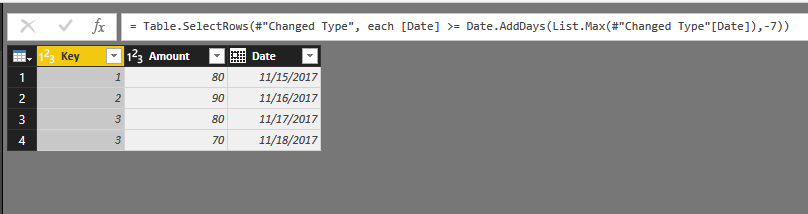
#"Filtered Rows" = Table.SelectRows(#"Changed Type", each [Date] >= Date.AddDays(List.Max(#"Changed Type"[Date]),-7))

Filtered tableFiltered tableOriginal tableOriginal tableRegards,

Xiaoxin Sheng

View solution in original post

2 REPLIES 2
Anonymous
Not applicable

HI @ovetteabejuela,


You can refer to below steps to filter the dynamic last 7 days:


1. Add custom steps to find out the last date from current table.

Custom1 = List.Max(#"Changed Type"[Date])

 7.PNG


2. Enable date filter on date column and use above variable as the parameter.

#"Filtered Rows" = Table.SelectRows(#"Changed Type", each [Date] >= Date.AddDays(List.Max(#"Changed Type"[Date]),-7))

Filtered tableFiltered tableOriginal tableOriginal tableRegards,

Xiaoxin Sheng

parry2k
Super User
Super User

you can create a column using rank function and then filter on this new column


Subscribe to the @PowerBIHowTo YT channel for an upcoming video on List and Record functions in Power Query!!

Learn Power BI and Fabric - subscribe to our YT channel - Click here: @PowerBIHowTo

If my solution proved useful, I'd be delighted to receive Kudos. When you put effort into asking a question, it's equally thoughtful to acknowledge and give Kudos to the individual who helped you solve the problem. It's a small gesture that shows appreciation and encouragement! ❤


Did I answer your question? Mark my post as a solution. Proud to be a Super User! Appreciate your Kudos 🙂
Feel free to email me with any of your BI needs.

Helpful resources

Announcements
Fabric Community Sticker Design Challenge Barcelona Carousel

Fabric Community Sticker Challenge - Barcelona 2026

If you love stickers, then you will definitely want to check out our community sticker challenge, Barcelona edition!

July Power BI Update Carousel

Power BI Monthly Update - July 2026

Check out the July 2026 Power BI update to learn about new features.

Power BI DataViz World Championships carousel

Power BI DataViz World Championships - June 2026

A new Power BI DataViz World Championship is coming this June! Don't miss out on submitting your entry.

Top Solution Authors