Join us at FabCon Atlanta from March 16 - 20, 2026, for the ultimate Fabric, Power BI, AI and SQL community-led event. Save $200 with code FABCOMM.
Register now!The Power BI Data Visualization World Championships is back! Get ahead of the game and start preparing now! Learn more
I am attempting to create a custom conditional column in PowerQuery. The goal is to create a column in my data set named "Picklist Update Needed" which will display a simple 'Yes' or 'No' for each row.
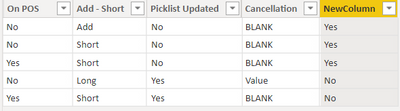
There are four columns in my data set ('On POS', 'Add-Short', 'Picklist Updated', 'Cancellation') that are involved in the logic for this column, below is chart showing the conditions that would result in a 'Yes' to populate in the custom conditional column.
| On POS | Add - Short | Picklist Updated | Cancellation |
| No | Add | No | BLANK |
| No | Short | No | BLANK |
| Yes | Short | No | BLANK |
If the combinations are anything other than these three above, the result would be 'No'.
What would the DAX code look like to create this?
Solved! Go to Solution.
Here is a column expression that shows one way to do it. Replace MultiColumn with your actual table name.
NewColumn =
VAR picklistcancellation =
AND (
MultiColumn[Picklist Updated] = "No",
MultiColumn[Cancellation] = "BLANK"
)
VAR otherconditions =
OR (
OR (
AND ( MultiColumn[On POS ] = "No", MultiColumn[Add - Short] = "Add" ),
AND ( MultiColumn[On POS ] = "No", MultiColumn[Add - Short] = "Short" )
),
AND ( MultiColumn[On POS ] = "Yes", MultiColumn[Add - Short] = "Short" )
)
RETURN
IF ( AND ( picklistcancellation, otherconditions ), "Yes", "No" )
Pat
To learn more about Power BI, follow me on Twitter or subscribe on YouTube.
Here is a column expression that shows one way to do it. Replace MultiColumn with your actual table name.
NewColumn =
VAR picklistcancellation =
AND (
MultiColumn[Picklist Updated] = "No",
MultiColumn[Cancellation] = "BLANK"
)
VAR otherconditions =
OR (
OR (
AND ( MultiColumn[On POS ] = "No", MultiColumn[Add - Short] = "Add" ),
AND ( MultiColumn[On POS ] = "No", MultiColumn[Add - Short] = "Short" )
),
AND ( MultiColumn[On POS ] = "Yes", MultiColumn[Add - Short] = "Short" )
)
RETURN
IF ( AND ( picklistcancellation, otherconditions ), "Yes", "No" )
Pat
To learn more about Power BI, follow me on Twitter or subscribe on YouTube.
Wow! Thank you! That worked perfectly. I will have to study exactly what you did there because it certainly isn't what I was thinking, which I couldn't get to work.
Thanks again!
Hi @Anonymous
I think you missed to add the condition chart?
Appreciate your Kudos!!
LinkedIn: www.linkedin.com/in/vahid-dm/
Looks like I got a solution already. Thanks for helping out.
The Power BI Data Visualization World Championships is back! Get ahead of the game and start preparing now!
| User | Count |
|---|---|
| 39 | |
| 37 | |
| 33 | |
| 32 | |
| 29 |
| User | Count |
|---|---|
| 133 | |
| 88 | |
| 85 | |
| 68 | |
| 64 |