This time we’re going bigger than ever. Fabric, Power BI, SQL, AI and more. We're covering it all. You won't want to miss it.
Learn moreLevel up your Power BI skills this month - build one visual each week and tell better stories with data! Get started
I am attempting to create a custom conditional column in PowerQuery. The goal is to create a column in my data set named "Picklist Update Needed" which will display a simple 'Yes' or 'No' for each row.
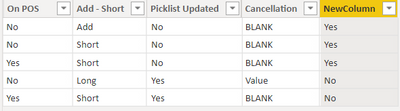
There are four columns in my data set ('On POS', 'Add-Short', 'Picklist Updated', 'Cancellation') that are involved in the logic for this column, below is chart showing the conditions that would result in a 'Yes' to populate in the custom conditional column.
| On POS | Add - Short | Picklist Updated | Cancellation |
| No | Add | No | BLANK |
| No | Short | No | BLANK |
| Yes | Short | No | BLANK |
If the combinations are anything other than these three above, the result would be 'No'.
What would the DAX code look like to create this?
Solved! Go to Solution.
Here is a column expression that shows one way to do it. Replace MultiColumn with your actual table name.
NewColumn =
VAR picklistcancellation =
AND (
MultiColumn[Picklist Updated] = "No",
MultiColumn[Cancellation] = "BLANK"
)
VAR otherconditions =
OR (
OR (
AND ( MultiColumn[On POS ] = "No", MultiColumn[Add - Short] = "Add" ),
AND ( MultiColumn[On POS ] = "No", MultiColumn[Add - Short] = "Short" )
),
AND ( MultiColumn[On POS ] = "Yes", MultiColumn[Add - Short] = "Short" )
)
RETURN
IF ( AND ( picklistcancellation, otherconditions ), "Yes", "No" )
Pat
To learn more about Power BI, follow me on Twitter or subscribe on YouTube.
Here is a column expression that shows one way to do it. Replace MultiColumn with your actual table name.
NewColumn =
VAR picklistcancellation =
AND (
MultiColumn[Picklist Updated] = "No",
MultiColumn[Cancellation] = "BLANK"
)
VAR otherconditions =
OR (
OR (
AND ( MultiColumn[On POS ] = "No", MultiColumn[Add - Short] = "Add" ),
AND ( MultiColumn[On POS ] = "No", MultiColumn[Add - Short] = "Short" )
),
AND ( MultiColumn[On POS ] = "Yes", MultiColumn[Add - Short] = "Short" )
)
RETURN
IF ( AND ( picklistcancellation, otherconditions ), "Yes", "No" )
Pat
To learn more about Power BI, follow me on Twitter or subscribe on YouTube.
Wow! Thank you! That worked perfectly. I will have to study exactly what you did there because it certainly isn't what I was thinking, which I couldn't get to work.
Thanks again!
Hi @Anonymous
I think you missed to add the condition chart?
Appreciate your Kudos!!
LinkedIn: www.linkedin.com/in/vahid-dm/
Looks like I got a solution already. Thanks for helping out.
Check out the April 2026 Power BI update to learn about new features.
Sign up to receive a private message when registration opens and key events begin.
If you have recently started exploring Fabric, we'd love to hear how it's going. Your feedback can help with product improvements.
| User | Count |
|---|---|
| 36 | |
| 28 | |
| 28 | |
| 21 | |
| 18 |
| User | Count |
|---|---|
| 68 | |
| 39 | |
| 33 | |
| 24 | |
| 23 |