Join us at FabCon Atlanta from March 16 - 20, 2026, for the ultimate Fabric, Power BI, AI and SQL community-led event. Save $200 with code FABCOMM.
Register now!The Power BI Data Visualization World Championships is back! It's time to submit your entry. Live now!
Hi,
I try to connect powerbi desktop to my sql network server(2008)( and always appear the next error:
Detalles: "Se produjo un error al leer datos desde el proveedor: 'No se puede cargar el archivo o ensamblado 'System.EnterpriseServices, Version=4.0.0.0, Culture=neutral, PublicKeyToken=b03f5f7f11d50a3a' ni una de sus dependencias. No se ha proporcionado el nivel de representación necesario o el nivel de representación no es válido. (Excepción de HRESULT: 0x80070542)'"
And not connect. The server works OK, because I use it for a lot apps.
How is the problem?
Thanks!!
Solved! Go to Solution.
Hello!!
I try to connect the desktop to my network SQL server 2008 and always appear the next error:
Detalles: "Se produjo un error al leer datos desde el proveedor: 'No se puede cargar el archivo o ensamblado 'System.EnterpriseServices, Version=4.0.0.0, Culture=neutral, PublicKeyToken=b03f5f7f11d50a3a' ni una de sus dependencias. No se ha proporcionado el nivel de representación necesario o el nivel de representación no es válido. (Excepción de HRESULT: 0x80070542)'"
I try the windows and sql server login, and always the same.
The server works ok with other apps.
What can I do?
I solved it by changing my user time from public to sysadmin
Hi!!
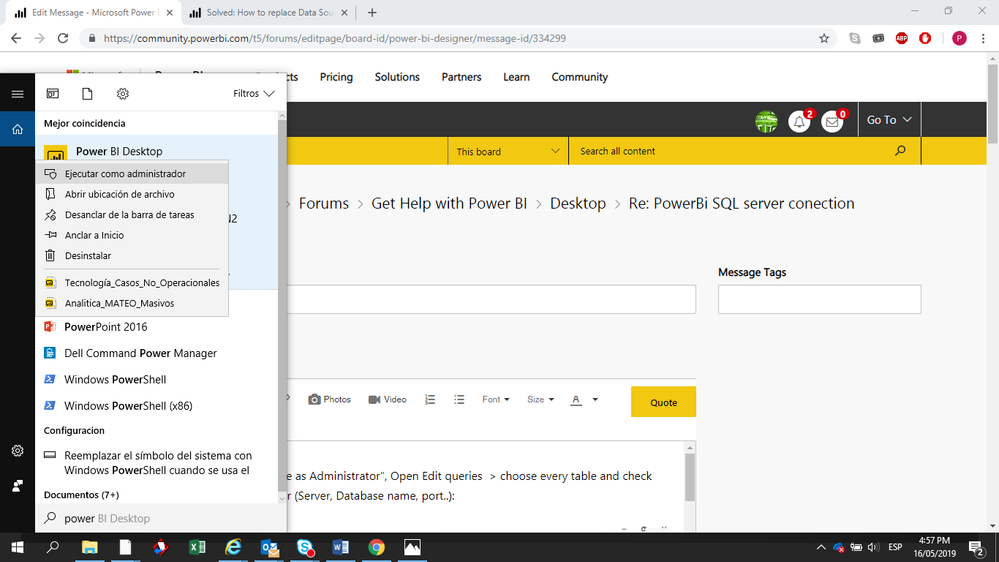
Try enter Power BI by left click as "Execute as Administrator",
Open Edit queries => Choose every table and check that the source is the same for SQL Server (Server, Database name, port..):
It happend to me and that was the solution.
The Table 1 was:
= Sql.Database("SBMDEAGSQL04,1454", "DW_DDS")
The Table 2 was:
= Sql.Database("SBMDEAGSQL04", "DW_DDS")
I added the port 1454.
Hi,
Thanks for the information, for me is working the query executing with elevated rights "Execute as Administrator".
The issue is that i don't have any diference on the tables between "Execute as Administrator" vs Normal...
the query only works when I executed as Administrator and I guees it will not work from a PBI Report server.
Thanks,
Hello!!
I try to connect the desktop to my network SQL server 2008 and always appear the next error:
Detalles: "Se produjo un error al leer datos desde el proveedor: 'No se puede cargar el archivo o ensamblado 'System.EnterpriseServices, Version=4.0.0.0, Culture=neutral, PublicKeyToken=b03f5f7f11d50a3a' ni una de sus dependencias. No se ha proporcionado el nivel de representación necesario o el nivel de representación no es válido. (Excepción de HRESULT: 0x80070542)'"
I try the windows and sql server login, and always the same.
The server works ok with other apps.
What can I do?
Hi @alfredomar,
Based on error message,the issue seems related to windows .net framework package. Please re-install suitable versions and try again.
Microsoft .NET Framework Repair Tool
Regards,
Xiaoxion Sheng
The Power BI Data Visualization World Championships is back! It's time to submit your entry.
Check out the January 2026 Power BI update to learn about new features.
| User | Count |
|---|---|
| 61 | |
| 49 | |
| 30 | |
| 25 | |
| 23 |
| User | Count |
|---|---|
| 128 | |
| 102 | |
| 56 | |
| 39 | |
| 31 |