cancel
Showing results for 
Search instead for 
Did you mean: 

Next up in the FabCon + SQLCon recap series: The roadmap for Microsoft SQL and Maximizing Developer experiences in Fabric. All sessions are available on-demand after the live show. Register now

Reply
hpatel123
Regular Visitor

PowerBI table transform

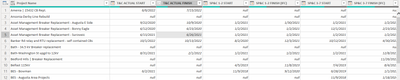
hpatel123_1-1683591841892.png


Hi, 

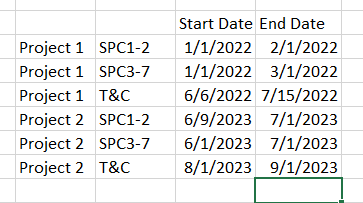
i have a table like above. How can i transform this to something like below so all start and end dates are consolidated to two columns? This will help me build my xviz gantt chart.


hpatel123_2-1683592091363.png


1 ACCEPTED SOLUTION
hpatel123
Regular Visitor

disregard my last question. i was able to figure it out. i created another custom column to T&C, SPC1-2, and SPC3-7, then pivoted the columns, which worked!

View solution in original post

4 REPLIES 4
hpatel123
Regular Visitor

disregard my last question. i was able to figure it out. i created another custom column to T&C, SPC1-2, and SPC3-7, then pivoted the columns, which worked!

hpatel123
Regular Visitor

Thank you amitchandak. Your steps helped me a little to get closer to where i want to be, but not there yet. Below screenshot shows Start and End dates date showing 'null' and additional unnessary rows.

hpatel123_0-1683648044219.png


below is 'From' current table 'To' my desired table look on how i'd like to see

hpatel123_1-1683648230003.png


Ashish_Mathur
Super User
Super User

Hi,

Share raw data in a format that can be pasted in an MS Excel file.


Regards,
Ashish Mathur
http://www.ashishmathur.com
https://www.linkedin.com/in/excelenthusiasts/
amitchandak
Super User
Super User

@hpatel123 , step one unpivot all date columns.

Step  2- Split by a delimiter, use option first delimiter in power query (There will 2 columns)

Create a New Column in power query

= if Text.Contains([Part 2 of split], "Start)  then "Start Date" else "End Date")


Delete the part 2 column now 

select the new column with Start and end date and Date and pivot that


https://radacad.com/pivot-and-unpivot-with-power-bi

Unpivot Data(Power Query): https://youtu.be/2HjkBtxSM0g

Pivot Data(Power Query) :https://www.youtube.com/watch?v=oKByyI09Bno&list=PLPaNVDMhUXGaaqV92SBD5X2hk3TMNlHhb&index=12


Text.Contains: https://youtube.com/watch?v=Hs2q6qcrdgU&feature=share


Power Query Split Column , Split Column By Delimiter: https://youtu.be/FyO9Vmhcfag


If this does not help
Can you share sample data and sample output in table format?


Share with Power BI Enthusiasts: Full Power BI Video (20 Hours) YouTube
Microsoft Fabric Series 60+ Videos YouTube
Microsoft Fabric Hindi End to End YouTube

Helpful resources

Announcements
New to Fabric survey Carousel

New to Fabric Survey

If you have recently started exploring Fabric, we'd love to hear how it's going. Your feedback can help with product improvements.

Power BI DataViz World Championships carousel

Power BI DataViz World Championships - June 2026

A new Power BI DataViz World Championship is coming this June! Don't miss out on submitting your entry.

March Power BI Update Carousel

Power BI Community Update - March 2026

Check out the March 2026 Power BI update to learn about new features.