FabCon is coming to Atlanta
Join us at FabCon Atlanta from March 16 - 20, 2026, for the ultimate Fabric, Power BI, AI and SQL community-led event. Save $200 with code FABCOMM.
Register now!- Power BI forums
- Get Help with Power BI
- Desktop
- Service
- Report Server
- Power Query
- Mobile Apps
- Developer
- DAX Commands and Tips
- Custom Visuals Development Discussion
- Health and Life Sciences
- Power BI Spanish forums
- Translated Spanish Desktop
- Training and Consulting
- Instructor Led Training
- Dashboard in a Day for Women, by Women
- Galleries
- Data Stories Gallery
- Themes Gallery
- Contests Gallery
- QuickViz Gallery
- Quick Measures Gallery
- Visual Calculations Gallery
- Notebook Gallery
- Translytical Task Flow Gallery
- TMDL Gallery
- R Script Showcase
- Webinars and Video Gallery
- Ideas
- Custom Visuals Ideas (read-only)
- Issues
- Issues
- Events
- Upcoming Events
The Power BI Data Visualization World Championships is back! Get ahead of the game and start preparing now! Learn more
- Power BI forums
- Forums
- Get Help with Power BI
- Desktop
- Re: PowerBI is Converting TRUE / FALSE to -1/0 on ...
- Subscribe to RSS Feed
- Mark Topic as New
- Mark Topic as Read
- Float this Topic for Current User
- Bookmark
- Subscribe
- Printer Friendly Page

- Mark as New
- Bookmark
- Subscribe
- Mute
- Subscribe to RSS Feed
- Permalink
- Report Inappropriate Content
PowerBI is Converting TRUE / FALSE to -1/0 on publish
I have a table in a report that contains the following column:-


- Mark as New
- Bookmark
- Subscribe
- Mute
- Subscribe to RSS Feed
- Permalink
- Report Inappropriate Content
Old post I know but I just encountered this myself so I thought that I would link people to the documentation about it.
I don't have a reason (since I think the behaviour is bollocks, especially when it differs between desktop and service) but it is documented here: https://learn.microsoft.com/en-us/power-bi/connect-data/desktop-data-types#truefalse-type
Basically, as my understanding goes, any text column that contains values that can be converted to logical true/false will be converted when doing a refresh in the service (not on desktop) and logical true is represented as -1, same as in the language Forth and some others... I'll refer to the answers in this Stack Overflow thread for the reasoning behind this representation:
https://stackoverflow.com/questions/23832703/why-does-forth-return-1-as-a-flag-for-true
- Mark as New
- Bookmark
- Subscribe
- Mute
- Subscribe to RSS Feed
- Permalink
- Report Inappropriate Content
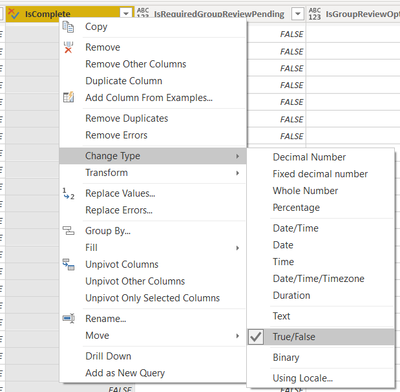
I encountered the exact same scenario. My published reports would look fine if I refreshed data using desktop version and then published online. However, if dataset is refreshed online (manually or scheduled), then the visuals returned with Blank results. Here's my solution that seems to be working. Using desktop version,
- In Power Query, change the column type to True/False (see screenshot below).
- Close and apply.
- In each visual, remove any existing use of the original column and replace it with the revised column.
- Not sure why I had to do this, but I did.
- Save and publish.
- Look at report online and it looks fine now.
- I tested by refreshing dataset again, but using PowerBI online.
- Reports look fine still.
I can't explain why PowerBI is converting the values (doesn't make sense to me!) and I can't explain why my solution is working either, but it is. I'm going back to my other datasets and applying this solution. From now on, I will edit all columns containing True/False to use the True/False column type. Hope this helps!
- Mark as New
- Bookmark
- Subscribe
- Mute
- Subscribe to RSS Feed
- Permalink
- Report Inappropriate Content
Any resolution to this? I'm having this problem and it's breaking my reports daily. There was no issue for about a month and it started all of a sudden.
- Mark as New
- Bookmark
- Subscribe
- Mute
- Subscribe to RSS Feed
- Permalink
- Report Inappropriate Content
Checkout my reply posted today... I think it fixed my issue.


- Mark as New
- Bookmark
- Subscribe
- Mute
- Subscribe to RSS Feed
- Permalink
- Report Inappropriate Content
This issue still persists in service and is not fixed


- Mark as New
- Bookmark
- Subscribe
- Mute
- Subscribe to RSS Feed
- Permalink
- Report Inappropriate Content
Hi @Anonymous ,
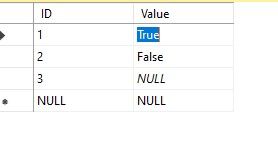
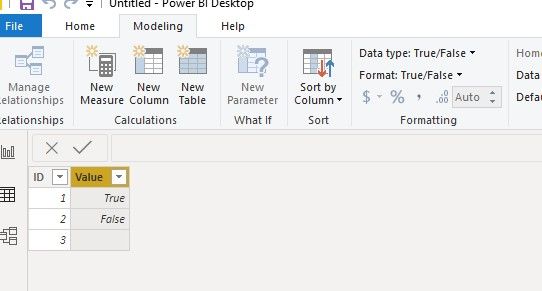
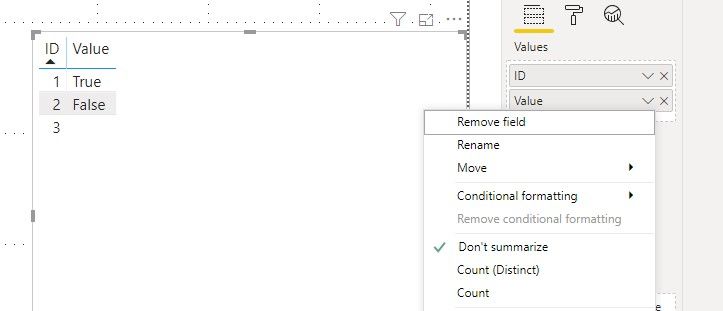
Sorry for that, but we cannot reproduce your issue on my side, What is the kind of connection you are using, import or directquery?
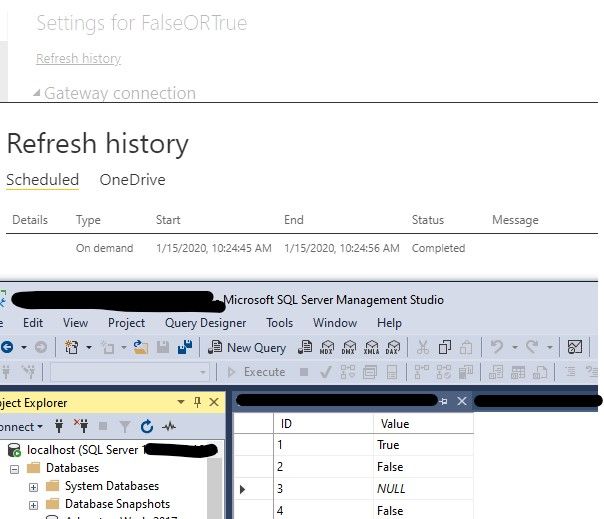
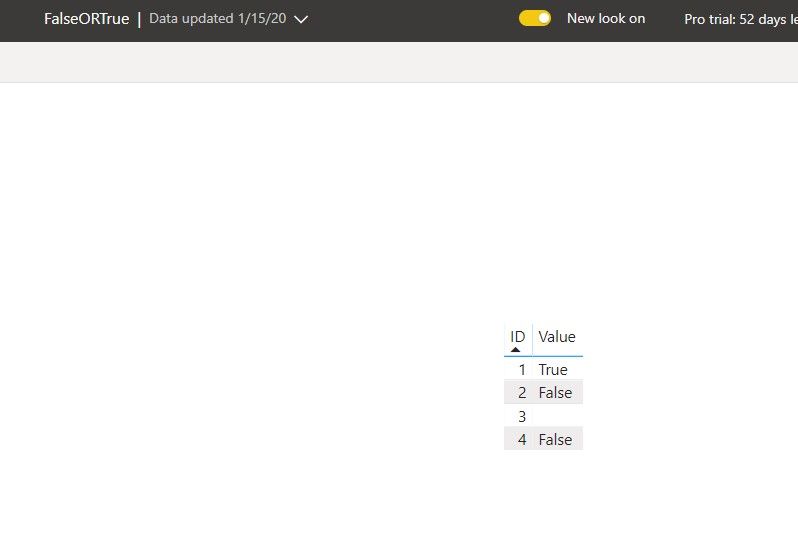
Best regards,
If this post helps, then please consider Accept it as the solution to help the other members find it more quickly.
- Mark as New
- Bookmark
- Subscribe
- Mute
- Subscribe to RSS Feed
- Permalink
- Report Inappropriate Content
Hi, this is Microsofr Project Online data accessed by odata.
URL used is https://XXX.sharepoint.com/sites/ppm/_api/Projectdata
Helpful resources

Power BI Dataviz World Championships
The Power BI Data Visualization World Championships is back! Get ahead of the game and start preparing now!

Power BI Monthly Update - December 2025
Check out the December 2025 Power BI Holiday Recap!

FabCon Atlanta 2026
Join us at FabCon Atlanta, March 16-20, for the ultimate Fabric, Power BI, AI and SQL community-led event. Save $200 with code FABCOMM.

| User | Count |
|---|---|
| 41 | |
| 38 | |
| 36 | |
| 30 | |
| 28 |


| User | Count |
|---|---|
| 128 | |
| 88 | |
| 79 | |
| 67 | |
| 62 |


