cancel
Showing results for 
Search instead for 
Did you mean: 

Learn from the best! Meet the four finalists headed to the FINALS of the Power BI Dataviz World Championships! Register now

Reply
Anonymous
Not applicable

PowerBI Mapshaper

Hello,


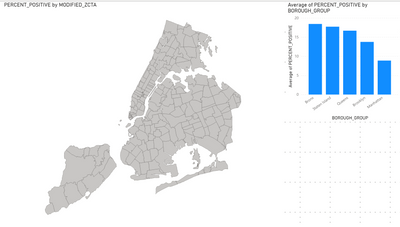
I would like to build a dashboard with COVID-19 data for New York City.  I have converted a zcta from geojson to topogson and it displays on PowerBI.  However, when I add the zip codes to the Location field and "Percentage Positive" to the color saturation field, nothing happens and I see this...

KyleKatherman_0-1595502574941.png

Could someone help me get the color saturation to work?  I am sure that I am missing a critical step, but I do not know what it is.  


The data I am using is located: https://raw.githubusercontent.com/nychealth/coronavirus-data/master/data-by-modzcta.csv


Thanks

2 REPLIES 2
Pragati11
Super User
Super User

Hi @Anonymous ,


What is the data category of your ZIPCODE column?

Are you using the same as below:

Pragati11_0-1595507046390.png


Thanks,

Pragati


Best Regards,

Pragati Jain


MVP logo


LinkedIn | Twitter | Blog YouTube 

Did I answer your question? Mark my post as a solution! This will help others on the forum!

Appreciate your Kudos!!

Proud to be a Super User!!

Anonymous
Not applicable

Hello @Pragati11 ,


I have tried doing this with the data category marked as Postal Code and as Uncategorgized.  It still says the map is "undefined" when I add the data to the color saturation field. 


Thanks,


Helpful resources

Announcements
Join our Fabric User Panel

Join our Fabric User Panel

Share feedback directly with Fabric product managers, participate in targeted research studies and influence the Fabric roadmap.

February Power BI Update Carousel

Power BI Monthly Update - February 2026

Check out the February 2026 Power BI update to learn about new features.

FabCon Atlanta 2026 carousel

FabCon Atlanta 2026

Join us at FabCon Atlanta, March 16-20, for the ultimate Fabric, Power BI, AI and SQL community-led event. Save $200 with code FABCOMM.