Join us at FabCon Atlanta from March 16 - 20, 2026, for the ultimate Fabric, Power BI, AI and SQL community-led event. Save $200 with code FABCOMM.
Register now!Get Fabric Certified for FREE during Fabric Data Days. Don't miss your chance! Request now
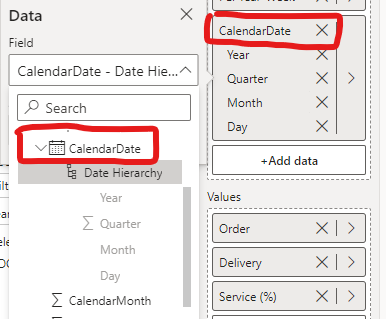
Hi, it used to be fairly simple to switch between showing date vs date hierarchy in a visual, in the July release however I simply cannot figure it out how to do it.
When I select the date it automatically shows the hierarchy and I dont see where to swith it to the actual dates intead.
Can someone explain it please?
Solved! Go to Solution.
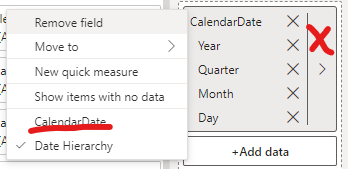
I finally figured it out: instead of clicking on the right arrow, just need to right-click on the CalendarDate and then the familiar menu comes up!
HEllo @BLB ,
try removing the year, quarter, month, day by clicking the X and it will remain the calendarDate.
If I answered your question, please mark my post as solution, Appreciate your Kudos 👍
Proud to be a Super User! | |
I already tried it as thats what I was expecting, but when I x-out the last from the hierarchy then it all disappears, so the date wont just stay there 🙄
Check out the November 2025 Power BI update to learn about new features.
Advance your Data & AI career with 50 days of live learning, contests, hands-on challenges, study groups & certifications and more!