Join us at FabCon Atlanta from March 16 - 20, 2026, for the ultimate Fabric, Power BI, AI and SQL community-led event. Save $200 with code FABCOMM.
Register now!The Power BI Data Visualization World Championships is back! Get ahead of the game and start preparing now! Learn more
Hi all,
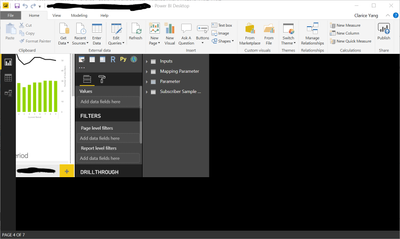
I have been having this window sizing problem from time to time (Shown in image below). Not sure what triggers this but when this happens, the only solution is to restart my computer even though I have tried to close the window and open it again.
If it helps:
I appreciate any help. Thanks!
Solved! Go to Solution.
Hi,
You could try and enable the option that lets Windows try and fix apps so they're not blurry.
First go into display settings and then go into advanced scaling settings and set the option to on.
Hi,
You could try and enable the option that lets Windows try and fix apps so they're not blurry.
First go into display settings and then go into advanced scaling settings and set the option to on.
Thank you! @Gordonlilj The sizing errors never happened ever since I've tried this solution.
The Power BI Data Visualization World Championships is back! Get ahead of the game and start preparing now!
| User | Count |
|---|---|
| 51 | |
| 42 | |
| 34 | |
| 33 | |
| 21 |
| User | Count |
|---|---|
| 143 | |
| 125 | |
| 100 | |
| 80 | |
| 61 |