cancel
Showing results for 
Search instead for 
Did you mean: 

The Power BI Data Visualization World Championships is back! Get ahead of the game and start preparing now! Learn more

Reply
JacktheYeti
Helper I
Helper I

PowerBI Data Types

Hello,


I'm importing data from a mySQL database to run some reports on. There is a column that repsents the coupon type and is identified by a number 1 - 5.


When the data is loaded into PowerBI, it categorizes this column as a Boolean, specifically True, vs. the whole number it actually is. 


When I query the Database outside of PowerBI I can see each of the whol enumbers appropriately (1 -5).

Is there a way I can load this datatype specifically before PowerBI Transforms it automatically for me?

1 ACCEPTED SOLUTION
JacktheYeti
Helper I
Helper I

The column causing trouble was type TINYINT inside the database. I created a new datasource and wrote a SQL statement that used the CAST() function to change the type and load it into PowerBI successfully. 


For reference, it looked like this: 

CAST(coupon.type AS SIGNED) as coupon_Type


View solution in original post

5 REPLIES 5
JacktheYeti
Helper I
Helper I

The column causing trouble was type TINYINT inside the database. I created a new datasource and wrote a SQL statement that used the CAST() function to change the type and load it into PowerBI successfully. 


For reference, it looked like this: 

CAST(coupon.type AS SIGNED) as coupon_Type


v-xicai
Community Support
Community Support

Hi @JacktheYeti ,


Method 1:

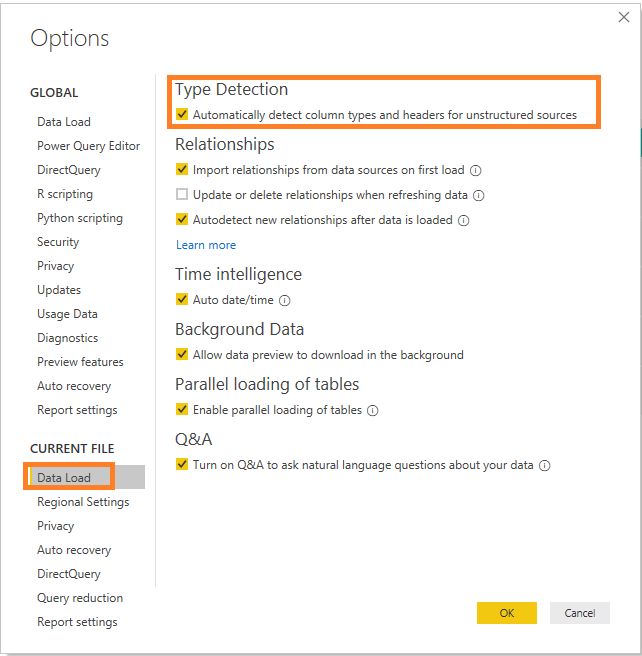
Go to File->Options and settings-> Options, disable the type detection option like picture below (disable the option will affect all fields' type detection, so do this carefully).38.png


Method 2:

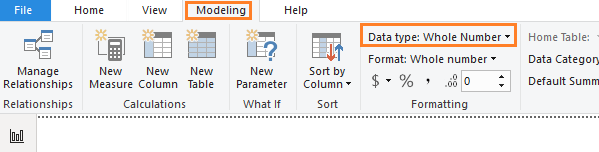
Change the data type in Report view or Data view .39.png


Method 3:

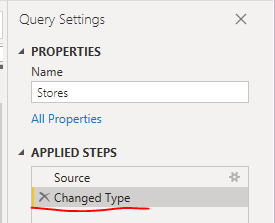
Enter into Query Editor, delete the step named "Changed Type", or change the data type.

40.png


Best Regards,

Amy


If this post helps, then please consider Accept it as the solution to help the other members find it more quickly.

Thanks Amy, I gave this a try but was unsuccessful. The data would load in as TRUE and FALSE or 1 and 0.

HotChilli
Super User
Super User

When you look at the data in Power Query, you should be able to edit or delete the step that wrongly identifies the column as a bool.

It happens upon initial data load, so it seems there is no step to delete or change. I've tried changing it post load but the BOOL becomes a 1 or 0 when I change it to a whole number type.

Helpful resources

Announcements
Power BI DataViz World Championships

Power BI Dataviz World Championships

The Power BI Data Visualization World Championships is back! Get ahead of the game and start preparing now!

December 2025 Power BI Update Carousel

Power BI Monthly Update - December 2025

Check out the December 2025 Power BI Holiday Recap!

FabCon Atlanta 2026 carousel

FabCon Atlanta 2026

Join us at FabCon Atlanta, March 16-20, for the ultimate Fabric, Power BI, AI and SQL community-led event. Save $200 with code FABCOMM.

Top Solution Authors