cancel
Showing results for 
Search instead for 
Did you mean: 

Vote for your favorite vizzies from the Power BI Dataviz World Championship submissions. Vote now!

Reply
Anonymous
Not applicable

Power bi visual fields

Please ,Kindly help me in solving this issue,

sailochana_0-1682675891209.png


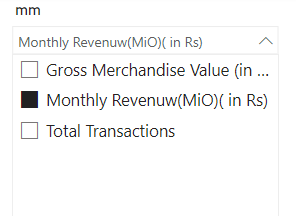
Here ,I created a Parameter slicer (a custom slicer,which is a collection of three columns data)

sailochana_1-1682675891144.png


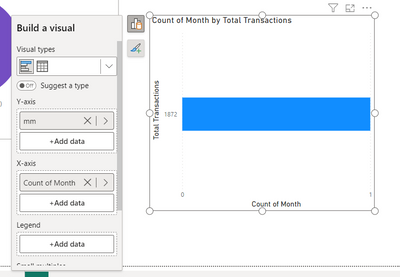
so I want to show the slicer selection value in bar chart, I added this slicer value in Y-axis field and in X-axis field I added Month,instead of showing month values it is considering count value of month ,I tried to edit but I couldnt able to convert count value to normal value. please guide me how to solve it ,by using a measure or any trick .


Thanks.


@Arul  @AmitChandak 


1 ACCEPTED SOLUTION
Ritaf1983
Super User
Super User

Hi @Anonymous 
A bar chart's X AXIS is always a value (aggregation)
A Y chart represents a category.
You can use column / line charts to display values over time.
If this post helps, then please consider Accept it as the solution to help the other members find it more quickly.

Regards,
Rita Fainshtein | Microsoft MVP
https://www.linkedin.com/in/rita-fainshtein/
Blog : https://www.madeiradata.com/profile/ritaf/profile

View solution in original post

1 REPLY 1
Ritaf1983
Super User
Super User

Hi @Anonymous 
A bar chart's X AXIS is always a value (aggregation)
A Y chart represents a category.
You can use column / line charts to display values over time.
If this post helps, then please consider Accept it as the solution to help the other members find it more quickly.

Regards,
Rita Fainshtein | Microsoft MVP
https://www.linkedin.com/in/rita-fainshtein/
Blog : https://www.madeiradata.com/profile/ritaf/profile

Helpful resources

Announcements
Power BI DataViz World Championships

Power BI Dataviz World Championships

Vote for your favorite vizzies from the Power BI World Championship submissions!

Sticker Challenge 2026 Carousel

Join our Community Sticker Challenge 2026

If you love stickers, then you will definitely want to check out our Community Sticker Challenge!

January Power BI Update Carousel

Power BI Monthly Update - January 2026

Check out the January 2026 Power BI update to learn about new features.

FabCon Atlanta 2026 carousel

FabCon Atlanta 2026

Join us at FabCon Atlanta, March 16-20, for the ultimate Fabric, Power BI, AI and SQL community-led event. Save $200 with code FABCOMM.