Join us at FabCon Atlanta from March 16 - 20, 2026, for the ultimate Fabric, Power BI, AI and SQL community-led event. Save $200 with code FABCOMM.
Register now!Vote for your favorite vizzies from the Power BI Dataviz World Championship submissions. Vote now!
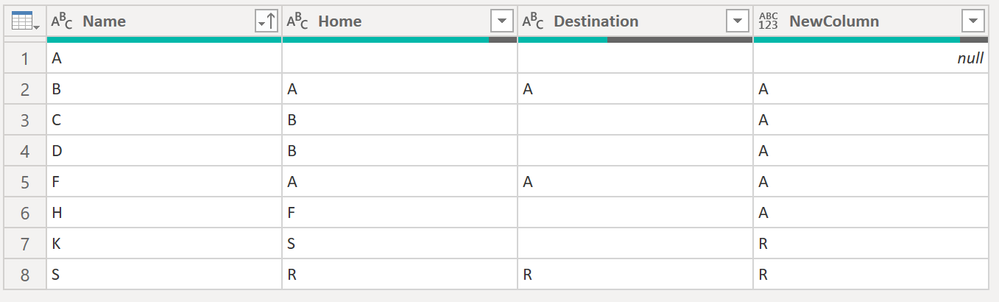
Hello all, please, I need your help with Power Query. I need to create a new column that follows this logic:
Solved! Go to Solution.
Hi @toum ,
Here the code in Power Query M that you can paste into the advanced editor (if you do not know, how to exactly do this, please check out this quick walkthrough)
let
Source = Table.FromRows(Json.Document(Binary.Decompress(Binary.FromText("i45WclTSUQKhWJ1oJScgwxGMQTxnIMsJJuWCzHFDUecBZLnBpIKBjCAwBvG8gaxgsFQsAA==", BinaryEncoding.Base64), Compression.Deflate)), let _t = ((type nullable text) meta [Serialized.Text = true]) in type table [Name = _t, Home = _t, Destination = _t]),
#"Changed Type" = Table.TransformColumnTypes(Source,{{"Name", type text}, {"Home", type text}, {"Destination", type text}}),
#"Merged Queries" = Table.NestedJoin(#"Changed Type", {"Home"}, #"Changed Type", {"Name"}, "Added Custom", JoinKind.LeftOuter),
#"Expanded Added Custom2" = Table.ExpandTableColumn(#"Merged Queries", "Added Custom", {"Destination"}, {"Added Custom.Destination"}),
#"Added Custom" = Table.AddColumn(#"Expanded Added Custom2", "NewColumn", each
if [Destination] = "" then [Added Custom.Destination]
else [Destination]),
#"Replaced Value" = Table.ReplaceValue(#"Added Custom",null, each [Name],Replacer.ReplaceValue,{"NewColumn"}),
#"Removed Columns" = Table.RemoveColumns(#"Replaced Value",{"Added Custom.Destination"}),
#"Sorted Rows" = Table.Sort(#"Removed Columns",{{"Name", Order.Ascending}})
in
#"Sorted Rows"
Do not forget to mark the answer as a solution so others can easily spot the answer!
/Tom
https://www.tackytech.blog/
https://www.instagram.com/tackytechtom/
| Did I answer your question❓➡️ Please, mark my post as a solution ✔️ |
| Also happily accepting Kudos 🙂 |
| Feel free to connect with me on LinkedIn! | |
| #proudtobeasuperuser | |
Hi @toum ,
How about this:
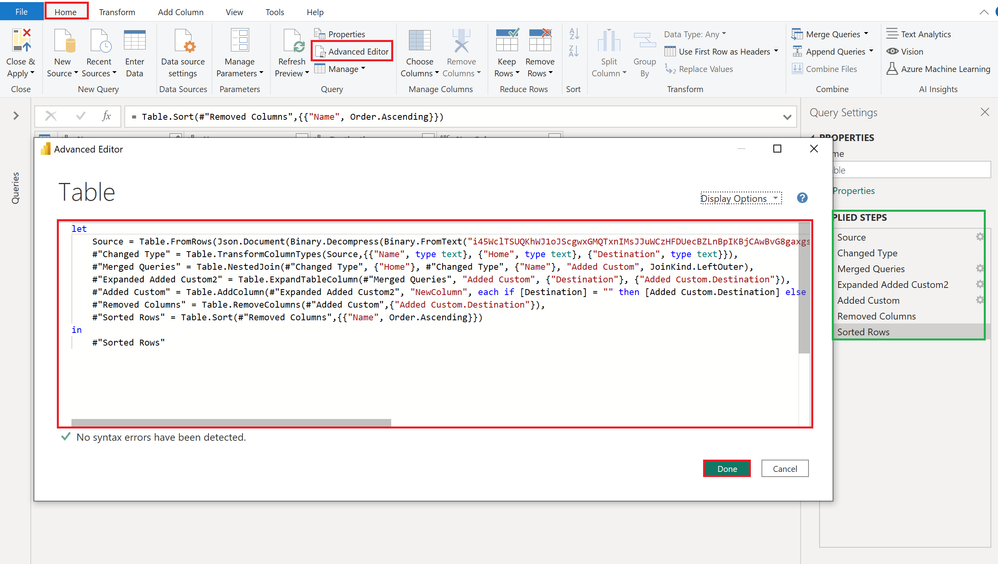
Here the code that you can paste into the advanced editor. Feel free to check out the steps on the right hand side as well 🙂
let
Source = Table.FromRows(Json.Document(Binary.Decompress(Binary.FromText("i45WclTSUQKhWJ1oJScgwxGMQTxnIMsJJuWCzHFDUecBZLnBpIKBjCAwBvG8gaxgsFQsAA==", BinaryEncoding.Base64), Compression.Deflate)), let _t = ((type nullable text) meta [Serialized.Text = true]) in type table [Name = _t, Home = _t, Destination = _t]),
#"Changed Type" = Table.TransformColumnTypes(Source,{{"Name", type text}, {"Home", type text}, {"Destination", type text}}),
#"Merged Queries" = Table.NestedJoin(#"Changed Type", {"Home"}, #"Changed Type", {"Name"}, "Added Custom", JoinKind.LeftOuter),
#"Expanded Added Custom2" = Table.ExpandTableColumn(#"Merged Queries", "Added Custom", {"Destination"}, {"Added Custom.Destination"}),
#"Added Custom" = Table.AddColumn(#"Expanded Added Custom2", "NewColumn", each if [Destination] = "" then [Added Custom.Destination] else [Destination]),
#"Removed Columns" = Table.RemoveColumns(#"Added Custom",{"Added Custom.Destination"}),
#"Sorted Rows" = Table.Sort(#"Removed Columns",{{"Name", Order.Ascending}})
in
#"Sorted Rows"
Hope this helps 🙂
/Tom
https://www.tackytech.blog/
https://www.instagram.com/tackytechtom/
| Did I answer your question❓➡️ Please, mark my post as a solution ✔️ |
| Also happily accepting Kudos 🙂 |
| Feel free to connect with me on LinkedIn! | |
| #proudtobeasuperuser | |
Thank you a lot for your help, that's what I needed but plz another thing for the row1 the NewColumn should be A. (if destination is empty and Name=Home or Home is empty the newColumn should = Name).
Hi @toum ,
Here the code in Power Query M that you can paste into the advanced editor (if you do not know, how to exactly do this, please check out this quick walkthrough)
let
Source = Table.FromRows(Json.Document(Binary.Decompress(Binary.FromText("i45WclTSUQKhWJ1oJScgwxGMQTxnIMsJJuWCzHFDUecBZLnBpIKBjCAwBvG8gaxgsFQsAA==", BinaryEncoding.Base64), Compression.Deflate)), let _t = ((type nullable text) meta [Serialized.Text = true]) in type table [Name = _t, Home = _t, Destination = _t]),
#"Changed Type" = Table.TransformColumnTypes(Source,{{"Name", type text}, {"Home", type text}, {"Destination", type text}}),
#"Merged Queries" = Table.NestedJoin(#"Changed Type", {"Home"}, #"Changed Type", {"Name"}, "Added Custom", JoinKind.LeftOuter),
#"Expanded Added Custom2" = Table.ExpandTableColumn(#"Merged Queries", "Added Custom", {"Destination"}, {"Added Custom.Destination"}),
#"Added Custom" = Table.AddColumn(#"Expanded Added Custom2", "NewColumn", each
if [Destination] = "" then [Added Custom.Destination]
else [Destination]),
#"Replaced Value" = Table.ReplaceValue(#"Added Custom",null, each [Name],Replacer.ReplaceValue,{"NewColumn"}),
#"Removed Columns" = Table.RemoveColumns(#"Replaced Value",{"Added Custom.Destination"}),
#"Sorted Rows" = Table.Sort(#"Removed Columns",{{"Name", Order.Ascending}})
in
#"Sorted Rows"
Do not forget to mark the answer as a solution so others can easily spot the answer!
/Tom
https://www.tackytech.blog/
https://www.instagram.com/tackytechtom/
| Did I answer your question❓➡️ Please, mark my post as a solution ✔️ |
| Also happily accepting Kudos 🙂 |
| Feel free to connect with me on LinkedIn! | |
| #proudtobeasuperuser | |
Vote for your favorite vizzies from the Power BI World Championship submissions!
If you love stickers, then you will definitely want to check out our Community Sticker Challenge!
Check out the January 2026 Power BI update to learn about new features.
| User | Count |
|---|---|
| 65 | |
| 50 | |
| 42 | |
| 25 | |
| 22 |
| User | Count |
|---|---|
| 143 | |
| 117 | |
| 56 | |
| 37 | |
| 31 |