Join us at FabCon Atlanta from March 16 - 20, 2026, for the ultimate Fabric, Power BI, AI and SQL community-led event. Save $200 with code FABCOMM.
Register now!Learn from the best! Meet the four finalists headed to the FINALS of the Power BI Dataviz World Championships! Register now
Hello!
I am running into an issue when I run a power query on transposed data.
I recieve reports in rows:
1 2
Site Name: xyz
Cost: $$
Sq. Ft: ##
etc.
When I upload the source file via folder the data comes back to me stacked. Therefore when I transpose the data in order to make column 1 my row headers all of my information is listed in the same row. I would like to create a new row under the same column header for each report. Is this possible?
Hi @Tylerspears27,
I recieve reports in rows:
1 2
Site Name: xyz
Cost: $$
Sq. Ft: ##
etc.
When I upload the source file via folder the data comes back to me stacked. Therefore when I transpose the data in order to make column 1 my row headers all of my information is listed in the same row. I would like to create a new row under the same column header for each report. Is this possible?
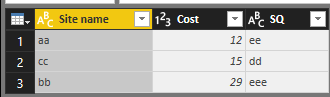
If I understand your scenario correctly that you have several tables with the similar values and you want to get the output below.
You could follow the steps to get the output above.
1. Go to Query Editor, and transpose your columns to get Site name , cost and SQ as Columns. Do this operator for each table.
2. Click Use First Row as Headers
3. Click Append.
In addition, you could refer to my pbix file.
Best Regards,
Cherry
Thank you for your response.
I am curious if there is a way to automate this process. I do not want to upload each file individually then append them together each time a new report is generated. Currently I have it pulling from a folder source and therefore not able to append the tables together from the same sheet. Is there any way around this problem?
Share feedback directly with Fabric product managers, participate in targeted research studies and influence the Fabric roadmap.
Check out the February 2026 Power BI update to learn about new features.
| User | Count |
|---|---|
| 53 | |
| 48 | |
| 38 | |
| 15 | |
| 14 |
| User | Count |
|---|---|
| 93 | |
| 79 | |
| 37 | |
| 27 | |
| 25 |