This time we’re going bigger than ever. Fabric, Power BI, SQL, AI and more. We're covering it all. You won't want to miss it.
Learn moreLevel up your Power BI skills this month - build one visual each week and tell better stories with data! Get started
Hi all,
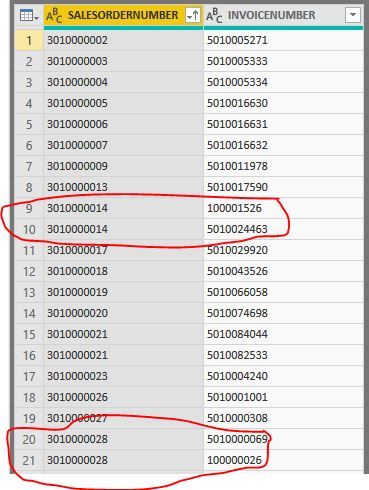
Looking for some help with this one. I have a table with two columns, Sales Order and Invoice. Sometimes, there are multiple Invoices per Sales Order. I'd like to break the INVOICENUMBER field in the photo below out into multiple fields in the Power Query Editor, so that sales order (circled below) 3010000014 and 3010000028 will show two columns for INVOICENUMBER instead of just one (INVOICENUMBER_1, INVOICENUMBER_2, etc). These are two examples where two invoices occurred for one Sales Order, but orders can have up to 15-20 invoices generated against them sometimes. Thanks in advance for your help PBI community!
Solved! Go to Solution.
I would caution against doing this (unless you have a very good reason). Powerbi works very well with columnar data and whatever you are planning will probably be easier with data in the current format. (Just my opinion )
Check out the April 2026 Power BI update to learn about new features.
Sign up to receive a private message when registration opens and key events begin.
If you have recently started exploring Fabric, we'd love to hear how it's going. Your feedback can help with product improvements.
| User | Count |
|---|---|
| 35 | |
| 26 | |
| 25 | |
| 22 | |
| 18 |
| User | Count |
|---|---|
| 65 | |
| 35 | |
| 32 | |
| 25 | |
| 23 |