This time we’re going bigger than ever. Fabric, Power BI, SQL, AI and more. We're covering it all. You won't want to miss it.
Learn moreDid you hear? There's a new SQL AI Developer certification (DP-800). Start preparing now and be one of the first to get certified. Register now
Hi folks,
I'm looking for a way to perform a merge query in Power Query, but only take the first match if it finds multiple. Below are examples of the data I have to work with and what my end goal is. Any thoughts would be appreciated,
Left Table:
| Item Number | Date |
| A123 | 2022-01-01 |
| B234 | 2022-01-02 |
| C345 | 2022-01-02 |
Right Table:
| Item Number | Date | ID |
| A123 | 2022-01-01 | ZZZ |
| C345 | 2022-01-02 | XXX |
| C345 | 2022-01-02 | YYY |
Result I'm getting with Left-Outer Merge
| Item Number | Date | ID |
| A123 | 2022-01-01 | ZZZ |
| B234 | 2022-01-02 | |
| C345 | 2022-01-02 | XXX |
| C345 | 2022-01-02 | YYY |
My goal result:
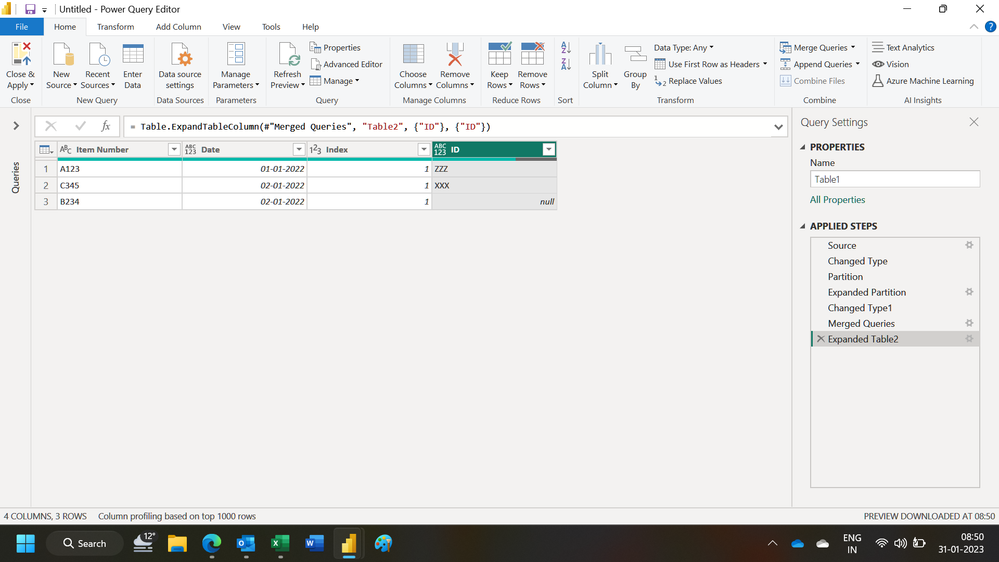
| Item Number | Date | ID |
| A123 | 2022-01-01 | ZZZ |
| B234 | 2022-01-02 | |
| C345 | 2022-01-02 | XXX |
Solved! Go to Solution.
Hi @kevinsa ,
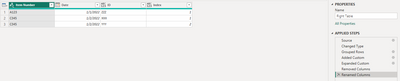
I suggest you to add an [Index] column to sort your ID by [Item Number] and [Date] group in Right Table.
For reference:
Create Row Number for Each Group in Power BI using Power Query
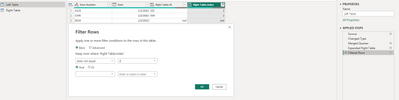
After you merge two table by left out, you can expand [ID] and [Index] in Right Table. Add a filter on new table to only keep the index value = null or 1.
Best Regards,
Rico Zhou
If this post helps, then please consider Accept it as the solution to help the other members find it more quickly.
Hi,
You may download my PBI file from here.
Hope this helps.
Hi @Ashish_Mathur I'd love to download your method for this, but the download link isnt working for me.
Hi,
I do not have that file now. Share some data to work with and show the expected result. Share data in a format that can be pasted in an MS Excel file.
Hi @kevinsa ,
I suggest you to add an [Index] column to sort your ID by [Item Number] and [Date] group in Right Table.
For reference:
Create Row Number for Each Group in Power BI using Power Query
After you merge two table by left out, you can expand [ID] and [Index] in Right Table. Add a filter on new table to only keep the index value = null or 1.
Best Regards,
Rico Zhou
If this post helps, then please consider Accept it as the solution to help the other members find it more quickly.
Select the Item Number column and remove duplicates after merging them using full outer join.
Check out the April 2026 Power BI update to learn about new features.
Sign up to receive a private message when registration opens and key events begin.
If you have recently started exploring Fabric, we'd love to hear how it's going. Your feedback can help with product improvements.
| User | Count |
|---|---|
| 34 | |
| 31 | |
| 30 | |
| 21 | |
| 16 |
| User | Count |
|---|---|
| 61 | |
| 50 | |
| 30 | |
| 23 | |
| 23 |