FabCon is coming to Atlanta
Join us at FabCon Atlanta from March 16 - 20, 2026, for the ultimate Fabric, Power BI, AI and SQL community-led event. Save $200 with code FABCOMM.
Register now!- Power BI forums
- Get Help with Power BI
- Desktop
- Service
- Report Server
- Power Query
- Mobile Apps
- Developer
- DAX Commands and Tips
- Custom Visuals Development Discussion
- Health and Life Sciences
- Power BI Spanish forums
- Translated Spanish Desktop
- Training and Consulting
- Instructor Led Training
- Dashboard in a Day for Women, by Women
- Galleries
- Data Stories Gallery
- Themes Gallery
- Contests Gallery
- QuickViz Gallery
- Quick Measures Gallery
- Visual Calculations Gallery
- Notebook Gallery
- Translytical Task Flow Gallery
- TMDL Gallery
- R Script Showcase
- Webinars and Video Gallery
- Ideas
- Custom Visuals Ideas (read-only)
- Issues
- Issues
- Events
- Upcoming Events
Get Fabric Certified for FREE during Fabric Data Days. Don't miss your chance! Request now
- Power BI forums
- Forums
- Get Help with Power BI
- Desktop
- Re: Power Query M Language - Adding 5 years to end...
- Subscribe to RSS Feed
- Mark Topic as New
- Mark Topic as Read
- Float this Topic for Current User
- Bookmark
- Subscribe
- Printer Friendly Page


- Mark as New
- Bookmark
- Subscribe
- Mute
- Subscribe to RSS Feed
- Permalink
- Report Inappropriate Content
Power Query M Language - Adding 5 years to end of the current year
Hello,
I would like to add 5 more years to this M Language function.
= Date.EndOfYear(DateTime.Date(DateTime.FixedLocalNow()))
This one returns only the end of the current year.
How can I do this?
Solved! Go to Solution.
- Mark as New
- Bookmark
- Subscribe
- Mute
- Subscribe to RSS Feed
- Permalink
- Report Inappropriate Content
Hello,
Thank you for trying to help me.
After playing around for a long time I finaly found it.
I basically did the following:
= Date.AddYears(Date.EndOfYear(DateTime.Date(DateTime.FixedLocalNow())), 5)
This extended the end date by 5 years.


- Mark as New
- Bookmark
- Subscribe
- Mute
- Subscribe to RSS Feed
- Permalink
- Report Inappropriate Content
Hi @Niels_T ,
You can use the AddYears function.. See below the M Query for the same
#"Added Custom" = Table.AddColumn(#"previous_step", "5_Years_later", each Date.AddYears([Finishtime], 5))
PFB sample screenshot

- Mark as New
- Bookmark
- Subscribe
- Mute
- Subscribe to RSS Feed
- Permalink
- Report Inappropriate Content
I'm sorry. I wasn't very clear.
I just want to have the original dates but the column needs to be longer by adding 5 more extra years instead of stopping at the current year.
- Mark as New
- Bookmark
- Subscribe
- Mute
- Subscribe to RSS Feed
- Permalink
- Report Inappropriate Content
Hi,
Can you share a sample of how you want your output to look like
- Mark as New
- Bookmark
- Subscribe
- Mute
- Subscribe to RSS Feed
- Permalink
- Report Inappropriate Content
I would like to have the data as followed:
| Date | Date (5 years extended) |
| 01/01/2021 | 01/01/2021 |
| 02/01/2021 | 02/01/2021 |
| 03/01/2021 | 03/01/2021 |
| ... | ... |
| 01/01/2025 | |
| 01/01/2025 |
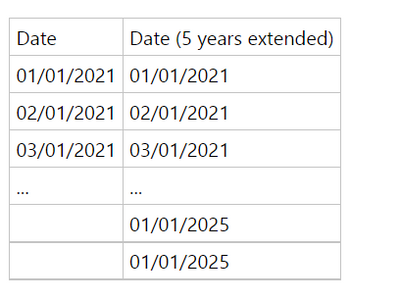
As you can see dates need to be exactly the same. Just the column needs to be extended by 5 years more.

- Mark as New
- Bookmark
- Subscribe
- Mute
- Subscribe to RSS Feed
- Permalink
- Report Inappropriate Content
Hi @Niels_T ,
Please try the following formula:
let
    Source = Duration.TotalDays( Date.AddYears( Date.EndOfYear( DateTime.Date( DateTime.FixedLocalNow() ) ), 5 ) - DateTime.Date( DateTime.FixedLocalNow() ) ),
    #"List Dates" = List.Dates( #date(2021,1,1), Source, #duration(1,0,0,0) ),
    #"Converted to Table" = Table.FromList(#"List Dates", Splitter.SplitByNothing(), null, null, ExtraValues.Error)
in
    #"Converted to Table"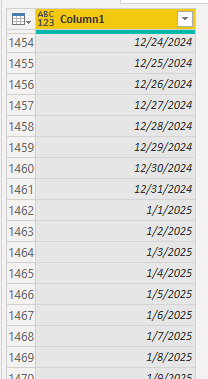
If the problem is still not resolved, please provide detailed error information or the expected result you expect. Let me know immediately, looking forward to your reply.
Best Regards,
Winniz
If this post helps, then please consider Accept it as the solution to help the other members find it more quickly.
- Mark as New
- Bookmark
- Subscribe
- Mute
- Subscribe to RSS Feed
- Permalink
- Report Inappropriate Content
Hello,
Thank you for trying to help me.
After playing around for a long time I finaly found it.
I basically did the following:
= Date.AddYears(Date.EndOfYear(DateTime.Date(DateTime.FixedLocalNow())), 5)
This extended the end date by 5 years.

- Mark as New
- Bookmark
- Subscribe
- Mute
- Subscribe to RSS Feed
- Permalink
- Report Inappropriate Content
Thak you for great expression - my dax formula wasn't working!

- Mark as New
- Bookmark
- Subscribe
- Mute
- Subscribe to RSS Feed
- Permalink
- Report Inappropriate Content
Hi Niels. This worked perfectly for me, I really appreciate it!!! Thank you!

Helpful resources

Power BI Monthly Update - November 2025
Check out the November 2025 Power BI update to learn about new features.

Fabric Data Days
Advance your Data & AI career with 50 days of live learning, contests, hands-on challenges, study groups & certifications and more!

FabCon Atlanta 2026
Join us at FabCon Atlanta, March 16-20, for the ultimate Fabric, Power BI, AI and SQL community-led event. Save $200 with code FABCOMM.


