cancel
Showing results for 
Search instead for 
Did you mean: 

Vote for your favorite vizzies from the Power BI Dataviz World Championship submissions. Vote now!

Reply
ovetteabejuela
Impactful Individual

Power Query | How to Mark Consecutive Days

Hi There,


With a date column, how do I create a new column that tells that this current row(Date) is the day after the previous row.


Like if it were in Excel.. if(A2=(A1+1),"Consecutive","Hop"). I know there's DAX solution but I wanted to know if there is an M solution.


@ImkeF , @MarcelBeug , @Anyone

2 ACCEPTED SOLUTIONS
Ashish_Mathur
Super User
Super User

Hi,

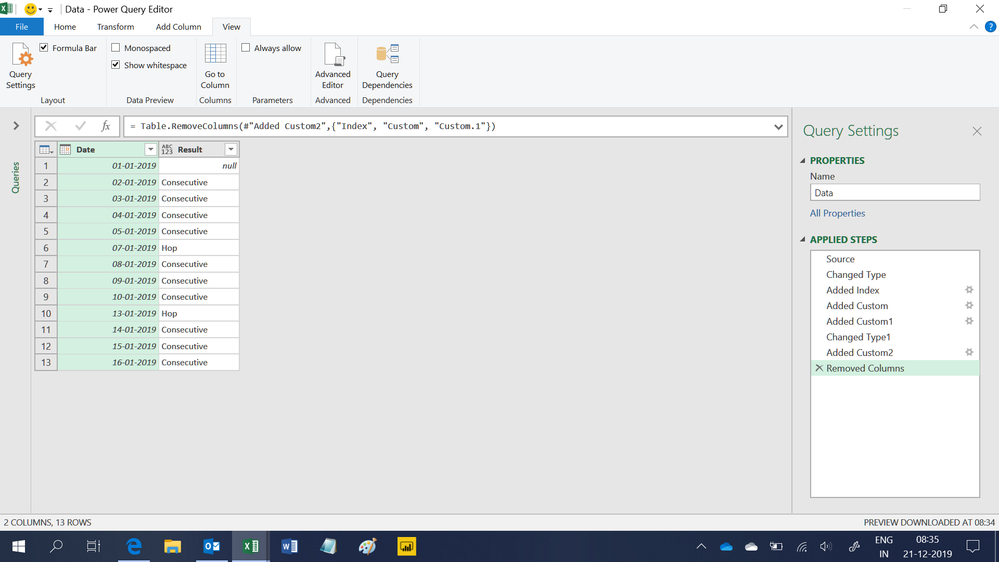
This M code works

let
    Source = Excel.CurrentWorkbook(){[Name="Data"]}[Content],
    #"Changed Type" = Table.TransformColumnTypes(Source,{{"Date", type date}}),
    #"Added Index" = Table.AddIndexColumn(#"Changed Type", "Index", 1, 1),
    #"Added Custom" = Table.AddColumn(#"Added Index", "Custom", each #"Added Index"{[Index]-2}[Date]),
    #"Added Custom1" = Table.AddColumn(#"Added Custom", "Custom.1", each try [Date]-[Custom] otherwise null),
    #"Changed Type1" = Table.TransformColumnTypes(#"Added Custom1",{{"Custom.1", Int64.Type}}),
    #"Added Custom2" = Table.AddColumn(#"Changed Type1", "Result", each if [Custom.1] = null then null else if [Custom.1] = 1 then "Consecutive" else "Hop"),
    #"Removed Columns" = Table.RemoveColumns(#"Added Custom2",{"Index", "Custom", "Custom.1"})
in
    #"Removed Columns"


Untitled.png


Regards,
Ashish Mathur
http://www.ashishmathur.com
https://www.linkedin.com/in/excelenthusiasts/

View solution in original post

dax
Community Support
Community Support

Hi overteabejuela,

You also could refer to below M code to see whether it work or not

let
    Source = Table.FromRows(Json.Document(Binary.Decompress(Binary.FromText("i45WMjIwtNQ31DdSitWBc4yROabIHHNkjgUyxxKZY4hinCGKeUYGCJ4RsulG+mbIHKDpsQA=", BinaryEncoding.Base64), Compression.Deflate)), let _t = ((type text) meta [Serialized.Text = true]) in type table [Date = _t]),
    #"Changed Type" = Table.TransformColumnTypes(Source,{{"Date", type date}}),
    #"Added Index" = Table.AddIndexColumn(#"Changed Type", "Index", 0, 1),
    #"Added Custom" = Table.AddColumn(#"Added Index", "Custom", each Date.AddDays([Date],-[Index])),
    #"Grouped Rows" = Table.Group(#"Added Custom", {"Custom"}, {{"ALL", each _, type table [Date=date, Index=number, Custom=date]}}),
    #"Added Custom1" = Table.AddColumn(#"Grouped Rows", "Custom.1", each Table.AddIndexColumn([ALL], "a", 1,1)),
    #"Removed Columns" = Table.RemoveColumns(#"Added Custom1",{"ALL"}),
    #"Expanded Custom.1" = Table.ExpandTableColumn(#"Removed Columns", "Custom.1", {"Date", "a"}, {"Date", "a"}),
    #"Added Custom2" = Table.AddColumn(#"Expanded Custom.1", "Custom.1", each if [a]<>1 then "Consecutive" else "Hop"),
    #"Removed Columns1" = Table.RemoveColumns(#"Added Custom2",{"Custom", "a"})
in
    #"Removed Columns1"
 

Best Regards,
Zoe Zhi

If this post helps, then please consider Accept it as the solution to help the other members find it more quickly.


View solution in original post

2 REPLIES 2
dax
Community Support
Community Support

Hi overteabejuela,

You also could refer to below M code to see whether it work or not

let
    Source = Table.FromRows(Json.Document(Binary.Decompress(Binary.FromText("i45WMjIwtNQ31DdSitWBc4yROabIHHNkjgUyxxKZY4hinCGKeUYGCJ4RsulG+mbIHKDpsQA=", BinaryEncoding.Base64), Compression.Deflate)), let _t = ((type text) meta [Serialized.Text = true]) in type table [Date = _t]),
    #"Changed Type" = Table.TransformColumnTypes(Source,{{"Date", type date}}),
    #"Added Index" = Table.AddIndexColumn(#"Changed Type", "Index", 0, 1),
    #"Added Custom" = Table.AddColumn(#"Added Index", "Custom", each Date.AddDays([Date],-[Index])),
    #"Grouped Rows" = Table.Group(#"Added Custom", {"Custom"}, {{"ALL", each _, type table [Date=date, Index=number, Custom=date]}}),
    #"Added Custom1" = Table.AddColumn(#"Grouped Rows", "Custom.1", each Table.AddIndexColumn([ALL], "a", 1,1)),
    #"Removed Columns" = Table.RemoveColumns(#"Added Custom1",{"ALL"}),
    #"Expanded Custom.1" = Table.ExpandTableColumn(#"Removed Columns", "Custom.1", {"Date", "a"}, {"Date", "a"}),
    #"Added Custom2" = Table.AddColumn(#"Expanded Custom.1", "Custom.1", each if [a]<>1 then "Consecutive" else "Hop"),
    #"Removed Columns1" = Table.RemoveColumns(#"Added Custom2",{"Custom", "a"})
in
    #"Removed Columns1"
 

Best Regards,
Zoe Zhi

If this post helps, then please consider Accept it as the solution to help the other members find it more quickly.


Ashish_Mathur
Super User
Super User

Hi,

This M code works

let
    Source = Excel.CurrentWorkbook(){[Name="Data"]}[Content],
    #"Changed Type" = Table.TransformColumnTypes(Source,{{"Date", type date}}),
    #"Added Index" = Table.AddIndexColumn(#"Changed Type", "Index", 1, 1),
    #"Added Custom" = Table.AddColumn(#"Added Index", "Custom", each #"Added Index"{[Index]-2}[Date]),
    #"Added Custom1" = Table.AddColumn(#"Added Custom", "Custom.1", each try [Date]-[Custom] otherwise null),
    #"Changed Type1" = Table.TransformColumnTypes(#"Added Custom1",{{"Custom.1", Int64.Type}}),
    #"Added Custom2" = Table.AddColumn(#"Changed Type1", "Result", each if [Custom.1] = null then null else if [Custom.1] = 1 then "Consecutive" else "Hop"),
    #"Removed Columns" = Table.RemoveColumns(#"Added Custom2",{"Index", "Custom", "Custom.1"})
in
    #"Removed Columns"


Untitled.png


Regards,
Ashish Mathur
http://www.ashishmathur.com
https://www.linkedin.com/in/excelenthusiasts/

Helpful resources

Announcements
Power BI DataViz World Championships

Power BI Dataviz World Championships

Vote for your favorite vizzies from the Power BI World Championship submissions!

Sticker Challenge 2026 Carousel

Join our Community Sticker Challenge 2026

If you love stickers, then you will definitely want to check out our Community Sticker Challenge!

January Power BI Update Carousel

Power BI Monthly Update - January 2026

Check out the January 2026 Power BI update to learn about new features.

FabCon Atlanta 2026 carousel

FabCon Atlanta 2026

Join us at FabCon Atlanta, March 16-20, for the ultimate Fabric, Power BI, AI and SQL community-led event. Save $200 with code FABCOMM.