This time we’re going bigger than ever. Fabric, Power BI, SQL, AI and more. We're covering it all. You won't want to miss it.
Learn moreLevel up your Power BI skills this month - build one visual each week and tell better stories with data! Get started
Hello,
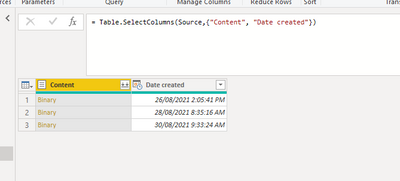
I am using Power Query Folder option as the data source which will have multiple excel files. All the excel files will be in same format with same header. I need to append all these records with a extra column "Creation Date" and add to the records.
I am almost there but not sure how to merge date created column above with each file.
Thanks,
Karthik
Solved! Go to Solution.
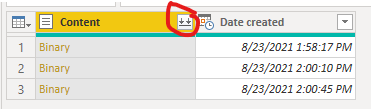
You can click on the double arrows on the Content column and use the Combine & Transform feature. Or you can add a column with Excel.Workbook([Content]) to get a Table with the Excel contents, and then update that expression to drill in further. For example, Excel.Workbook([Content]){0}[Data].
Pat
To learn more about Power BI, follow me on Twitter or subscribe on YouTube.
Hi @Anonymous,
Click combine files:
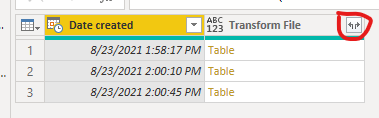
Expand the table:
If you still have some question, please don't hesitate to let me known.
Best Regards,
Link
Is that the answer you're looking for? If this post helps, then please consider Accept it as the solution. Really appreciate!
Hello @v-xulin-mstf / @mahoneypat ,
Both the solution works and thanks for the information.
For anyone who is referring in future can click below link for more information.
Thanks,
Karthik
Hi @Anonymous,
Click combine files:
Expand the table:
If you still have some question, please don't hesitate to let me known.
Best Regards,
Link
Is that the answer you're looking for? If this post helps, then please consider Accept it as the solution. Really appreciate!
You can click on the double arrows on the Content column and use the Combine & Transform feature. Or you can add a column with Excel.Workbook([Content]) to get a Table with the Excel contents, and then update that expression to drill in further. For example, Excel.Workbook([Content]){0}[Data].
Pat
To learn more about Power BI, follow me on Twitter or subscribe on YouTube.
Check out the April 2026 Power BI update to learn about new features.
Sign up to receive a private message when registration opens and key events begin.
If you have recently started exploring Fabric, we'd love to hear how it's going. Your feedback can help with product improvements.
| User | Count |
|---|---|
| 35 | |
| 31 | |
| 26 | |
| 21 | |
| 18 |
| User | Count |
|---|---|
| 68 | |
| 37 | |
| 32 | |
| 25 | |
| 23 |