Get Fabric or SQL Certified for Free.
Get certified for free when you join Fabric Data Days 2026 and dive into Fabric, Power BI, SQL, AI, and other essential data skills.
Join now- Power BI forums
- Get Help with Power BI
- Desktop
- Service
- Report Server
- Power Query
- Mobile Apps
- Developer
- DAX Commands and Tips
- Custom Visuals Development Discussion
- Health and Life Sciences
- Power BI Spanish forums
- Translated Spanish Desktop
- Training and Consulting
- Instructor Led Training
- Dashboard in a Day for Women, by Women
- Galleries
- Data Stories Gallery
- Themes Gallery
- Contests Gallery
- QuickViz Gallery
- Quick Measures Gallery
- Visual Calculations Gallery
- Fabric Apps Gallery
- Notebook Gallery
- Translytical Task Flow Gallery
- TMDL Gallery
- R Script Showcase
- Webinars and Video Gallery
- Ideas
- Custom Visuals Ideas (read-only)
- Issues
- Issues
- Events
- Upcoming Events
July 28 - August 9 | Final Round of the Power BI Dataviz World Championships. This is your chance. Learn more
- Power BI forums
- Forums
- Get Help with Power BI
- Desktop
- Re: Power Query - Error while rounding off time
- Subscribe to RSS Feed
- Mark Topic as New
- Mark Topic as Read
- Float this Topic for Current User
- Bookmark
- Subscribe
- Printer Friendly Page


- Mark as New
- Bookmark
- Subscribe
- Mute
- Subscribe to RSS Feed
- Permalink
- Report Inappropriate Content
Power Query - Error while rounding off time
Hi Team,
I wanted to round off my time column into the nearest hour in Power Query and it worked for most of the data, but about 20% of the data has errors now and I am not able to understand why.
Here's a snapshot and this is the code I used : Time.From(Number.Round(Number.From([IST Time])*24)/24)
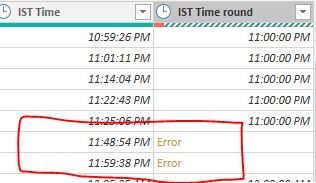
Can anyone help me understand how to fix this? Or suggest a better code to use.
Solved! Go to Solution.
- Mark as New
- Bookmark
- Subscribe
- Mute
- Subscribe to RSS Feed
- Permalink
- Report Inappropriate Content
Well you can use the DAX to create a caluclated column on your original table or recreate the table as a visual and add a column for the measure. Should make it fairly easy to determine if there were any errors.

- Mark as New
- Bookmark
- Subscribe
- Mute
- Subscribe to RSS Feed
- Permalink
- Report Inappropriate Content
Hey @galbatrox9
You don't have to use DAX for this. I would just duplicate the column, retitle it, and then in query editor change the format to HH under the Transform tab. See this article for more information: https://docs.microsoft.com/en-us/dax/custom-date-and-time-formats-for-the-format-function
If this helps please kudo.
If this answers your question please accept it as a solution.
- Mark as New
- Bookmark
- Subscribe
- Mute
- Subscribe to RSS Feed
- Permalink
- Report Inappropriate Content
Hi @Anonymous ,
Thats neat, but what if i wanted to round to the nearest hour? In your way, 10:45 PM would be converted to 10 PM, but i want it to come to 11 PM.
- Mark as New
- Bookmark
- Subscribe
- Mute
- Subscribe to RSS Feed
- Permalink
- Report Inappropriate Content
My bad. I forgot formatting doesn't round. In that case you were on the right track. The answer you're looking for is in this post: https://community.powerbi.com/t5/Desktop/How-to-round-minutes-in-time-to-the-nearest-hour/td-p/47643...
- Mark as New
- Bookmark
- Subscribe
- Mute
- Subscribe to RSS Feed
- Permalink
- Report Inappropriate Content
Haha the code I used was exactly from that link! But its giving me errors on some lines.
- Mark as New
- Bookmark
- Subscribe
- Mute
- Subscribe to RSS Feed
- Permalink
- Report Inappropriate Content
Haha I see that now. Have you tried the DAX solution instead of the M option?
If it has to be M try this thread: https://community.powerbi.com/t5/Desktop/Round-Down-to-Nearest-30-Minute-Interval-Query-Editor/td-p/...
- Mark as New
- Bookmark
- Subscribe
- Mute
- Subscribe to RSS Feed
- Permalink
- Report Inappropriate Content
I just tried the Dax solution. Do you know a way to check if there are errors in that? From the filter dropdown, i cant see any errors. @Anonymous
- Mark as New
- Bookmark
- Subscribe
- Mute
- Subscribe to RSS Feed
- Permalink
- Report Inappropriate Content
Well you can use the DAX to create a caluclated column on your original table or recreate the table as a visual and add a column for the measure. Should make it fairly easy to determine if there were any errors.
- Mark as New
- Bookmark
- Subscribe
- Mute
- Subscribe to RSS Feed
- Permalink
- Report Inappropriate Content
Only concern with this is I believe it makes it based on a 24 hour clock and I'm not sure how to convert it to 12 hour if that is what you need.
Helpful resources

FabCon & SQLCon – Barcelona 2026
Join us in Barcelona for FabCon and SQLCon, the Fabric, Power BI, SQL, and AI community event. Save €200 with code FABCMTY200.

Fabric Community Sticker Challenge - Barcelona 2026
If you love stickers, then you will definitely want to check out our community sticker challenge, Barcelona edition!

Power BI Monthly Update - July 2026
Check out the July 2026 Power BI update to learn about new features.

Power BI DataViz World Championships - June 2026
A new Power BI DataViz World Championship is coming this June! Don't miss out on submitting your entry.

| User | Count |
|---|---|
| 30 | |
| 28 | |
| 22 | |
| 21 | |
| 19 |


| User | Count |
|---|---|
| 44 | |
| 32 | |
| 18 | |
| 17 | |
| 17 |


