We've captured the moments from FabCon & SQLCon that everyone is talking about, and we are bringing them to the community, live and on-demand. Starts on April 14th. Register now
Hello BI Community,
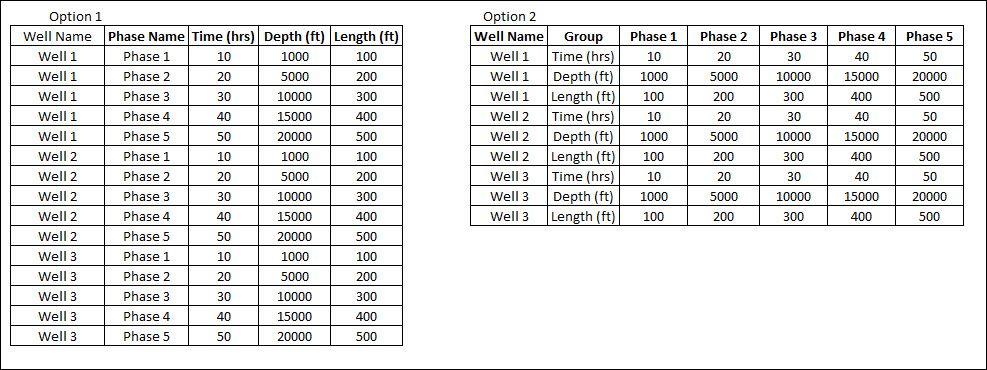
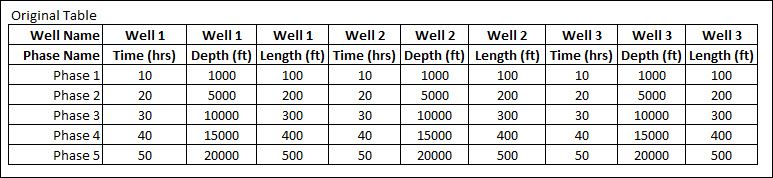
I am working with a data source that is excel based and I am very limited in the changes I can make with the structure. See below photos as a reference, photo 1 shows the scrubbed date version of the original table I am working with and photo 2 shows examples of the transformation I am trying to achieve. In reality, the original table contains hundreds of columns and contains both numerical/alphanumerical values in the cells and so I just want to tackle one problem at a time.
This table contains multiple headers and so I am trying to clean up the table so that it can look like either option #1 or option #2. I have been able to replicate option #1 however then I am faced with needing to duplicate the query and repeat the steps for the hundreds of columns. Has anyone successfully trasnformed a sheet similiar to the one shown below and if so, is there a particular technique you used to perform this over many columns?
Another option I was thinking is to create a unique column / query that displaying the well names and then integrate into the M-code an iterating step down through this column. Does anyone have any example M-code of interating steps to repeat a series of transformations & merges? If so, can I have a copy of that code?
Thanks in advance!
Hi @Joerobert,
Could you please mark the proper answers as solutions?
Best Regards,
Dale
For Option1: First you have to unpivot on the first column, adressing the first 2 rows as headers and then pivot back just with the values from the 2nd row.
Therefore you have to use my special function here: https://www.thebiccountant.com/2017/06/19/unpivot-by-number-of-columns-and-rows-in-powerbi-and-power...
Use it like this:
let
Source = fnUnpivotByNumbers(Table1, 1, 2),
#"Pivoted Column" = Table.Pivot(Source, List.Distinct(Source[Attrib.2]), "Attrib.2", "Value")
in
#"Pivoted Column"
Imke Feldmann (The BIccountant)
If you liked my solution, please give it a thumbs up. And if I did answer your question, please mark this post as a solution. Thanks!
How to integrate M-code into your solution -- How to get your questions answered quickly -- How to provide sample data -- Check out more PBI- learning resources here -- Performance Tipps for M-queries
If you have recently started exploring Fabric, we'd love to hear how it's going. Your feedback can help with product improvements.
A new Power BI DataViz World Championship is coming this June! Don't miss out on submitting your entry.
Share feedback directly with Fabric product managers, participate in targeted research studies and influence the Fabric roadmap.
| User | Count |
|---|---|
| 57 | |
| 38 | |
| 33 | |
| 19 | |
| 16 |
| User | Count |
|---|---|
| 68 | |
| 66 | |
| 41 | |
| 34 | |
| 25 |