Get certified for free when you join Fabric Data Days 2026 and dive into Fabric, Power BI, SQL, AI, and other essential data skills.
Join nowJuly 28 - August 9 | Final Round of the Power BI Dataviz World Championships. This is your chance. Learn more
Hi,
I am stuck and unable to implement hyperlinks that will link to different Power BI reports and web pages.
It says here: https://appsource.microsoft.com/en-us/product/power-bi-visuals/wa104381299 you are able to do so.
Does anyone have a step by step guide on how to do this?
Thanks,
Carmen
Solved! Go to Solution.
Hi @Anonymous ,
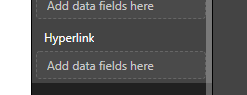
There is a hyperlink field in this visual, you can drag the hyperlink column to this field:
The data should use the Web URL data type, please refer to this document: https://docs.microsoft.com/en-us/power-bi/power-bi-hyperlinks-in-tables
Best Regards,
Teige
How did you get it work. I've added the column with the type of URL but there is no clickable value or column.
Hi @Anonymous ,
There is a hyperlink field in this visual, you can drag the hyperlink column to this field:
The data should use the Web URL data type, please refer to this document: https://docs.microsoft.com/en-us/power-bi/power-bi-hyperlinks-in-tables
Best Regards,
Teige
Hi,
Thanks for your help. I've got it working now.
Join us in Barcelona for FabCon and SQLCon, the Fabric, Power BI, SQL, and AI community event. Save €200 with code FABCMTY200.
If you love stickers, then you will definitely want to check out our community sticker challenge, Barcelona edition!
Check out the July 2026 Power BI update to learn about new features.
| User | Count |
|---|---|
| 30 | |
| 28 | |
| 23 | |
| 21 | |
| 19 |
| User | Count |
|---|---|
| 44 | |
| 31 | |
| 18 | |
| 18 | |
| 16 |