cancel
Showing results for 
Search instead for 
Did you mean: 

Learn from the best! Meet the four finalists headed to the FINALS of the Power BI Dataviz World Championships! Register now

Reply
akash_Varma
Frequent Visitor

Power Bi Visuals

Hi there, 


I am trying to create a Cumulative graph, I managed to pull up data and calculate values, 
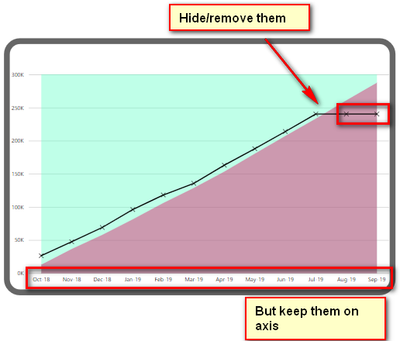
I am now struggling with removing values which are yet to be calculated for eg. Aug 19 and Sep 19.

I want to remove the line from the graph but would like to keep them on the axisforum 2.png


Forum.png


Thank you, 🙂

3 REPLIES 3
v-chuncz-msft
Community Support
Community Support

@akash_Varma 


Let the measure return BLANK () and take advantage of Show items with no data.

Community Support Team _ Sam Zha
If this post helps, then please consider Accept it as the solution to help the other members find it more quickly.

HI @v-chuncz-msft 

I have already tried that it didn't work 

Hi,

Assuming the blank line represents measure1, try this measure

=IF(ISBLNK([Measure1]),BLANK(),[Measure1])

Hope this helps.


Regards,
Ashish Mathur
http://www.ashishmathur.com
https://www.linkedin.com/in/excelenthusiasts/

Helpful resources

Announcements
New to Fabric survey Carousel

New to Fabric Survey

If you have recently started exploring Fabric, we'd love to hear how it's going. Your feedback can help with product improvements.

Power BI DataViz World Championships carousel

Power BI DataViz World Championships - June 2026

A new Power BI DataViz World Championship is coming this June! Don't miss out on submitting your entry.

Join our Fabric User Panel

Join our Fabric User Panel

Share feedback directly with Fabric product managers, participate in targeted research studies and influence the Fabric roadmap.

March Power BI Update Carousel

Power BI Community Update - March 2026

Check out the March 2026 Power BI update to learn about new features.