cancel
Showing results for 
Search instead for 
Did you mean: 

The Power BI Data Visualization World Championships is back! Get ahead of the game and start preparing now! Learn more

Reply
Zakon8
New Member

Power Bi - Outlook meeting report issue

Hi Guys,


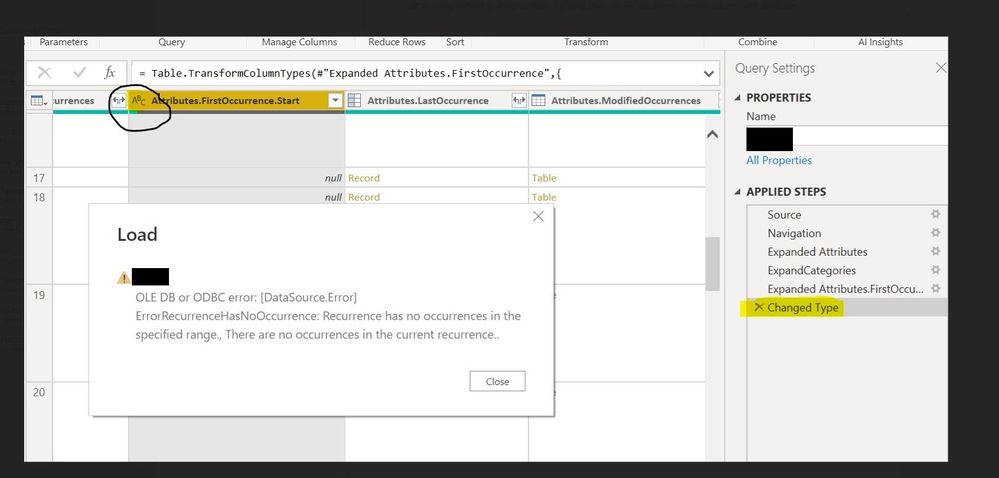
I'm trying to create report for all meetings from User's Outlook calendar. It's working correctly for 6 of 10 Users. There are no diferences between these calendars(same permissions, in every calendar there are some reccuring meetings without end dates but it's fine). I'm not sure what could be wrong here. I have an error when im trying to expand attribute FirstOccurrence.


I was also trying to change type of this column to "text" as I found this solution on this forum, but unfortunately it's also not working.

PowerBi meetings.jpg


Error message:

Spoiler
OLE DB or ODBC error: [DataSource.Error] ErrorRecurrenceHasNoOccurrence: Recurrence has no occurrences in the specified range., There are no occurrences in the current recurrence


Code:

Spoiler
let
Source = Exchange.Contents("XXXXXX"),
    Calendar1 = Source{[Name="Calendar"]}[Data],
    #"Expanded Attributes" = Table.ExpandRecordColumn(Calendar1, "Attributes", {"AppointmentType", "DeletedOccurrences", "FirstOccurrence", "LastOccurrence", "ModifiedOccurrences", "Organizer", "Recurrence", "Sensitivity"}, {"Attributes.AppointmentType", "Attributes.DeletedOccurrences", "Attributes.FirstOccurrence", "Attributes.LastOccurrence", "Attributes.ModifiedOccurrences", "Attributes.Organizer", "Attributes.Recurrence", "Attributes.Sensitivity"}),
    ExpandCategories = Table.TransformColumns(#"Expanded Attributes", {"Categories", each Text.Combine(List.Transform(_, Text.From), "/"), type text}),
    #"Expanded Attributes.FirstOccurrence" = Table.ExpandRecordColumn(ExpandCategories, "Attributes.FirstOccurrence", {"Start"}, {"Attributes.FirstOccurrence.Start"}),
    #"Changed Type" = Table.TransformColumnTypes(#"Expanded Attributes.FirstOccurrence",{{"Attributes.FirstOccurrence.Start", type text}}),
    #"Added Custom" = Table.AddColumn(#"Changed Type", "CustomStart", each [Attributes.FirstOccurrence.Start]),
    #"Removed Columns" = Table.RemoveColumns(#"Added Custom",{"Attributes.FirstOccurrence.Start"})
in
    #"Removed Columns"


3 REPLIES 3
Zakon8
New Member

refreshing.

Anonymous
Not applicable

Hi @Zakon8 ,


I have found a similar post, please refer to.

[E2007SP1][EWSMA][C#] CalendarFolder.FindAppointments - Recurrence has no occurrences in the specifi...

  • What is the similar code that uses EWS that works for this user? How does the XML compare?  The 'effective' date for the error makes no sense since that is one year outside of the calendar view window. You might have a corrupt recurring meeting. Did you recently do a migration to 2007? Are you having an issue opening an item in Outlook?

Best Regards
Community Support Team _ Polly

If this post helps, then please consider Accept it as the solution to help the other members find it more quickly.



@Anonymous wrote:
  •  Did you recently do a migration to 2007? Are you having an issue opening an item in Outlook?

Nope, we are using Exchange 2016 in Hybrid mode, all mailboxes are located on Exchange Online.

Also there is no issue from User perspective with opening these meetings from Outlook. 


Any ideas?


BR,

Zakon8


Helpful resources

Announcements
Power BI DataViz World Championships

Power BI Dataviz World Championships

The Power BI Data Visualization World Championships is back! Get ahead of the game and start preparing now!

December 2025 Power BI Update Carousel

Power BI Monthly Update - December 2025

Check out the December 2025 Power BI Holiday Recap!

FabCon Atlanta 2026 carousel

FabCon Atlanta 2026

Join us at FabCon Atlanta, March 16-20, for the ultimate Fabric, Power BI, AI and SQL community-led event. Save $200 with code FABCOMM.