Join us at FabCon Atlanta from March 16 - 20, 2026, for the ultimate Fabric, Power BI, AI and SQL community-led event. Save $200 with code FABCOMM.
Register now!Learn from the best! Meet the four finalists headed to the FINALS of the Power BI Dataviz World Championships! Register now
Hey,
Since the month turned, I'm trying to load April data in my Power Bi Desktop report to develop before pushing to web, but no matter what I do, it doesnt work at all! No errors displayed, I just click on refresh, and it loads only until 2020-04.
My data is from a SQL source and my DB table is updated and I can see 2020-04 data in it.
I already followed these steps bellow but nothing worked.
https://community.powerbi.com/t5/Desktop/Refreshing-Power-BI-desktop-files/m-p/474749
Sorry if this is stating too simple a suggestion, but sounds like there is a filter in your query that is limiting the data loaded. Or are you assessing using a visual with a Date table that doesn't cover the new dates (done that myself)?
If this solution works for you, please mark it as the solution. Kudos are appreciated too. Please let me know if not.
Regards,
Pat
To learn more about Power BI, follow me on Twitter or subscribe on YouTube.
Hello @mahoneypat , great point, but no, there is no filter in my report, even if I open Power Query and filter, there is no 2020-04 listed there...
Hi @jvbs ,
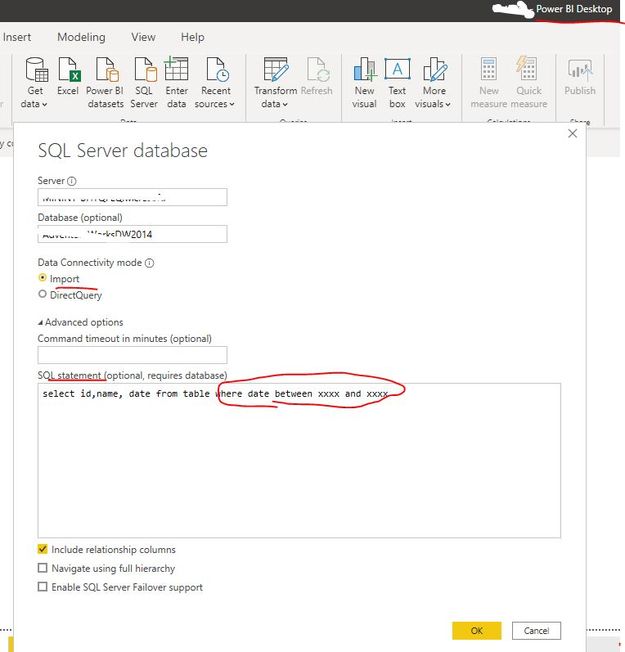
Did you add a conditional clause for filtering when connecting to a SQL source in Power BI Desktop just like below screen shot? It is import mode, right? And could you please provide some screen shots of the related tables display in SQL Server and Power BI Desktop if it is convenient?
Best Regards
Rena
Share feedback directly with Fabric product managers, participate in targeted research studies and influence the Fabric roadmap.
Check out the February 2026 Power BI update to learn about new features.
| User | Count |
|---|---|
| 62 | |
| 54 | |
| 40 | |
| 17 | |
| 15 |
| User | Count |
|---|---|
| 94 | |
| 83 | |
| 33 | |
| 32 | |
| 24 |