Join us at FabCon Atlanta from March 16 - 20, 2026, for the ultimate Fabric, Power BI, AI and SQL community-led event. Save $200 with code FABCOMM.
Register now!The Power BI Data Visualization World Championships is back! Get ahead of the game and start preparing now! Learn more
Hello,
I spend hours on finding a solution but can't go through.
My Power BI Desktop is linked to a sharepoint folder (which contains a bunch of CSV file) in One Drive for business. The first time, everything went well, my Power BI desktop data is directly linked to my one drive.
BUT, here comes the problem,
When I want to add a new CSV file into my sharepoint Folder, Power BI does not take it into account, and even worse, says that there is an error.
I tried to found where does the issue comes from,I found it but I cannot solve it.
In My Power Query editor, When the function source is created, it takes only into account the files I imported at the begenning. However, When I Hit the "Refresh Preview", the file I've juste added in one drive finally appears. Thus, I need a function/ tool or whatever that will automatically refresh the Source function to get all the new CSV file I added to my One Drive folder.
Thank you in advance,
Bnew file added in the folder but nothing happens
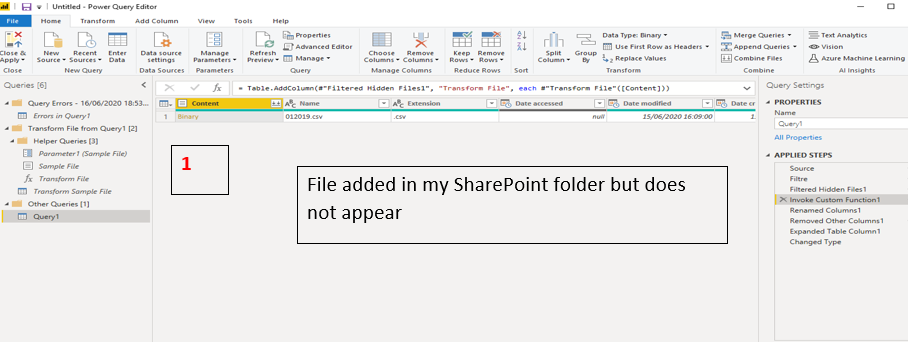
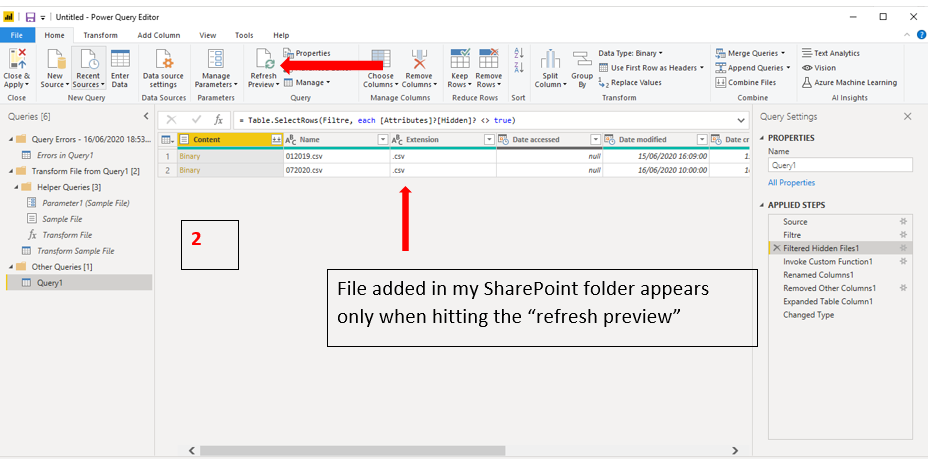
hit manuallyRefresh and data is loaded in the Query editor
Solved! Go to Solution.
Hi @bebert ,
It is by design. When you use Power BI Desktop, you need to click refresh in the menu bar to get
updated data. After you publish it to the power bi service, you can use onedrive refresh for get updated data automantically. Please refer to https://docs.microsoft.com/en-us/power-bi/connect-data/refresh-data#onedrive-refresh
If this post helps, then please consider Accept it as the solution to help the other members find it more quickly.
Best Regards,
Dedmon Dai
Hi @bebert ,
It is by design. When you use Power BI Desktop, you need to click refresh in the menu bar to get
updated data. After you publish it to the power bi service, you can use onedrive refresh for get updated data automantically. Please refer to https://docs.microsoft.com/en-us/power-bi/connect-data/refresh-data#onedrive-refresh
If this post helps, then please consider Accept it as the solution to help the other members find it more quickly.
Best Regards,
Dedmon Dai
The Power BI Data Visualization World Championships is back! Get ahead of the game and start preparing now!
| User | Count |
|---|---|
| 64 | |
| 47 | |
| 41 | |
| 36 | |
| 23 |
| User | Count |
|---|---|
| 189 | |
| 124 | |
| 106 | |
| 78 | |
| 52 |