cancel
Showing results for 
Search instead for 
Did you mean: 

The Power BI Data Visualization World Championships is back! Get ahead of the game and start preparing now! Learn more

Reply
Gokul_G16
Resolver I
Resolver I

Power BI matrix table back ground color column can't be changed issue:

Hi All, / @Thennarasu_R 

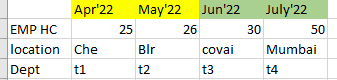
Please find he below snap for your reference , i have matrix table like below format. In power BI matrix table how to give the different backgroud color for this..

Please kindly need your thoughts here...


Note : I have just enabled the column header option in switch values to rows rather than column..


Gokul_G16_0-1672821477696.png


Regards,
Gokul


5 REPLIES 5
Anonymous
Not applicable

Hi @Gokul_G16 


If you are doing it for 3 columns, create these columns in 3 different ways as a calculation. then add to the value part of your matrix (measure a, measure B, measure C)

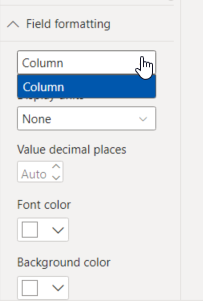
When you put it in the value field, the field formatting part will become active. Thus, you will be able to make special formatting on the basis of calculation.


EzgiAslankara_0-1672826263285.png

If this post helps, then please consider Accept it as the solution to help the other members find it more quickly.


Best regards 🙂


Hi @Anonymous ,

Thanks for update, Actaully i would be drive only month wise details, In the matrix table column header should be different color , for like Apr'22 to Aug'22 - Green , Sep'22 to Dec'22- Red, Jan'23 to Mar'23- Yellow.

Can you please check this type of scenario will applicapable or not!.

Thanks,
Gokul.

Anonymous
Not applicable

Hi @Gokul_G16 


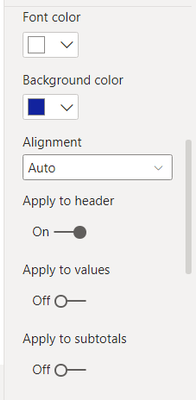
If you make the format settings in the Field Formatting field as in the screenshot below, then activate the "Apply to header" option and disable the others, only the header of that column will change.


EzgiAslankara_0-1672906593364.png


amitchandak
Super User
Super User

@Gokul_G16 , I matrix visual we can do conditional formatting on column fields. we can choose a color for a column field.

Share with Power BI Enthusiasts: Full Power BI Video (20 Hours) YouTube
Microsoft Fabric Series 60+ Videos YouTube
Microsoft Fabric Hindi End to End YouTube

Dear @amitchandak ,

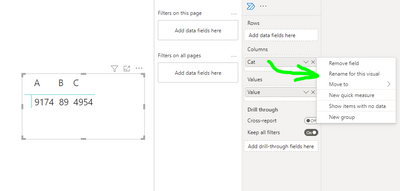
I was trying for bewlow snap like, our requirement needed, while am just conert the column field to row header option values enbled,
Can u please find the below snap like , I need to give the A,B,C..column should be in different color is our requirement ..

Gokul_G16_0-1672825602669.png


Regards, 
Gokul

Helpful resources

Announcements
Power BI DataViz World Championships

Power BI Dataviz World Championships

The Power BI Data Visualization World Championships is back! Get ahead of the game and start preparing now!

December 2025 Power BI Update Carousel

Power BI Monthly Update - December 2025

Check out the December 2025 Power BI Holiday Recap!

FabCon Atlanta 2026 carousel

FabCon Atlanta 2026

Join us at FabCon Atlanta, March 16-20, for the ultimate Fabric, Power BI, AI and SQL community-led event. Save $200 with code FABCOMM.