Hi,
Im having a problem with the Power BI solution i have being too slow. Basically i have a data sets ranging from 50 000 rows to 1 000 000 rows, for which it might take 20min to perform the query below.
Does anyone have any improvement ideas on how to perform the following problem faster than the current solution that is also presented below?
Problem
For people familiar with accounting: I would like to see where do entries from one account go to. As in "other side of a journal entry".
Basically the data is this as in the table below:
| Account | Identifier | Sum |
| 1000 | 565 | 100€ |
| 1100 | 565 | 20€ |
| 1200 | 565 | -120€ |
| 1200 | 572 | -101€ |
| 1300 | 572 | 50€ |
| 1400 | 572 | 50€ |
| 1500 | 572 | 1€ |
| 1600 | 577 | -5000€ |
| 1600 | 577 | 5000€ |
Of course, there will be hundreds of thousands of lines. But the rule is:
1. All Identifiers (565 for example) equal out to zero in the Sum-field.
Goal:
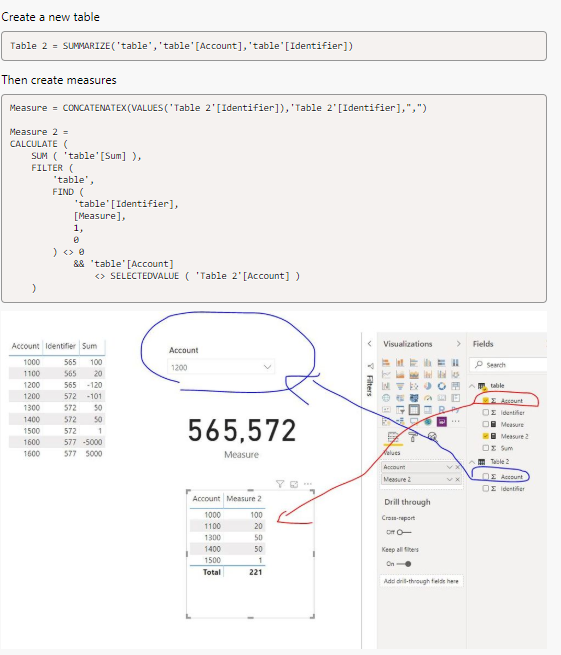
I would like to create a dashboard, where i can filter account 1200 and it would present to me the following:
| Account | |
| 1000 | 100€ |
| 1100 | 20€ |
| 1300 | 50€ |
| 1400 | 50€ |
| 1500 | 1€ |
So the solution would be like this:
Filter all Identifiers that are in account 1200 (565 & 572 in this case).
If account <> 1200 then SUM the values of these identifiers and show which account they are assigned to.
The current solution that is too slow: