Join us at FabCon Atlanta from March 16 - 20, 2026, for the ultimate Fabric, Power BI, AI and SQL community-led event. Save $200 with code FABCOMM.
Register now!Get Fabric Certified for FREE during Fabric Data Days. Don't miss your chance! Request now
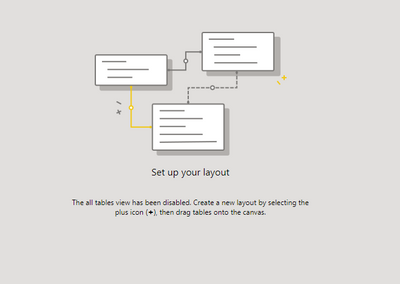
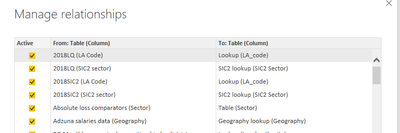
Hello, so I have recently opened a desktop file where I have previously built a model. But it is now saying that all table view has been disabled. As in the right image, all the relationships are maintained its just i can no longer see the tables as well as the relationships anymore.
Does anyone know how to stop the all table view from being disabled? , So that I can visualise my model again.
Many thanks,
Callum
Solved! Go to Solution.
I've found an answer here:
https://community.powerbi.com/t5/Desktop/quot-The-all-tables-view-has-been-disabled-quot-How-to-reen...
Hi @CallumMurfet ,
What version of Power BI are you using? I am not able to reproduce this issue at my end.
Thanks,
Pragati
Hi Pragati,
I am using the Version: 2.87.684.0 64-bit (November 2020)
i dont know if this is a new update but it is frustrating as I had organised my model visually and now I cannot see it.
Hi @CallumMurfet ,
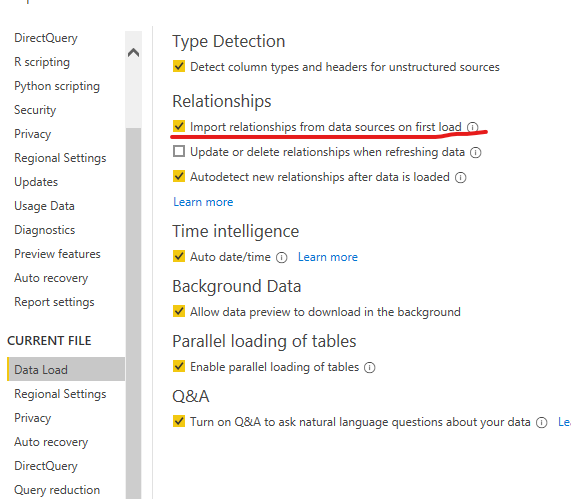
Have you selected the option I marked below?
Best Regards,
Kelly
Did I answer your question? Mark my post as a solution!
Check out the November 2025 Power BI update to learn about new features.
Advance your Data & AI career with 50 days of live learning, contests, hands-on challenges, study groups & certifications and more!