cancel
Showing results for 
Search instead for 
Did you mean: 

The Power BI Data Visualization World Championships is back! Get ahead of the game and start preparing now! Learn more

Reply
Anonymous
Not applicable

Power BI changes Yes/No values in Excel to True/False

Hello,


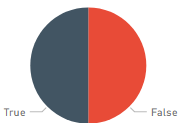
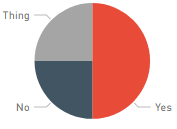
I have an Excel file in Sharepoint that I imported into a Power Bi dataset. The Excel file is actually populated by Microsoft Forms, if that matters. In the Excel file, there are columns with Yes/No values. When creating a pie chart, the values are changed to True/False (see image on left). When adding another value ("Thing" in this case), it shows correctly as seen in the image on the right. I've tried changing the field format in Excel to "Text" and added an apostrophe to the value to no effect.

Previously, I used a streaming dataset and Microsoft Flow to import the data into Power Bi, but the functionality seemed to be incredibly limited. Although, all the modeling/query editor features are still disabled. Therefore, I still can't add custom columns to try manipulate the value.

Please help.


TrueFalse.pngYesNo.png


1 ACCEPTED SOLUTION

@Anonymous 


Since this is a live connection, left-navigation and modeling are disabled. You may try adding measures.

Community Support Team _ Sam Zha
If this post helps, then please consider Accept it as the solution to help the other members find it more quickly.

View solution in original post

3 REPLIES 3
az38
Community Champion
Community Champion

Hi @Anonymous 

If you want to use Yes/No as a Text, not boolean - go to the query editor (Edit Queries button), find column, then in Transform ribbon set Date type as Text

enjoy


do not hesitate to kudo useful posts and mark solutions as solution


do not hesitate to give a kudo to useful posts and mark solutions as solution
LinkedIn
Anonymous
Not applicable

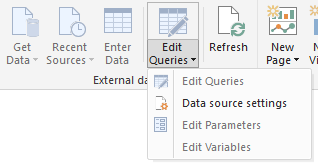
Those options are disabled for me:

EditQueryDisabled.png

@Anonymous 


Since this is a live connection, left-navigation and modeling are disabled. You may try adding measures.

Community Support Team _ Sam Zha
If this post helps, then please consider Accept it as the solution to help the other members find it more quickly.

Helpful resources

Announcements
Power BI DataViz World Championships

Power BI Dataviz World Championships

The Power BI Data Visualization World Championships is back! Get ahead of the game and start preparing now!

November Power BI Update Carousel

Power BI Monthly Update - November 2025

Check out the November 2025 Power BI update to learn about new features.

FabCon Atlanta 2026 carousel

FabCon Atlanta 2026

Join us at FabCon Atlanta, March 16-20, for the ultimate Fabric, Power BI, AI and SQL community-led event. Save $200 with code FABCOMM.