Get certified for free when you join Fabric Data Days 2026 and dive into Fabric, Power BI, SQL, AI, and other essential data skills.
Join nowJuly 28 - August 9 | Final Round of the Power BI Dataviz World Championships. This is your chance. Learn more
I want to calculate average time between to dates. The data looks like this:
| Step | Datetime |
| 2 | 14.11.2022 13:02:56 |
| 4 | 14.11.2022 13:05:15 |
| 2 | 14.11.2022 13:11:23 |
| 4 | 14.11.2022 13:13:38 |
| 2 | 14.11.2022 13:24:03 |
| 4 | 14.11.2022 13:26:21 |
| 2 | 15.11.2022 12:16:58 |
| 4 | 15.11.2022 12:19:28 |
I need to get an average time between all the steps number 4 and stpes number 2.
14.11.2022 13:05:15 - 14.11.2022 13:02:56 = 00:02:19
14.11.2022 13:13:38 - 14.11.2022 13:11:23 = 00:02:15
14.11.2022 13:26:21 - 14.11.2022 13:24:03 = 00:02:18
15.11.2022 12:19:28 - 15.11.2022 12:16:58 = 00:02:30
The average between all four equals to 00:02:20
When I use formula measure = CALCULATE(SUM(Logging[CreatedAt]),Logging[Step] = 4) - CALCULATE(SUM(Logging[CreatedAt]),Logging[Step] = 2) it calculates the total of all four rows.
The result of the formula above 30.12.1899 0:09:22
(by the way, how to get rid of this strange date result 30.12.1899?)
If I use formula measure = AVERAGEX(Logging, CALCULATETABLE(VALUES(Logging[CreatedAt]), FILTER(Logging, Logging[Step] = 4)) - CALCULATETABLE(VALUES(Logging[CreatedAt]), FILTER(Logging, Logging[Step] = 4))) it delivers nothing.
Solved! Go to Solution.
Hi, @bombom
For your needs, you'll need to convert the difference to "seconds", take the average and convert the result back to time format.
Please try measure formula like:
EndAt =
IF (
MAX ( Logging[Step] ) = 2,
CALCULATE (
MIN ( Logging[CreatedAt] ),
FILTER ( ALL ( Logging ), Logging[CreatedAt] > MAX ( Logging[CreatedAt] ) )
),
BLANK ()
)diff(second) = DATEDIFF(MAX(Logging[CreatedAt]),[EndAt],SECOND)Average = AVERAGEX(Logging,[diff(second)])Result1 =
IF (
[Average] = BLANK (),
BLANK (),
TIME ( 0, 0, FLOOR ( 'Souktion1'[Average], 1 ) )
)
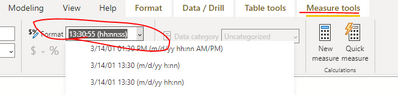
If the total result is 30.12.1899 0:09:22, you just need to change the format of your measure.
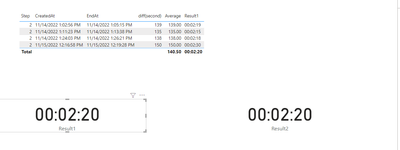
Result:
Reference:
Best Regards,
Community Support Team _ Eason
Hi, @bombom
For your needs, you'll need to convert the difference to "seconds", take the average and convert the result back to time format.
Please try measure formula like:
EndAt =
IF (
MAX ( Logging[Step] ) = 2,
CALCULATE (
MIN ( Logging[CreatedAt] ),
FILTER ( ALL ( Logging ), Logging[CreatedAt] > MAX ( Logging[CreatedAt] ) )
),
BLANK ()
)diff(second) = DATEDIFF(MAX(Logging[CreatedAt]),[EndAt],SECOND)Average = AVERAGEX(Logging,[diff(second)])Result1 =
IF (
[Average] = BLANK (),
BLANK (),
TIME ( 0, 0, FLOOR ( 'Souktion1'[Average], 1 ) )
)
If the total result is 30.12.1899 0:09:22, you just need to change the format of your measure.
Result:
Reference:
Best Regards,
Community Support Team _ Eason
@bombom , Try a measure like
AVERAGEX(Table,
var _max = maxx(filter(Table, Table[Datetime] < earlier([Datetime]) && [Step] =2),[Datetime])
return
if([Step] =4,datediff(_max,[Datetime],second) ,blank())
)
or
time(0,0,0) + AVERAGEX(Table,
var _max = maxx(filter(Table, Table[Datetime] < earlier([Datetime]) && [Step] =2),[Datetime])
return
if([Step] =4,datediff(_max,[Datetime],second) ,blank())
)/(3600*24)
Join us in Barcelona for FabCon and SQLCon, the Fabric, Power BI, SQL, and AI community event. Save €200 with code FABCMTY200.
If you love stickers, then you will definitely want to check out our community sticker challenge, Barcelona edition!
Check out the July 2026 Power BI update to learn about new features.
| User | Count |
|---|---|
| 30 | |
| 28 | |
| 24 | |
| 23 | |
| 18 |
| User | Count |
|---|---|
| 44 | |
| 32 | |
| 18 | |
| 17 | |
| 16 |